M7225 User’s Guide
29
Configuring the Barcode Scanner
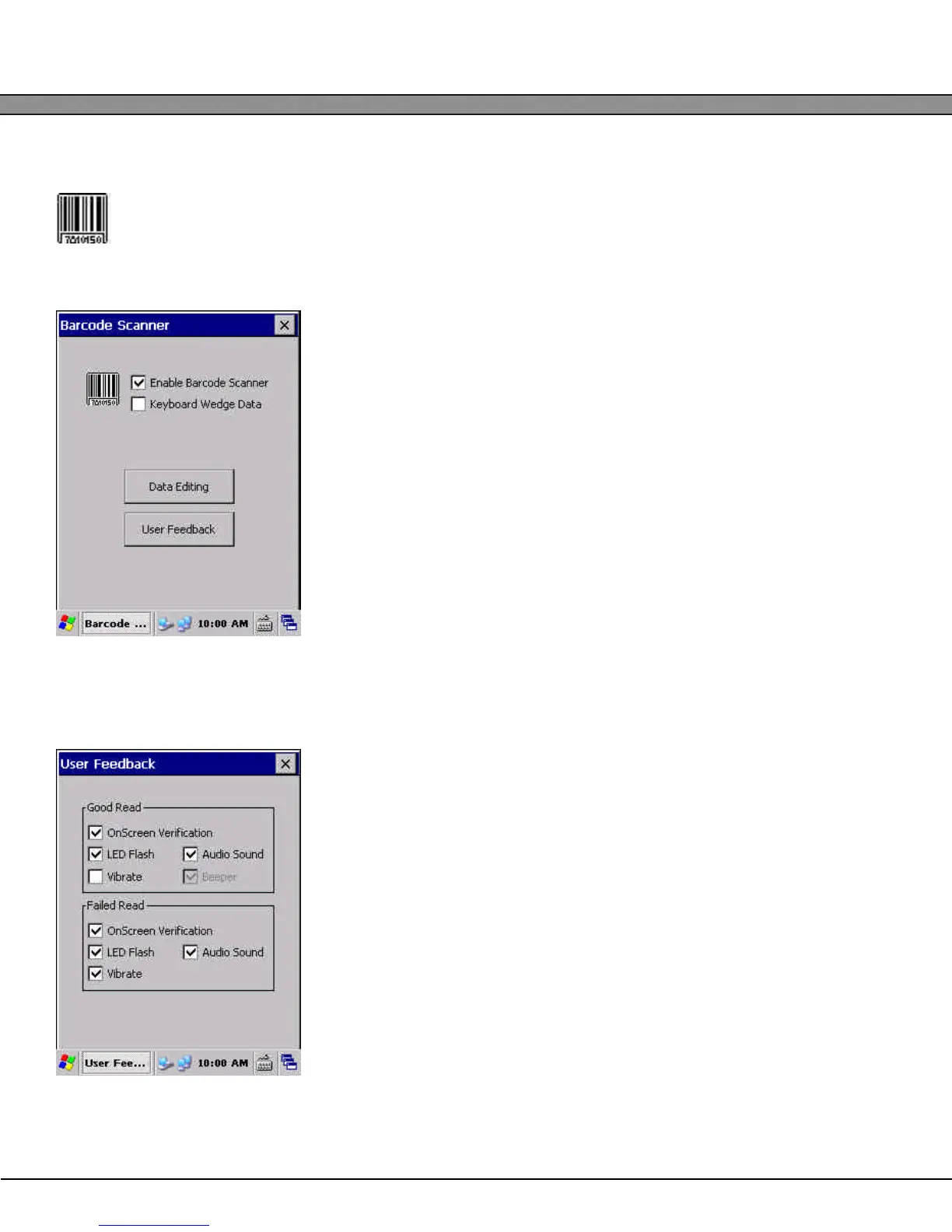
The barcode scanner can be configured by selecting the Barcode Setup icon in Control Panel.
Barcode Scanner Modes
The internal barcode scanner can be used in two different data modes:
keyboard wedge and serial. When used in keyboard wedge mode,
scanned barcode data will be seen as if the user had typed the data on
the keypad. This allows easy integration into applications that do not
explicitly support barcode scanners.
When keyboard wedge mode is disabled, the barcode data is not routed
through the keyboard buffer. In this mode, the barcode data can be
read by applications from the special “BCD1:” device.
User Feedback
To configure the user feedback settings for barcode scanning, select the
User Feedback button.
Good Read Group
The checkboxes in the Good Read group enable and disable the differ-
ent feedback options when a barcode is successfully scanned.
Failed Read Group
The checkboxes in the Failed Read group enable and disable the differ-
ent feedback options to be utilized when the trigger or SCAN button is
pressed, but no barcode is read.


 To Next Page