3. 7
IPSEC VPN
fatbox G3
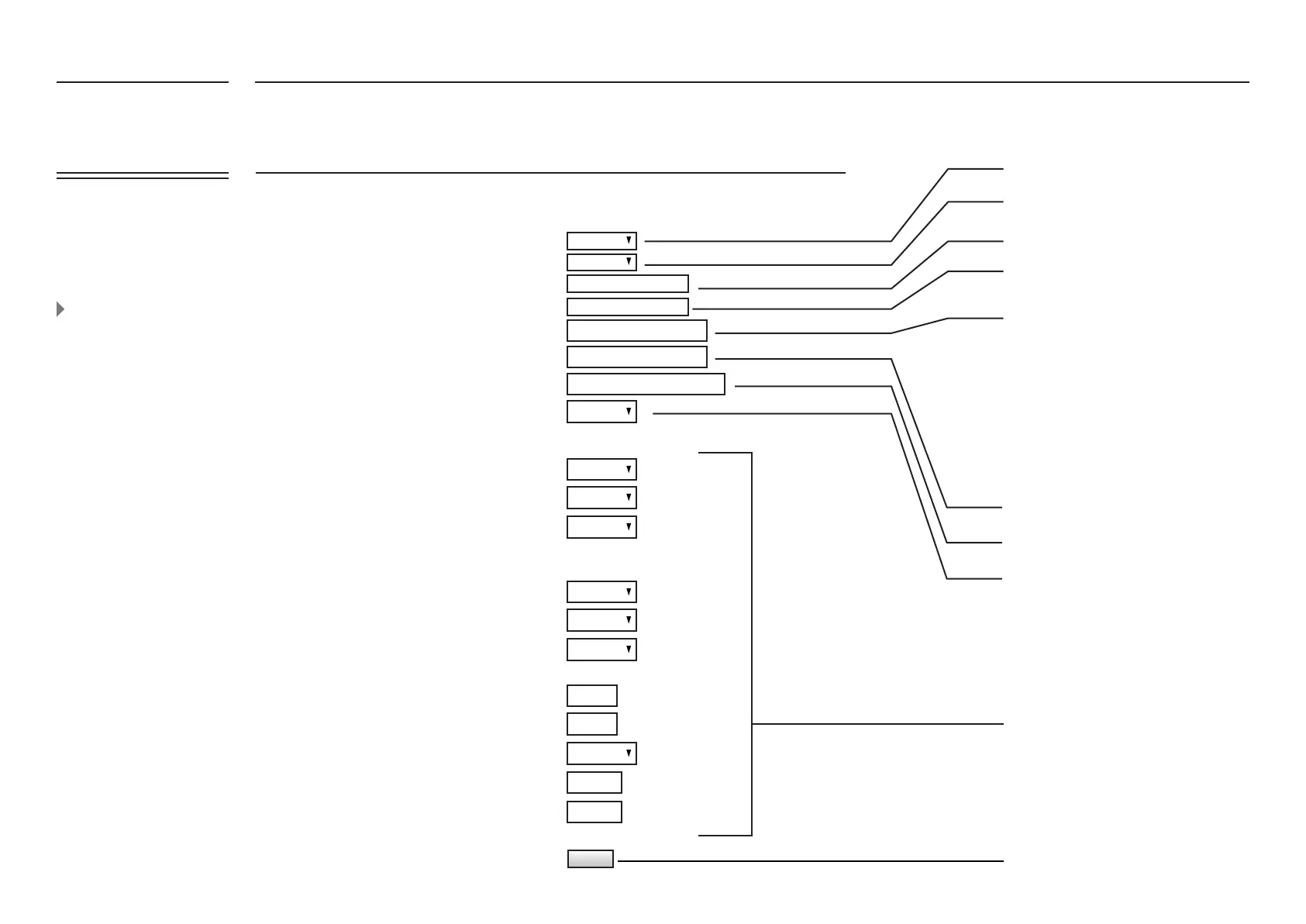
Site-to-Site IKE PSK IPSEC Settings
3G IPSEC
Enabled
Disabled
Start
AES 128
AES 128
SHA1
SHA1
14
main mode
Restart
yourvpngateway
192.168.1.0/24
10.1.1.0/24
yourvpnhost
3600
3600
60
180
IPSEC NATP
NATP DMZ Host
VPN Server IP address
VPN Server Subnet IP Address/ Mask
Local VPN Subnet IP Address/ Mask
PSK Phasephrase
Phase 2
Start Mode (auto)
Encryption
ISAKMP Phase 1
Encryption
Hash Algorithm
Authentication (HMAC)
D-H Group
IKEv1 Mode
IKE SA Lifetime (s)
IPSEC Lifetime (s)
DPD Action
DPD Delay (s)
DPD Timeout (s)
FATBOX G3 conguration
for Site-to-Site IPSEC VPN
(as of the example in the
previous page)
WEB
MANAGEMENT
Enable or Disable IPSEC
Enable or Disable redirecting all trafc to
DMZ host
Enter the IP address of the DMZ host
Key in the outward-facing (public) IP of the
remote server
Key in the IP subnet set for the LAN on the
remote server side (i.e. 192.168.1.0/24)
Following this, your ‘Local VPN subnet IP
Address/Mask (ETH1)’ and ‘ETH1 IP
Address’ in the LAN Ethernet page must
also
correspond (For example if your ‘ETH1 IP
Address’ is 10.1.1.1, then your ‘Local VPN
subnet IP Address/Mask (ETH1)’ must be
10.1.1.0/24
10.1.1.0/24 (according to network settings)
Set to match remote end settings
Input these settings to correspond with
your remote end settings
UPDATE and restart FATBOX
start = IPSEC tunnel will automatically be
connected;
route = IPSEC tunnel will be connected
when data is present
UPDATE
120 - 86400 Sec
120 - 86400 Sec
10 - 240 Sec
10 - 240 Sec
FATBOX_G3
MENU OPTIONS
Quick Start
LAN Settings
WiFi & BT Settings
WAN Settings
Port Forwarding
Dynamic DNS
IPsec VPN
Port Settings
IoT Hardware
IoT Client
SNMP
Management
System Status
Logout


 To Next Page