SafeWizard Operating Instructions American Security Products Company
Last Revision 10/17/2008 Page 63 of 73 Document 4305199
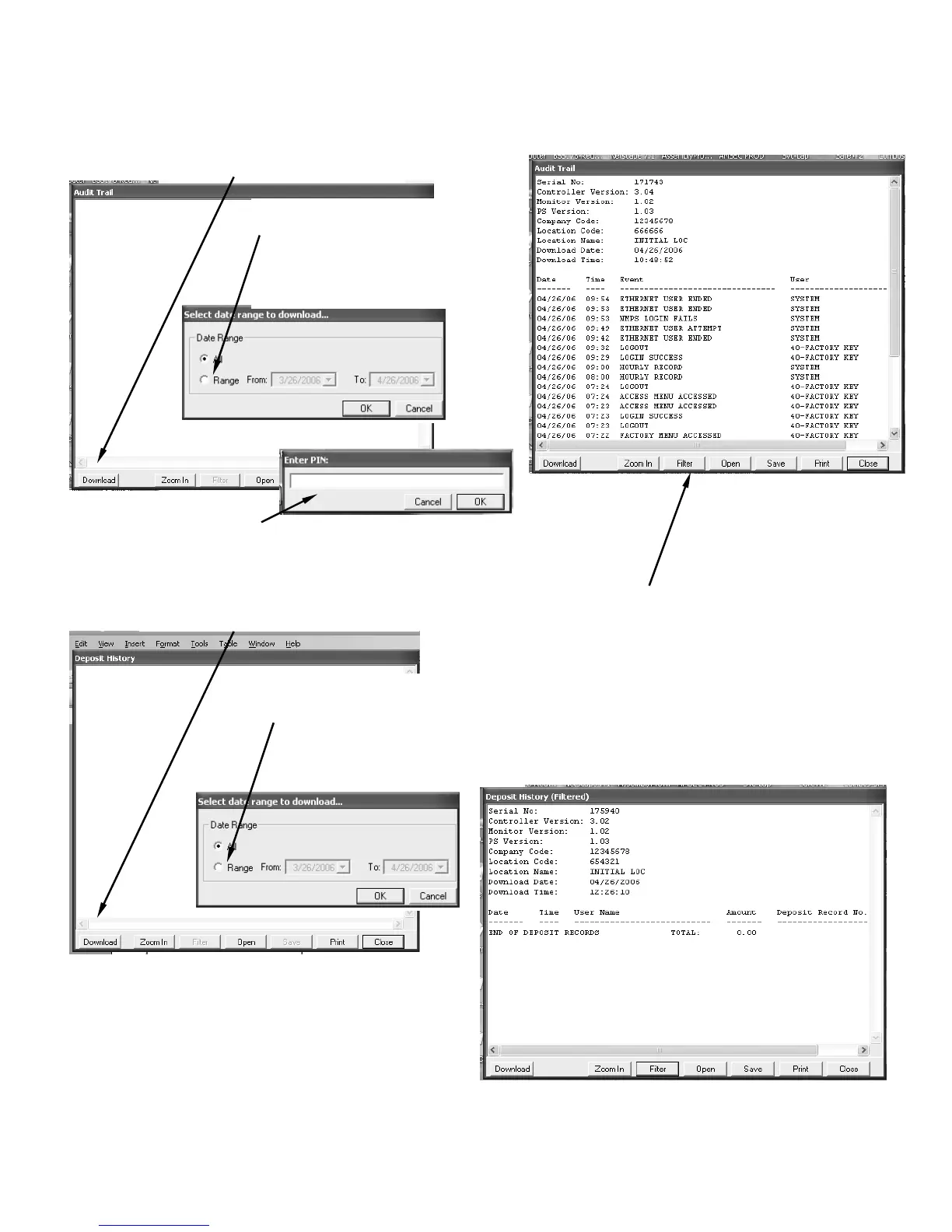
Step #5. Audit Trail
Select Download-
Step #5a- Select “Range”, then
select the “From” & “To” date.
Select “OK” and the Enter PIN:
screen will open unless a
previous Audit file was accessed.
Step #5b- Enter the REMOTE
User P.I.N. and select “OK”.
Step#5c- After selecting “OK”, a screen
displaying the date range with a blue
progress band indicating information is being
downloaded, then the screen with the Audit
records will appear.
Selecting “Filter” will open a second screen with
various selections to view particular activities of
the Audit records. Selecting “Clear Filter” will
return to the menu allowing another filter
selection or to return to the original Audit record,
select “OK” in the Filter screen.
Step #6. Deposit History
Select Download-
Step #6a- Select “Range”, then
select the “From” & “To” date.
Select “OK” and the Enter PIN:
screen will open unless a previous
Audit file was accessed.



 To Next Page