SafeWizard Operating Instructions American Security Products Company
Last Revision 10/17/2008 Page 62 of 73 Document 4305199
Chapter 4-8-1
Obtaining Audit
Records Using the
Serial Port with Optional Audit Pack # 0635167
WizDat program is used to retrieve Audit records, Deposit records, System Configuration information,
and list of Users in the lock system.
In the following steps, “Select” in the instruction step means “left click” of the mouse.
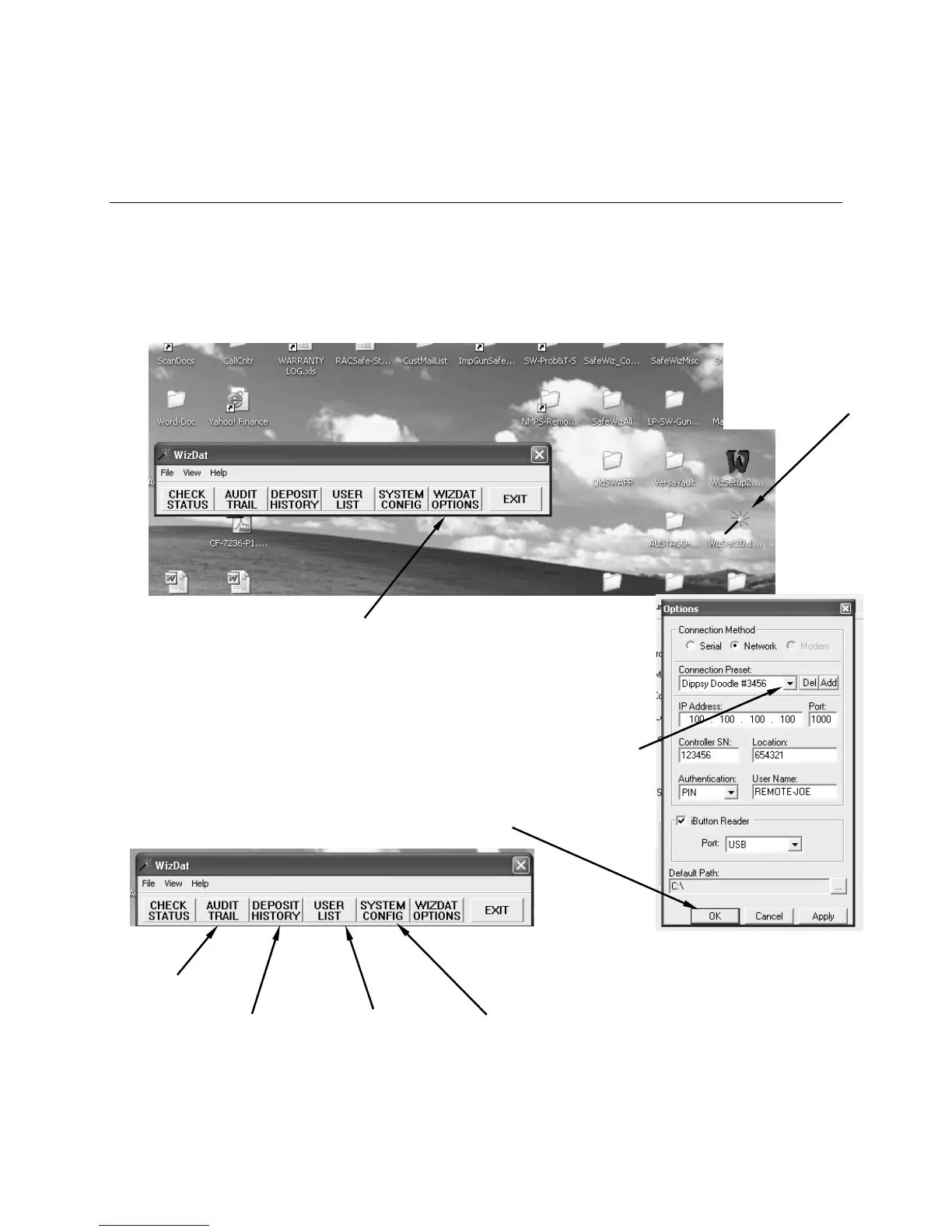
Step #1.
Double left click the “Wand”
to open WizDat program.
Step #2.
Select WizDat Options
Step #3.
The “Connection Method”
screen will open with the last
screen used in the WizSetUp
program. If you would like a
different Connection screen,
select the down arrow to the
right of the box to open the
menu list. Select the location
you want to connect to. Then
select “OK” to activate that
selection.
Step #4.
Select the activity desired.
See Step #5
for obtaining an
Audit record
See Step #6
for obtaining a
Deposit record
See Step #7
for obtaining a
User list
See Step #8
for obtaining the
System
Configuration
re
ort



 To Next Page