ACCEL-7450 User's Manual
- 4 -
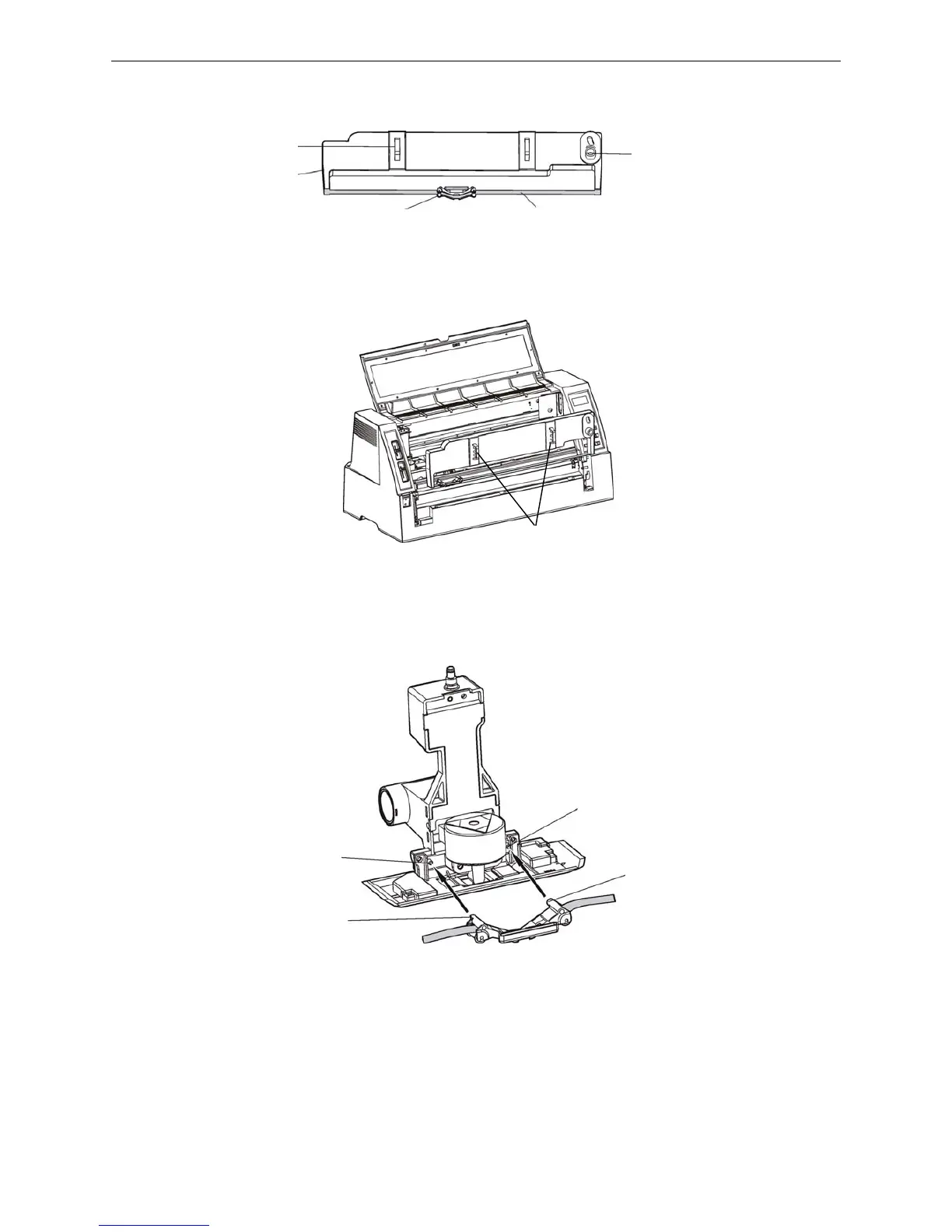
3. Turn the ribbon knob in the direction of the arrow to remove any slack from the ribbon so it is easier
to install. (As shown below)
4. Hold the carriage handle and fit the ribbon cartridge into the ribbon cartridge position, then push it
into place. (As shown below)
5. Aim the two round holes on the ribbon nip at the two guide poles of the carriage, then press them
into place. (As shown below)
6. Turn the ribbon knob in the direction of the arrow to remove any slack from the ribbon again, ensure
that there is no crease in the ribbon core.
7. After installing the ribbon cartridge (as shown below), please close the printer cover.
Figure 2-5 Ribbon cartridge
Figure 2-6 Installing the ribbon cartridge
Figure 2-7 Install the ribbon nip to the carriage
Ribbon cartridge
(JMR106)
Carriage handle
Ribbon knob
Ribbon nip Ribbon core
Carriage handle
Guide pole
Round hole
Round hole
Guide pole


 To Next Page