ACCEL-7450 User's Manual
- 6 -
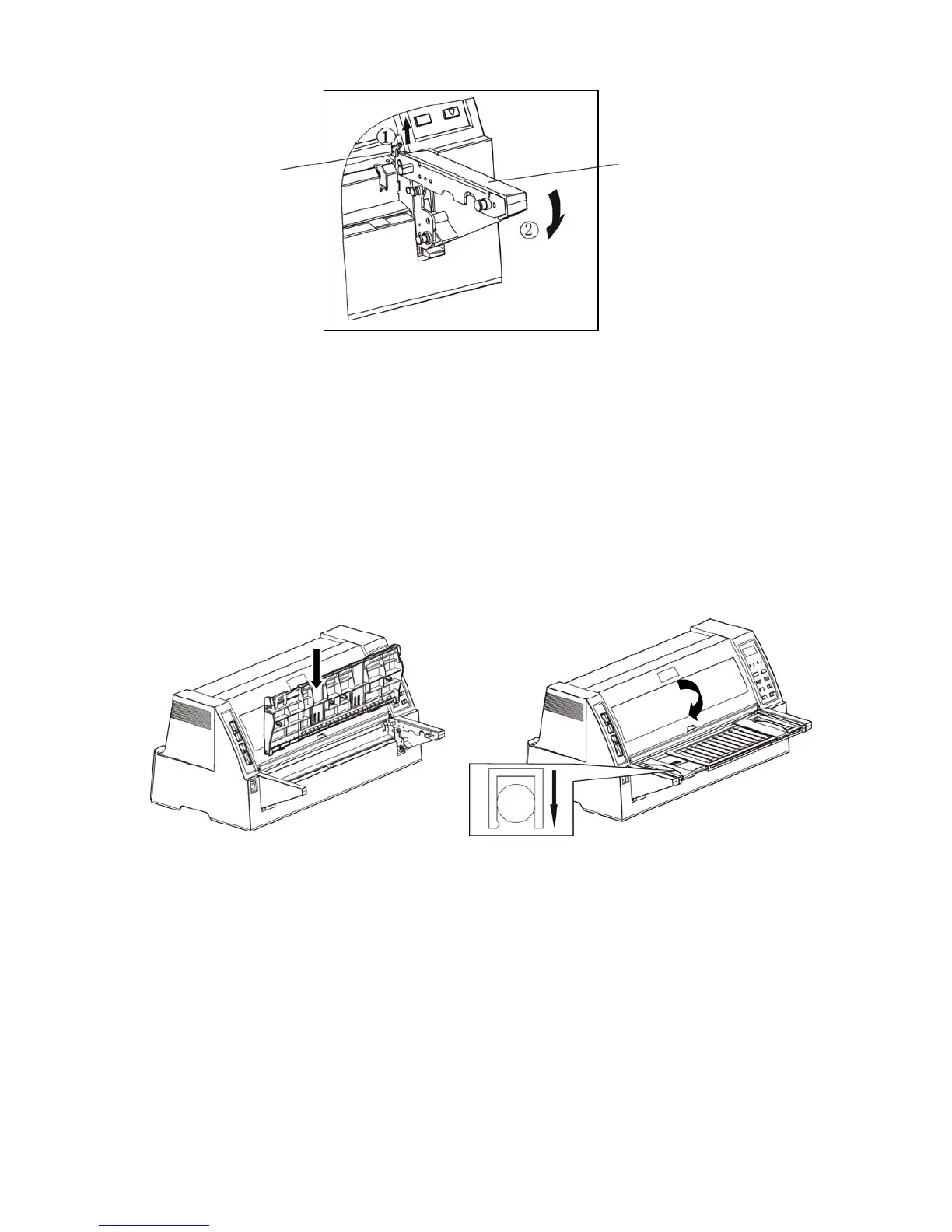
Note: Please operate refer to the sketch map of Dismantle the holder when you are dismantling
the holders: Firstly, pull the draw knob upwards then press the holder downwards, the
holder will be dismantled.
2.7 Installing and Dismantling the Front Table
2.7.1 Installing the front table
Firstly, hold the front of the front table vertically down, aim the right and left install grooves at the
positioning shafts on the right and left holders, then press them down and fit them into place, at last,
rotate the front table outwards and press it into place.
2.7.2 Dismantling the front table
Hold the right and left holders with your hands, pull it up with your thumbs on both sides of the front
table, then rotate it upwards until it becomes vertically, at last lift it up.
2.8 Installing the Tractor
Note: If only use the cut sheet, you don’t need to install the tractor.
Figure 2-10 Dismantle the right front table holder
Figure 2-11 Install the front table
Right front table holder
Draw knob
(1) (2)


 To Next Page