Amtech
16
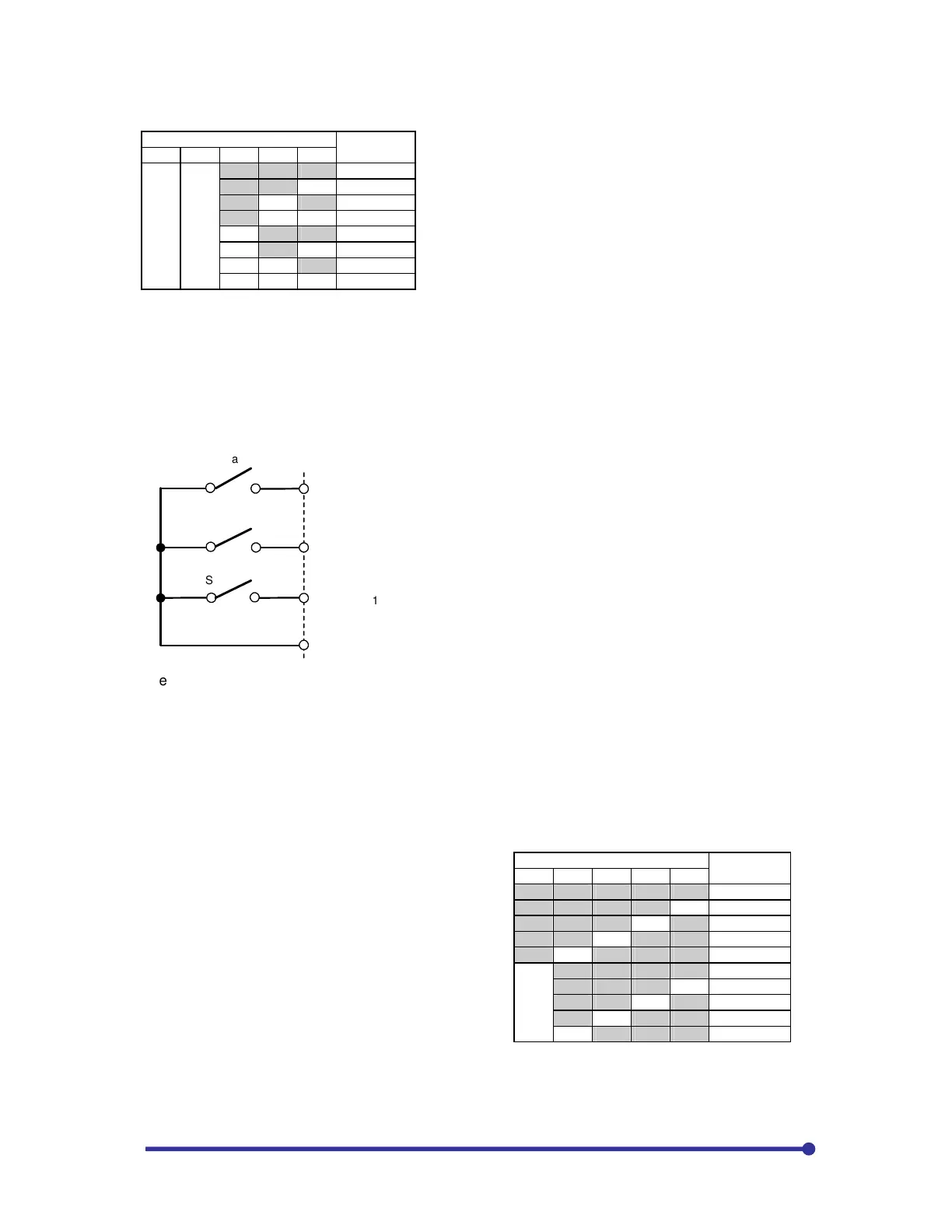
(1) For binary mode (B11-8 = 1)
Sequence command
Selected
frequency
SE S3 S2 S1 S0
*
*
OFF OFF OFF B11-0
OFF OFF ON B11-1
OFF ON OFF B11-2
OFF ON ON B11-3
ON OFF OFF B11-4
ON OFF ON B11-5
ON ON OFF B11-6
ON ON ON B11-7
*
: SE and S3 are not used.
Direct method:
Step-1: Connect selector switch for start between PSI1 & RY0.
Step-2: Assign PSI2 to S0 by setting C04-2=2 and PSI3 to S1 by setting C04-3=3. As PSI1 and PSI2
are assigned to other functions in default conditions, clear them first by setting C03-1=0 and C03-7=0.
Connect selector switches S0 and S1 between PSI2 & RY0 and PSI3 & RY0 respectively.
S0
PSI2
PSI1
PSI2
RY0
S1
S0
S1
Start
F: RUN
Step-3: Set C04-0=16
Step-4: Set B11-8=2 for direct method
Step-5: Set the desired frequency in parameter B11-0 and B11-1
Step-6: When both the switches are OFF, the previous set frequency will be selected.
Step-7: Keep only S0 switch to ON position, the frequency set in B11-0 will be selected.
Step-8: Keep only S1 switch to ON position, the frequency set in B11-1 will be selected.
The table shows how the multiple preset speed
(frequency) can be selected using more digital inputs
(PSI1 ~ PSI7).
Refer detail instruction manual for
more detail and timing diagrams on this
application.
(2) For direct select mode (B11-8 = 2)
Sequence command
Selected
frequency
SE S3 S2 S1 S0
OFF OFF OFF OFF OFF Previous values
OFF OFF OFF OFF ON B11-0
OFF OFF OFF ON OFF B11-1
OFF OFF ON OFF OFF B11-2
OFF ON OFF OFF OFF B11-3
ON OFF OFF OFF OFF Previous values
ON OFF OFF OFF ON B11-4
ON OFF OFF ON OFF B11-5
ON OFF ON OFF OFF B11-6
ON ON OFF OFF OFF B11-7
When S0 to S3 are all OFF, or when two or more are set
between S0 and S3, the previous values will be held.
If there are no previous values because the power has been
turned ON, etc., "0" will be set.


 To Next Page