Page 35
Settings
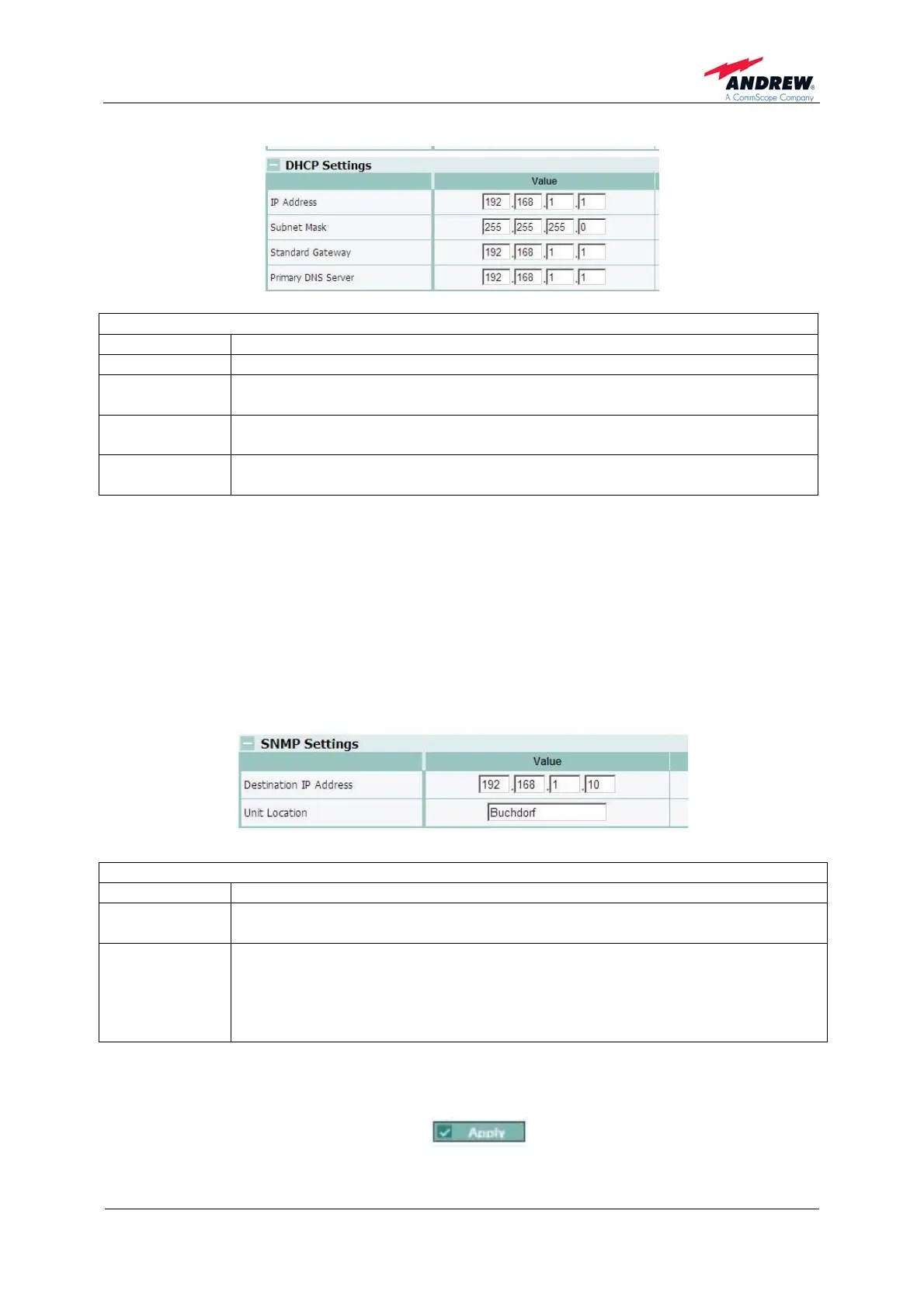
LAN Connectivity – DHCP Settings
*
Parameter Description of Value
IP Address
The IP address of the repeater can be changed herein. **
Subnet Mask
The Subnet Mask can be changed herein. If DHCP is enabled no entries
are possible. **
Standard
Gateway
The Standard Gateway can be changed herein. If DHCP is enabled no
entries are possible. **
Primary DNS
Server
The primary DNS server can be changed herein. If DHCP is enabled no
entries are possible. **
*
) Note: When DHCP is enabled no entries can be made.
** ) Note: BEFORE logout/ press <Apply> to record your settings made. The changed settings
of the values will only become effective after a manual logout by the user.
However, the new settings are already displayed as actual values during the
present session after having clicked the Apply button.
The values set will not apply when local connection has been interrupted or is
terminated by an automatic session timeout. The settings can be reset to default
values as described in chapter 7.2 Display and Reset & Installation Assistance
Button.
Settings
LAN Connectivity –
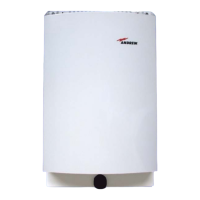
SNMP Settings
*
Parameter Description of Value
Destination IP
Address
If ‘forwarding’ of alarms via SNMP is selected, the destination IP address
has to be entered where the alarms traps ought to be sent to.
Unit Location
The Unit Location is sent with each SNMP alarm trap to get information
about e.g. address or location/ building where the repeater is installed. No
validation is done with the entry. Maximum 20 characters are allowed. The
settings are only applied in the status bar at the bottom of each page after a
new log in.
*
When "polling" or "disabled" is selected at Alarming via SNMP, these parameters cannot be
accessed.
Confirm changes made by clicking the
button.


 To Next Page