10
Luna/Alba | EN
Before using for the first time
Functioning
The shot sizes, i.e. the volume of grounds per serving, are defined by the grinding
time in this grinder.
The user can specify up to three different recipes (grinding times) and also has the
option to control the grinding time manually (Manual grinding).
The grinding process starts automatically when the portafilter is inserted and stops
automatically after the defined grinding time has elapsed (Grinding according to
recipe) or when the portafilter is removed (Manual grinding).
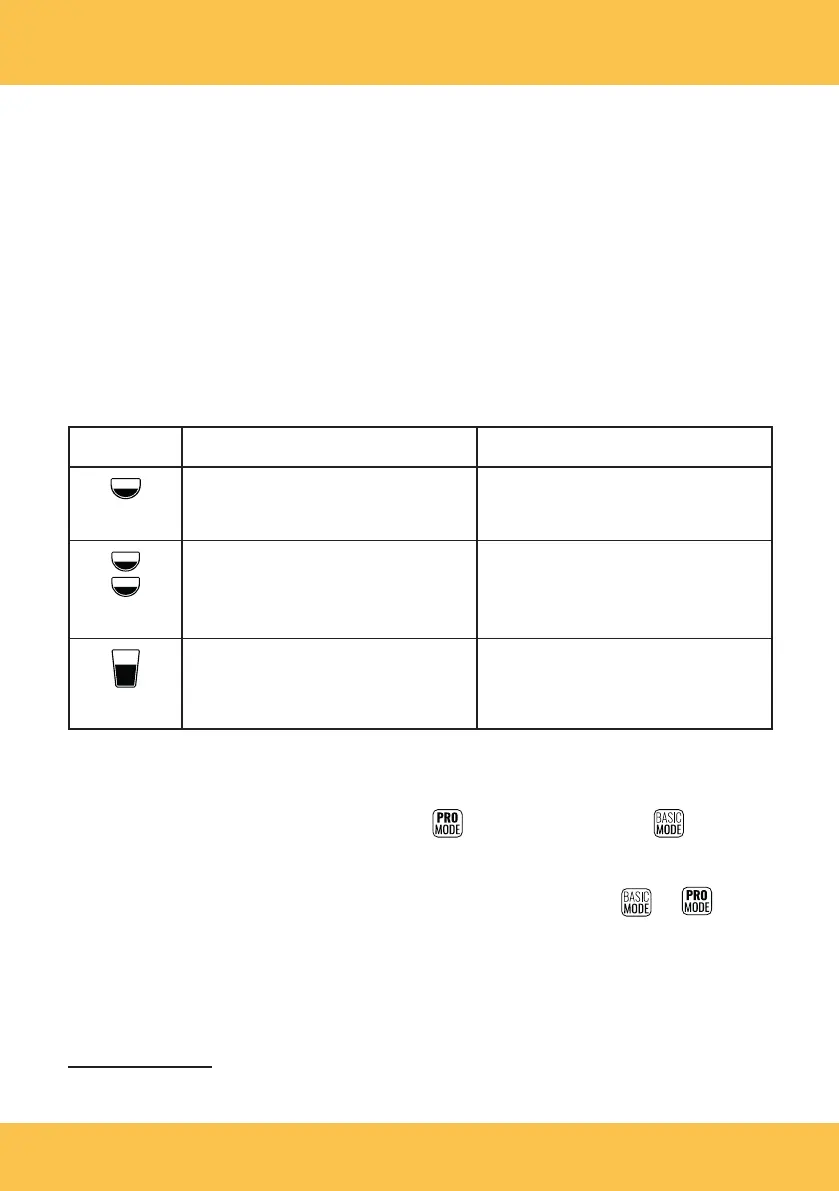
The following recipes (grinding times) are preset at the factory:
Recipe Model: Luna Model: Alba
Single shot:
3seconds (approx.8–11g*) 1.5 seconds (approx. 8–11 g*)
Double shot
5 seconds (approx. 14–18 g*) 2.5 seconds (approx. 14–18 g*)
Americano
4 seconds (approx. 14–18 g*). 2 seconds (approx. 14–18 g*).
Proceed as described in the “Setting or changing the recipe/grinding time” section to
customize the factory setting and define other grinding times for the recipes.
The grinder has two modes: the Pro mode ( ) and the Basic mode ( ). The user
can make settings in the Pro mode (e.g. change the grinding times for each recipe).
The user can only use the grinder in the preconfigured state in the Basic mode.
To change from one mode to the other, tap the respective symbol or on the
touchscreen in the Typo, Recipe selection display. The owner password (1932) must
be entered when changing from the Basic mode to the Pro mode.
You can deactivate the owner password protection for the Pro mode via the main
menu (see “Opening and using the main menu” section).
* The quantity of ground coffee depends on the espresso bean type selected, the grinding degree
selected and the mains frequency (see “Technical data” section).



 To Next Page