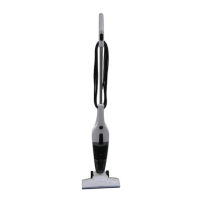
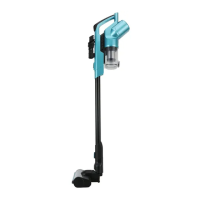
This document describes the Anko Rechargeable Hand - Stick Vac, Model No.: SL593C, Rev 2, designed for household use.
Function Description:
The Anko Rechargeable Hand - Stick Vac is a versatile cleaning appliance that can be used as a full-sized stick vacuum with an extension tube and motorised floor head, or as a compact hand vacuum by attaching accessories directly to the main body. It is designed for dry, indoor surfaces and is suitable for picking up dust and debris. The vacuum features a rechargeable and removable battery pack, offering cordless operation. It includes a motorised floor head for effective cleaning and a crevice/brush tool for furniture and corners. The appliance has a speed control function, allowing users to switch between low and high power modes. An adjustable carry handle enhances usability, particularly for reaching under low items.
Important Technical Specifications:
- Model No.: SL593C, Rev 2
- Battery Charger Model No.: ZD12D260050AU
- Battery Charger Input: 100–240V~ 50/60Hz 0.5A
- Battery Charger Output: 26.0V --- 500mA
- Battery Pack Specification: SL593C, Li-ion, 22.2Vd.c., 2200mAh
- Run Time (fully charged battery):
- Approximately 30 - 35 minutes for continuous use (low power mode)
- Approximately 20 - 25 minutes for continuous use (high power mode)
Usage Features:
- Assembly: The vacuum cleaner consists of a stick vac body/handle, rechargeable/removable battery pack, dust canister, crevice/brush tool, battery charger, motorised floor head, extension tubes, and control buttons. The extension tubes are assembled by pushing them together until they lock, ensuring the tube with the tool holder is the lower section. The extension tube then locks into the vacuum cleaner body. The motorised floor head attaches to the other end of the extension tube in a similar locking mechanism. For hand vacuum use, accessories can be attached directly to the main body without the extension tube.
- Charging: Before first use, the vacuum cleaner must be charged for at least 5 hours. The battery pack is inserted into the back of the vacuum cleaner body until it locks. The small plug of the battery charger cable is connected to the charging port on the side of the vacuum cleaner body, and the charger is plugged into a power point. During charging, indicator light bars on the handle illuminate in order of charge state and blink. All bars turn off when fully charged. The vacuum cleaner cannot be started while charging.
- On/Off and Speed Control: To switch on, press the top button on the handle once; the vacuum starts in default (low power) mode. Pressing the "Max" button once changes to high power mode. Pressing the "Max" button again returns to low power mode. Pressing the On/Off button again turns the vacuum off.
- Indicator Lights:
- Charge Status: Indicator lights show battery charge level (3 bars for full, 2 for 1/3 used, 1 for 2/3 used). When the battery is flat, the vacuum turns off, and all three bars flash 5 times, indicating a need for recharging.
- Jammed Floor Head Brush: A red indicator light below the "Max" button blinks on and off if the floor head rotary brush is jammed. The vacuum cleaner will turn off automatically in this event.
- Carry Handle: The vacuum cleaner features an adjustable carry handle. By pressing a small round button on the back of the handle, the handle unlatches, allowing the vacuum cleaner body to swing down. This makes it easier to reach under low items. To return to the "normal" position, push the handle back up until it latches.
- Tools and Tool Storage: The crevice/brush tool is used for cleaning furniture and corners. To use as a brush, slide the brush down until it locks. To use as a crevice tool, slide the brush up until it locks. The tool fits into the end of the hand vac or the extension tube. There is also a flip-up brush on the inlet section of the vacuum cleaner body, which can be rotated upward to latch in place for use, and downward for storage. A tool holder is located on the lower extension tube for convenient storage of the crevice/brush tool.
Maintenance Features:
- Emptying the Dust Canister: The dust canister should be emptied frequently, or when suction power is reduced, for optimal performance. To empty, remove the dust canister from the vacuum cleaner by pressing a button on the side, allowing it to swing down and lift out. Unclip the latch on the trap door to release contents into a dustbin, then close the trap door until it clips shut.
- Cleaning the Filters: Filters must be cleaned regularly to maintain suction performance and prevent overheating. Cleaning is recommended when emptying the dust canister.
- First, remove the dust canister from the vacuum cleaner body.
- Grasp the filter and pull it up and out.
- Turn the filter over and remove the black foam filter.
- Wash the filter in warm mild soapy water, rinse in clean fresh cold water, and let it completely dry. Do not scrub, place in a dishwasher, or use a hair dryer.
- The white filter should only be washed if very dirty; otherwise, tap it on a hard surface to dislodge dust.
- The centre component, where the filter is located, can also be removed for cleaning by grasping its edges and pulling straight up. When refitting, ensure the large tab aligns with the large slot and the small tab aligns with the small slot in the dust canister, then rotate until they drop in. Incorrect fitment will prevent proper dust pickup.
- Never use the vacuum cleaner with a wet or damp filter or without the filter fitted, as this can cause damage and void the warranty.
- Cleaning the Vacuum Cleaner Body and Tools: Clean only the outside of the vacuum cleaner, components, and accessories using a moist cloth and mild detergent. Wipe off moisture with a dry cloth after cleaning. Do not use petrol, flammable liquids, solvents, or place accessories/components in a dishwasher.
- Cleaning the Motorised Floor Head: The rotary brush in the floor head can be removed for cleaning hair and debris.
- Ensure the floor head is removed from the extension tube or vacuum cleaner.
- Turn the floor head over so the bottom face is up.
- Rotate a small locking screw on the right side 1/8 turn clockwise to unlock (using a flat blade screwdriver or coin).
- Swing up the cover.
- Grasp the rotary brush and slide it to the right, then lift it out.
- Remove any hair, thread, or debris caught around the brush, end bearings, or wheels.
- Refit the brush by aligning its end onto the drive spindle, rotating it until it slides down, and then pushing it into position.
- Close the cover and rotate the locking screw 1/8 turn anticlockwise to lock.
- Spare Parts: If a filter is broken or worn, it should be replaced. Filters can be purchased by contacting customer service.
- Storage: After use, empty the dust canister and clean the filters. The battery can be recharged or stored in a dry, cool place. Unplug the battery charger when not in use. For compact storage, the vacuum cleaner can be removed from the extension tube and hooked onto the lower tube, allowing it to stand upright.


 To Next Page
 General