EN
96
USING THE BUTTONS
AUTO mode
Check that the appliance is connected to the mains.
The status light on the appliance goes on.
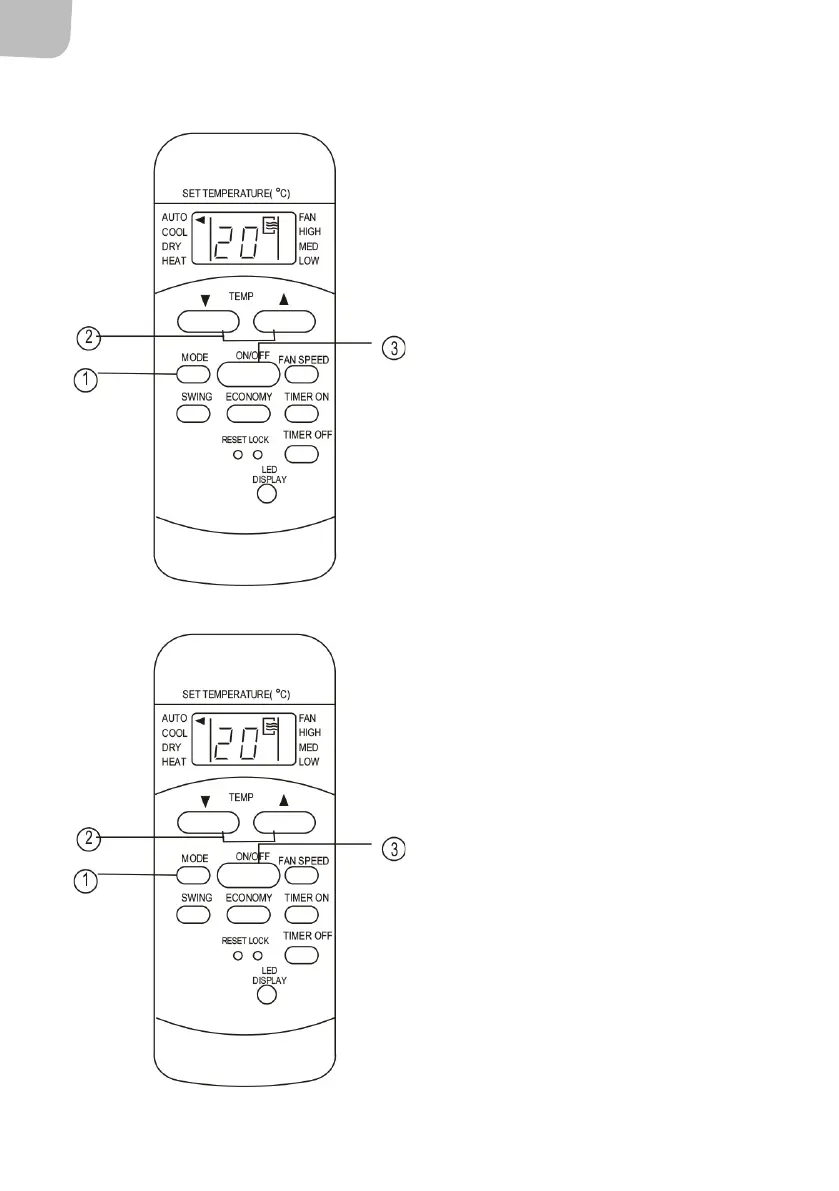
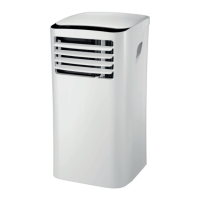
1. Press the MODE button until AUTO mode
is activated.
2. Press the TEMP button to set the required
temperature from 17 to 30°C in steps of
1°C or from 62 to 88°F in steps of 1°F.
3. Press the ON/OFF button to start the
appliance.
NOTE:
• In AUTO mode the appliance compares the
actual room temperature with the set point
temperature, which is set from the remote
control and activates COOL, HEAT or DRY
mode.
• In AUTO mode it is not possible to set the fan
speed. The fan speed is controlled
automatically.
• You can also set the required mode manually.
Cooling/heating/fan
Check that the appliance is connected to the mains.
1. Press the MODE button until the required
mode is activated (COOL, HEAT (only on
models with both heating and cooling)
or FAN).
2. Press the TEMP button to set the required
temperature from 17 to 30°C in steps of
1°C or from 62 to 88°F in steps of 1°F.
3. Press the FAN SPEED to set the required
fan speed to AUTO, LOW, MED or HIGH.
4. Press the ON/OFF button to start the
appliance.
NOTE: In FAN mode the set point temperature is
not shown on display on the remote control and it
is not possible to change the setting. Only steps 1, 3
and 4 should be carried out.


 To Next Page