Antelope Audio Zen Quadro Synergy Core User Manual
Page 71
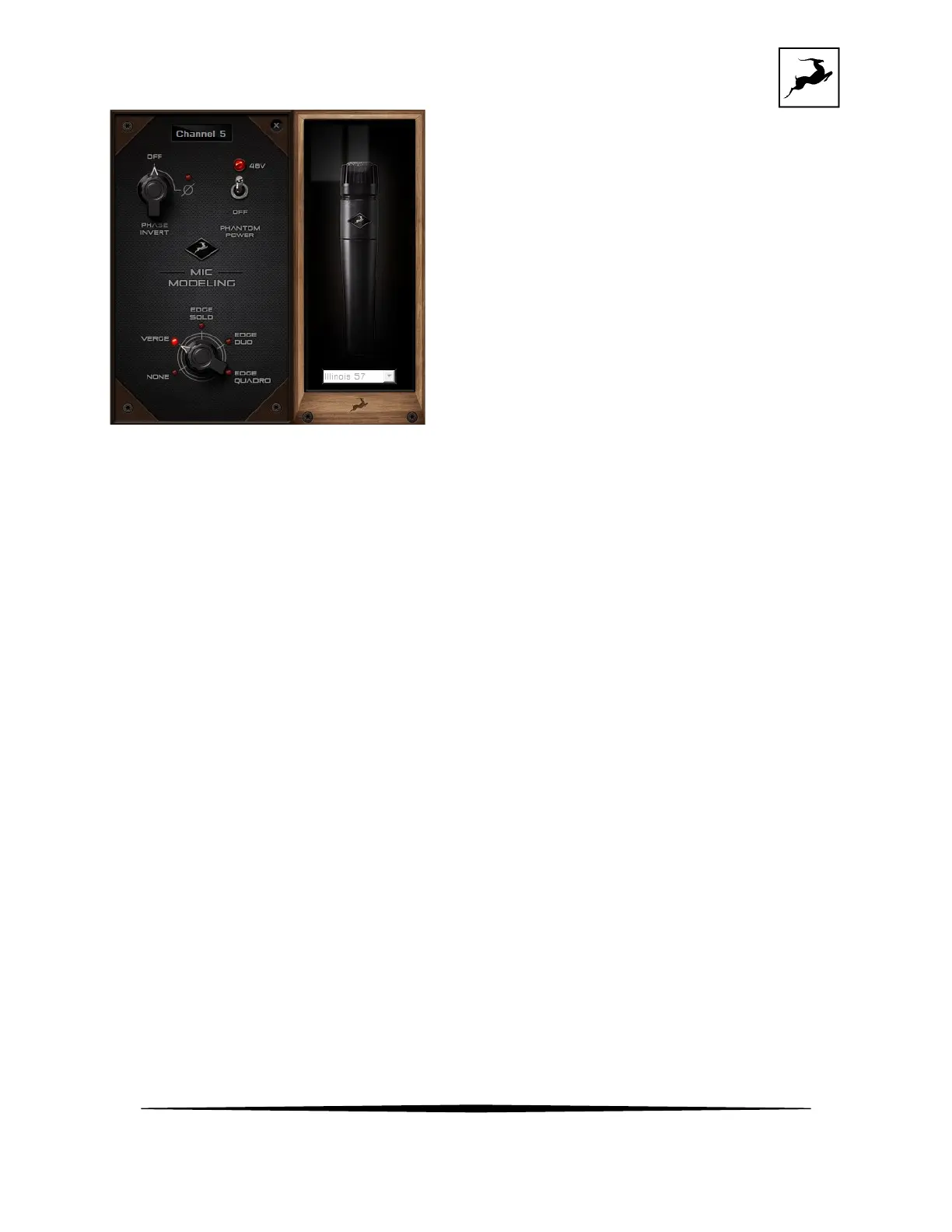
Verge Mic Emulations Window
The following functionality is available:
• Choose mic emulations from the drop-down menu on the right.
• Click and turn the ‘Phase Invert’ dial to flip the signal polarity.
• Click and drag the ‘48’V switch to activate or turn off phantom power.
Recording and Monitoring Verge
• Route the “PREAMP” channel for Verge to your Desired outputs to monitor “dry” audio.
Route to ‘USB 1 I/O’ or ‘USB 2 I/O’ to record from the corresponding input in your
DAW.
• Route the “EMU MIC” channel for Verge (same number as the “PREAMP” input”) to your
desired outputs to monitor “mic emulation” audio. Route to ‘USB 1 I/O’ or ‘USB 2 I/O’ to
record from the corresponding input in your DAW or mobile device.
• Route “PREAMP” and “EMU MIC” channels to your desired outputs and ‘USB 1 I/O’ or
‘USB 2 I/O’ inputs to monitor and record both “dry” and “mic emulation” audio.
•
For more information about Verge, visit its product page.



 To Next Page