20
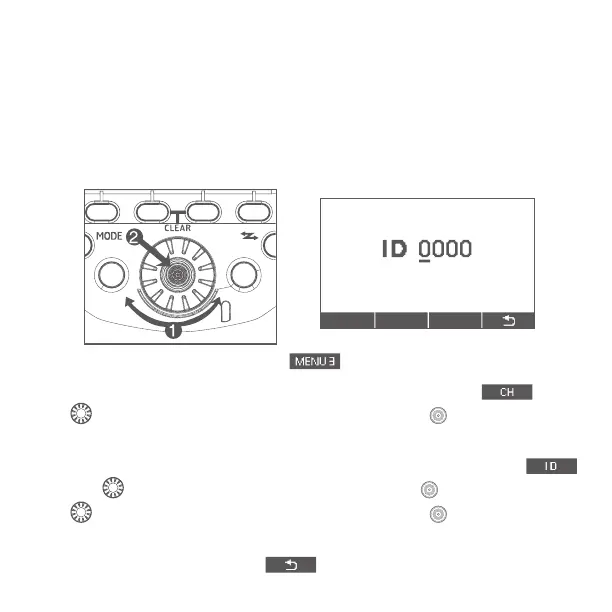
3. Transmission Channel/Wireless Radio ID Settings: To avoid interference
with wireless multiple ash systems using radio transmission that are used
by other photographers or with other devices that use radio waves (wireless),
you can change the transmission channel and wireless radio ID.
Use the following procedures to set the master unit’s transmission channel
and wireless radio ID. Set the same channel and ID for both the master unit
and slave unit. For the slave unit settings, see the ash’s instruction manual.
3.1 Press function button 4 until is displayed.
3.2 Set a channel: Press function button 1 corresponding to
turn
<
> to select from Ch. 1-15 or Auto, and press < > button to nish
the setting.
3.3
Set wireless radio ID: Press function button 2 corresponding t
o ,
turn <
> to select the digit to be set and press < > button. Again turn
<
> to select a number from 0-9, and press the < > button.
3.4 Repeat step 3.3 to set the four ID digits one by one. Press function
button 4 for corresponding to
to return to the shooting-ready state.


 To Next Page