23
ETTL: Fully Automatic Wireless Flash Shooting
E3
+
transmitter attached to the camera (master) and a wirelessly controlled
ash (slave) can perform fully automatic wireless shooting.
1. Autoash Shooting Using One Slave Unit
1.1 Set the ash as the slave unit: For the slave unit setting, see the ash
or the E3
+
receiver’s instruction manual. Set A, B or C as the ring group. If
set to D or E, the ash does not re.
1.2 Check the channel and ID: If the channels and IDs of the master unit
and slave unit are different, set them to exactly the same number.
1.3 Position the camera and the slave unit within the range of wireless
radio transmission.
1.4 Set the ash mode to <
>: Press the < > button on master
and set the ash mode to < >.The slave unit is set automatically
to< > during shooting via the control form the master unit. For
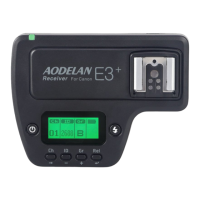
slave units that use E3
+
receiver, ashes on the receiver need not to set
to wireless slave mode, but the need to be set to ETTL mode manually
before shooting.
1.5 Check the transmission status and that the ash is ready:
Check that the <
>lamp lights green;
When the ash that is set to wireless slave mode is ready, the AF-
assist beam emitter blinks at 1-second intervals;
Check that the <
> slave ash-ready icon is lit on the master unit’s
LCD panel;


 To Next Page