29
TC5-2V2SA.rev.05
TC5-2V2SA
1
Viewing Relative Humidity
The relative humidity is expressed as a percentage.
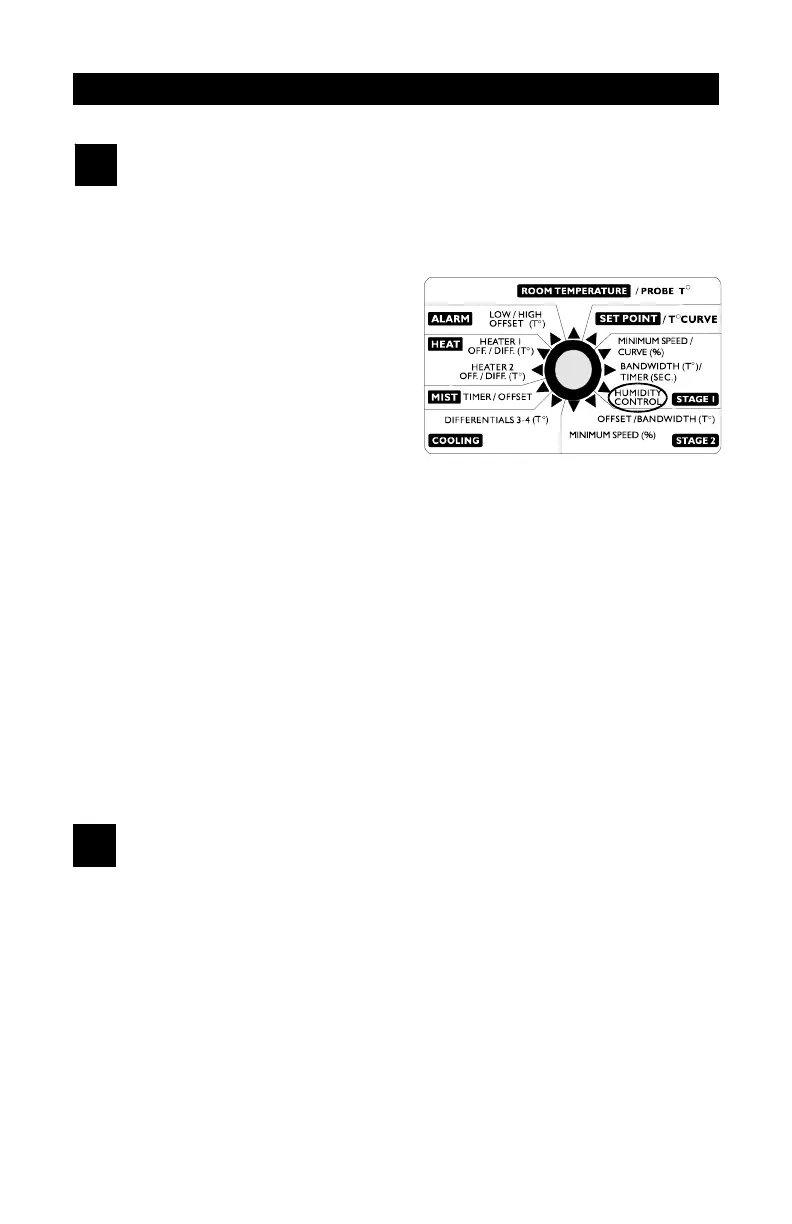
n Set the selection knob to
STAGE 1 — HUMIDITY CON-
TROL. The current relative
humidity is displayed.
n Turn the adjustment knob
clockwise by one notch. The
minimum humidity flashes on
the display, alternating with the
letters "Lo".
n Turn the adjustment knob clockwise one notch further. The maximum
humidity flashes on the display, alternating with the letters "Hi".
n Turn the adjustment knob clockwise a third notch. The current humid-
ity value is displayed again.
NOTE: If you let the display flash for more than 10 seconds when the
maximum or minimum humidity is displayed, the controller resets the mini-
mum and maximum humidity values currently in memory (the display stops
flashing to indicate that the reset has been done).
2
Adjusting Relative Humidity Set Point
When the relative humidity exceeds the humidity set point, stage 1 mini-
mum speed is increased by a proportional amount to compensate for the
increase in humidity. Note that the humidity compensation feature must be
activated for this to work.
n Set the selection knob to STAGE 1 — HUMIDITY CONTROL. The
current humidity reading is displayed.


 To Next Page