72
PROGRAMMING
Setting the temperature in the Baking chamber MAX 280°C (350°C)
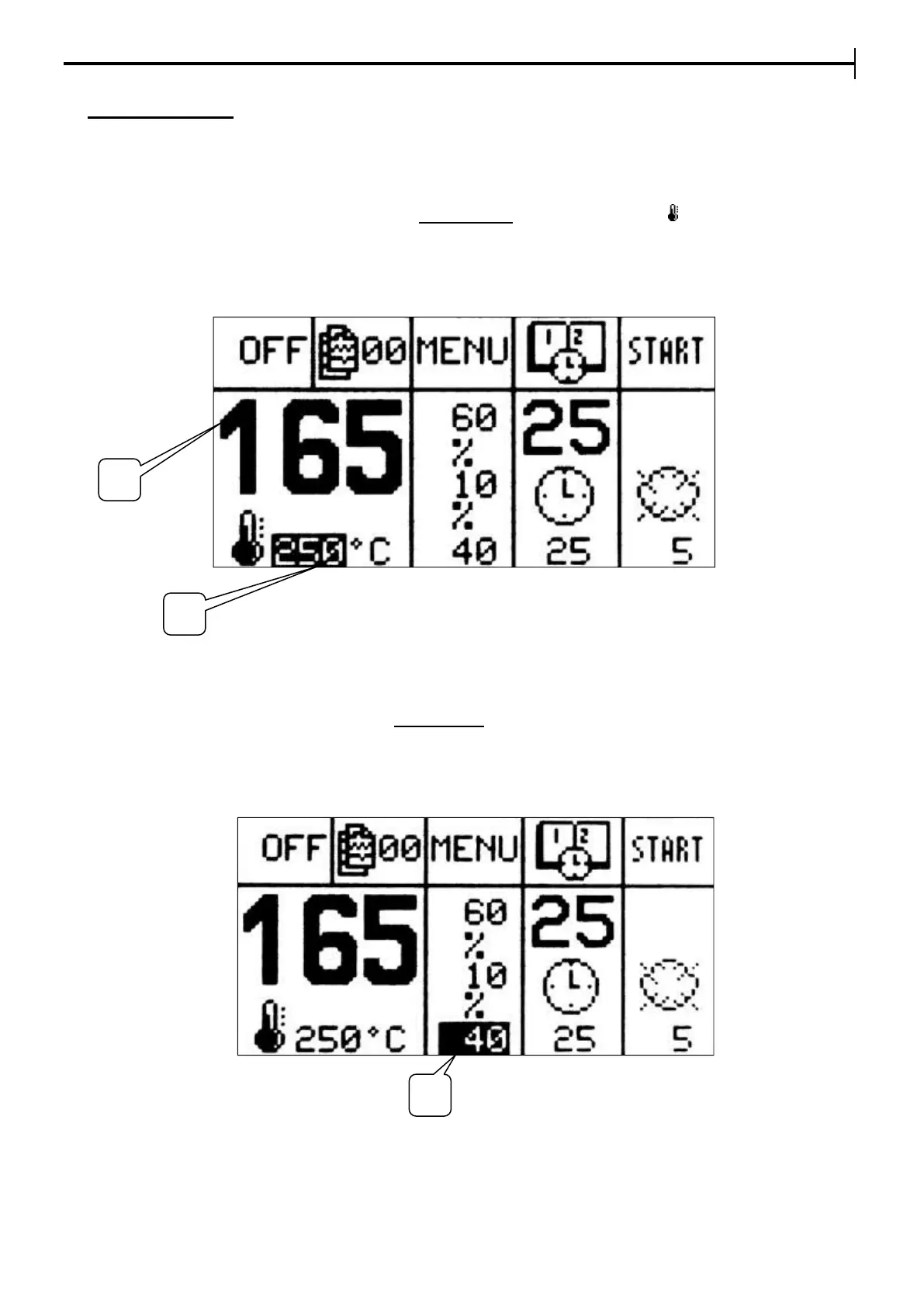
The value (1) is the actual current temperature in the baking chamber.
To set the baking temperature, press the button Temperature (indicated by the icon ). Press Enter and the
setpoint (2) previously set will start to flash. It’ll be possible to edit the value (2) with the buttons + and - ; to
confirm the set value, press Enter again and the setpoint will stop to flash, memorizing the data. If the
modification occurs when the baking cycle is active, the value is not saved and it goes back to the previously
set value for the following baking.
Setting Floor power percentages
With the % button, place the cursor onto the Floor Power (3) setpoint. Press Enter, modify the value using
the buttons + and –
NB. The sum of ceiling/floor percentages will always be max. 100%
To confirm the value press Enter and exit from the setting phase.
The recommended setting is 40%.


 To Next Page