3.
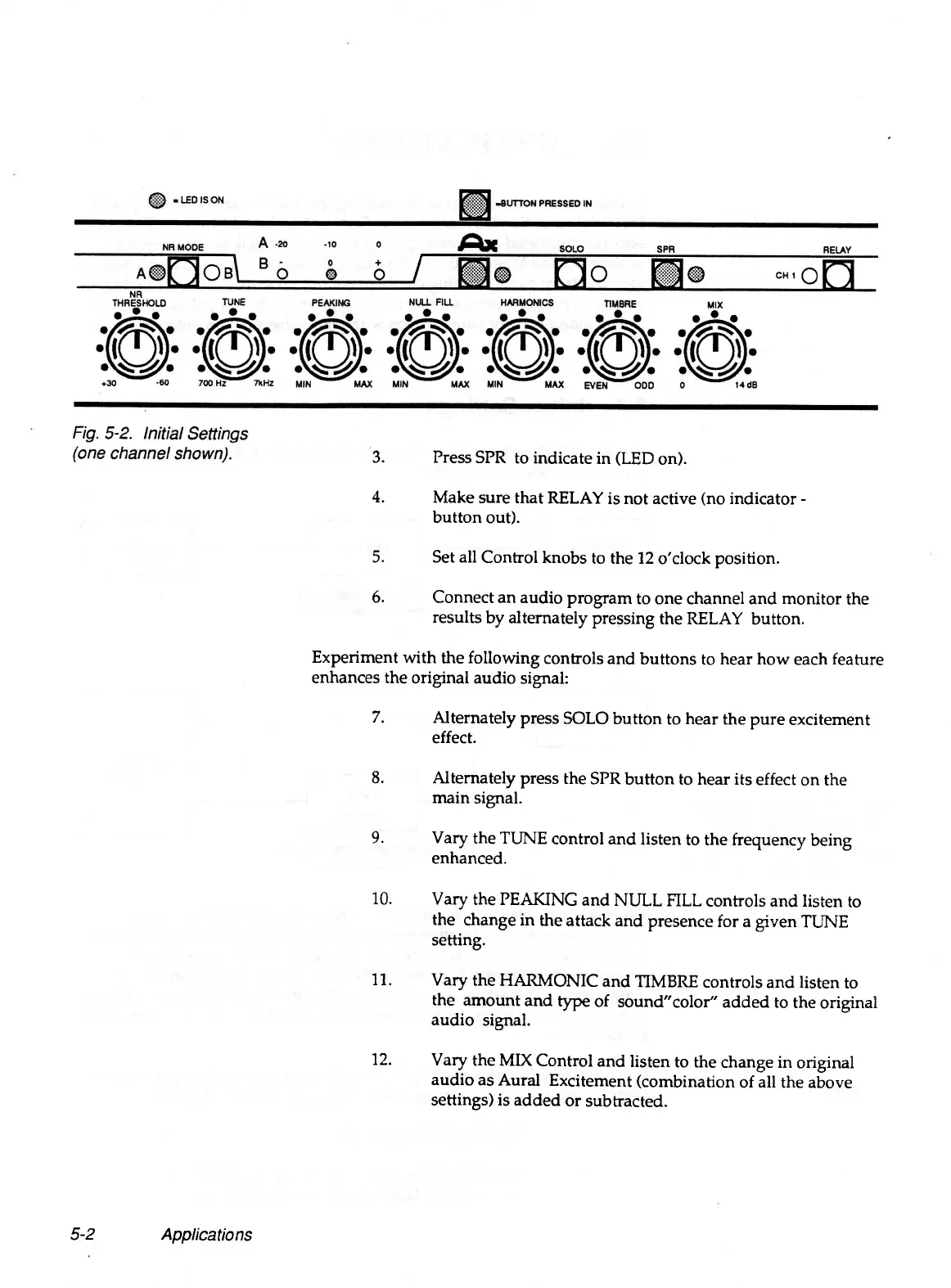
Press SPR to indicate in (LED on).
4.
Make sure that RELAY is not active (no indicator -
button out).
5.
Set all Control knobs to the 12 o'clock position.
6.
Connect an audio program to one channel and monitor the
results by alternately pressing the RELAY button.
Experiment with the following controls and buttons to hear how each feature
enhances the original audio signal:
7.
Alternately press SOLO button to hear the pure excitement
effect.
8.
Alternately press the SPR button to hear its effect on the
main signal.
9.
Vary the TUNE control and listen to the frequency being
enhanced.
10.
Vary the PEAKING and NULL FILL controls and listen to
the change in the attack and presence for a given TUNE
setting.
11.
Vary the HARMONIC and TIMBRE controls and listen to
the amount and type of sound"color" added to the original
audio signal.
12.
Vary the MIX Control and listen to the change in original
audio as Aural Excitement (combination of all the above
settings) is added or subtracted.
5-2
Applications


 To Next Page