5.3 Recording a Snare Drum with Excitement
To add Aural Excitement to the sound of a snare drum, perform the follow
ing steps after you are satisfied with the audio balance of level and equaliza
tion:
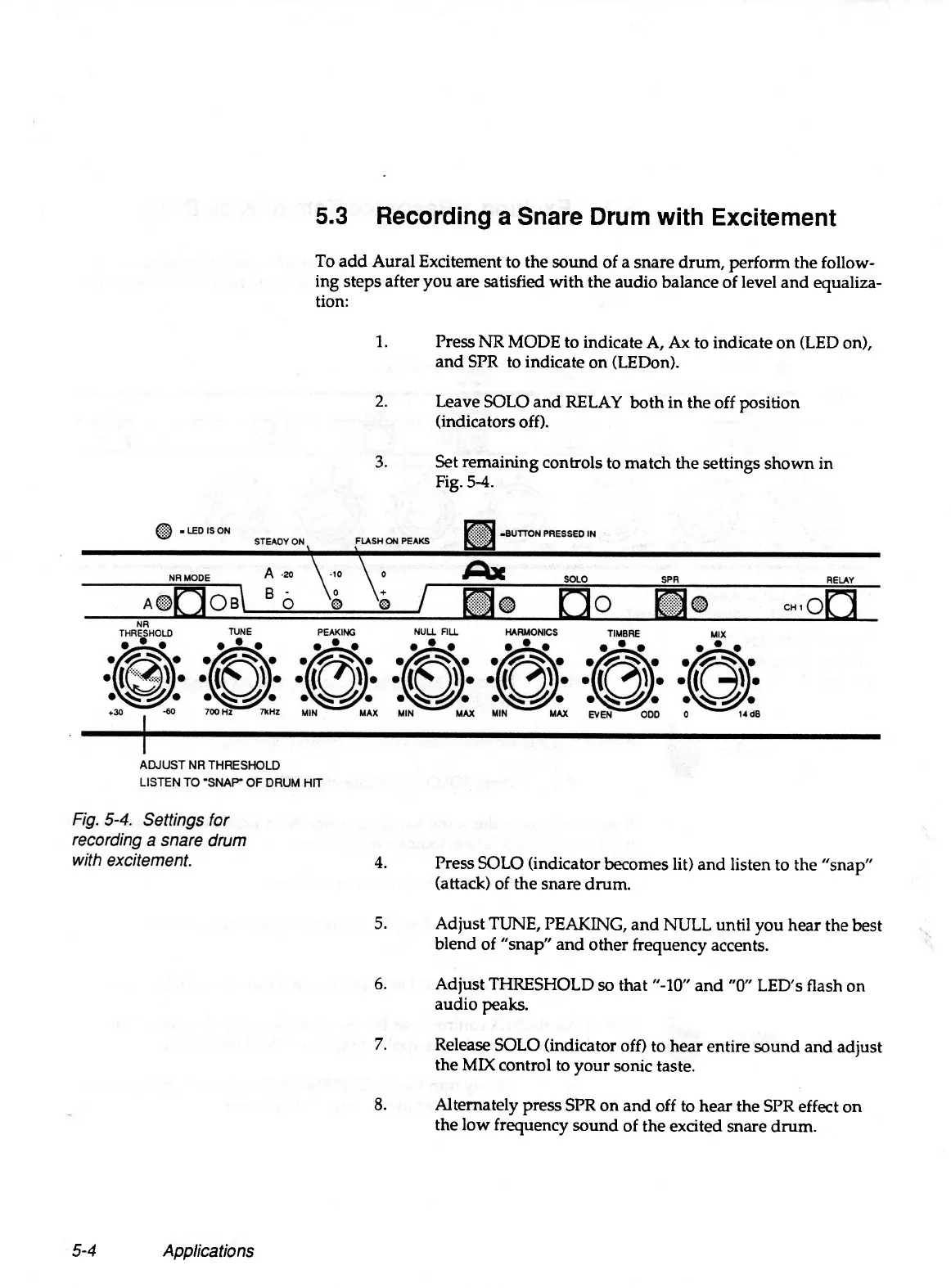
1. Press NR MODE to indicate A, Ax to indicate on (LED on),
and SPR to indicate on (LEDon).
2. Leave SOLO and RELAY both in the off position
(indicators off).
3. Set remaining controls to match the settings shown in
Fig. 5-4.
4. Press SOLO (indicator becomes lit) and listen to the "snap"
(attack) of the snare drum.
5. Adjust TUNE, PEAKING, and NULL until you hear the best
blend of "snap" and other frequency accents.
6. Adjust THRESHOLD so that "-10" and "0" LED's flash on
audio peaks.
7. Release SOLO (indicator off) to hear entire sound and adjust
the MIX control to your sonic taste.
8. Alternately press SPR on and off to hear the SPR effect on
the low frequency sound of the excited snare drum.
5-4
Applications


 To Next Page