5.2 Exciting a Recorded Tom or Kick Drum
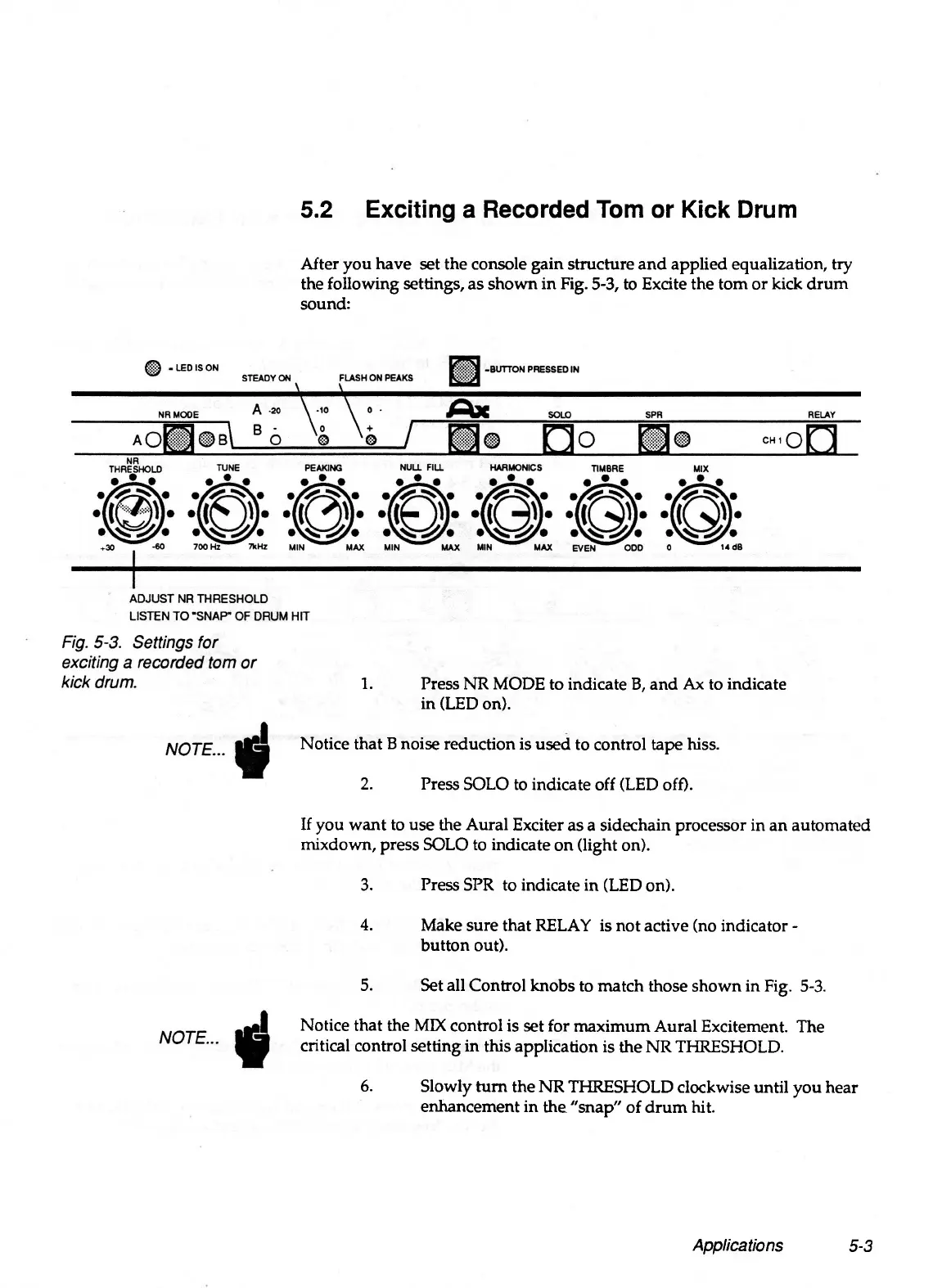
After you have set the console gain structure and applied equalization, try
the following settings, as shown in Fig. 5-3, to Excite the tom or kick drum
sound:
Applications
5-3
1. Press NR MODE to indicate B, and Ax to indicate
in (LED on).
Notice that B noise reduction is used to control tape hiss.
2. Press SOLO to indicate off (LED off).
If you want to use the Aural Exciter as a sidechain processor in an automated
mixdown, press SOLO to indicate on (light on).
3. Press SPR to indicate in (LED on).
4. Make sure that RELAY is not active (no indicator -
button out).
5. Set all Control knobs to match those shown in Fig. 5-3.
Notice that the MIX control is set for maximum Aural Excitement. The
critical control setting in this application is the NR THRESHOLD.
6. Slowly turn the NR THRESHOLD clockwise until you hear
enhancement in the "snap" of drum hit.


 To Next Page