13
Overview
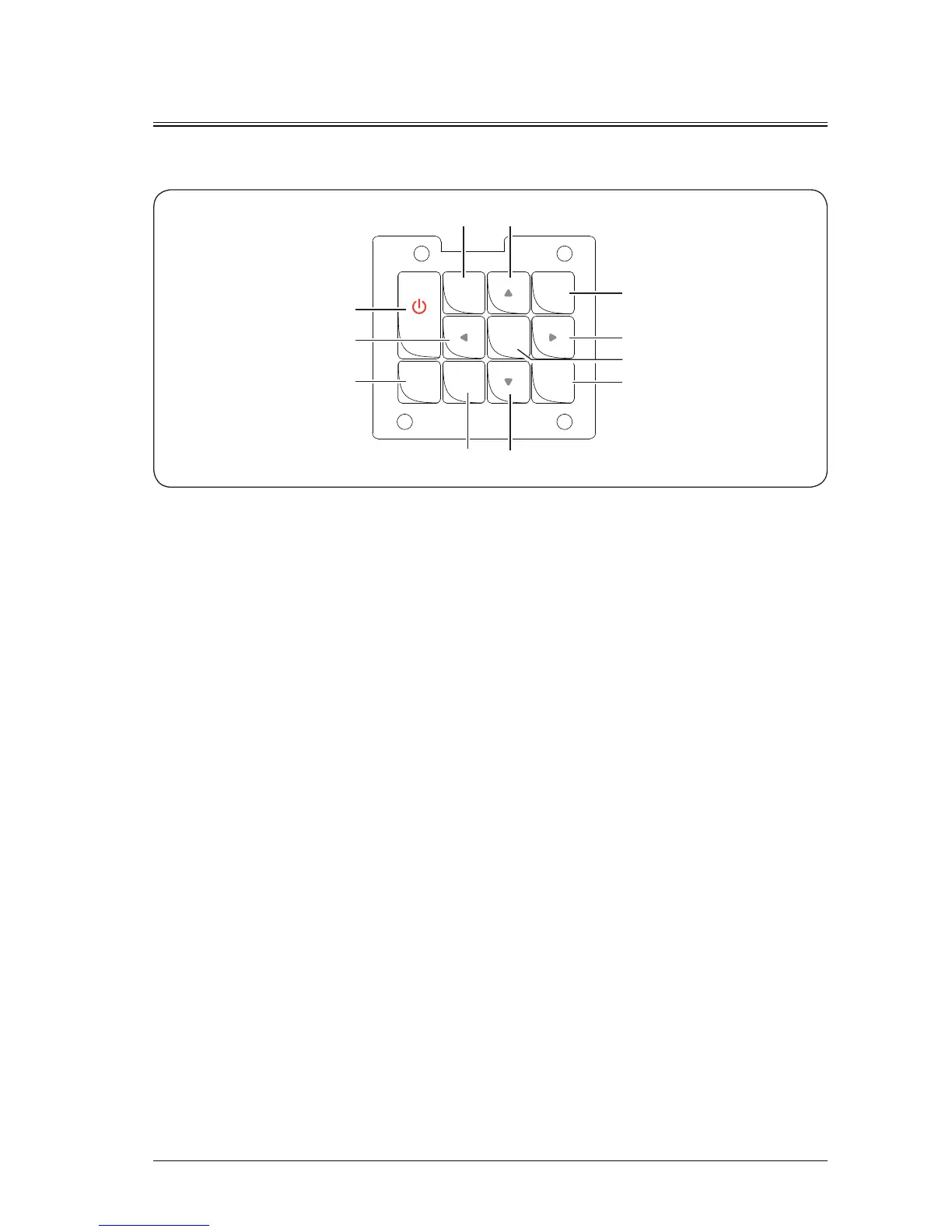
Control panel
①
POWER button (power-on/off)
Press the power button to enable the projector. In the power-on state, press the power button twice to
power off the projector.
②
LENS button
Press the button repeatedly to enter the lens focusing, shifting and zooming menus.
③
AUTO SETUP button
Press this button to pop up the automate centering dialog box. After you press the OK button, the lens is
centered automatically.
④
DOUSER button
When an picture is displayed, press to disable the display, and press again to enable the display.
⑤
MENU button
Press the menu button to display the screen menu. Press the menu button again to go back to the
previous menu or exit the screen menu.
⑥
(Arrow key)
Scroll up or down to select the adjustment item; move to the left to select an adjustment item or decrease
the value; move to the right to select an adjustment item or increase the value.
⑦
OK button
Press to select or confirm the current value or item.
⑧
SOURCE button
Set the input source to HDMI, HDBaseT, DVI, RGB1, Video, RGB2 or DP.
AUTO
SETUP
POWER
LENS
SOURCE
OK
DOUSER
MENU
④
⑧
⑥
⑥
⑥
⑥
⑤
①
③
②
⑦


 To Next Page