15
Overview
Replacing the Battery of the Remote Control
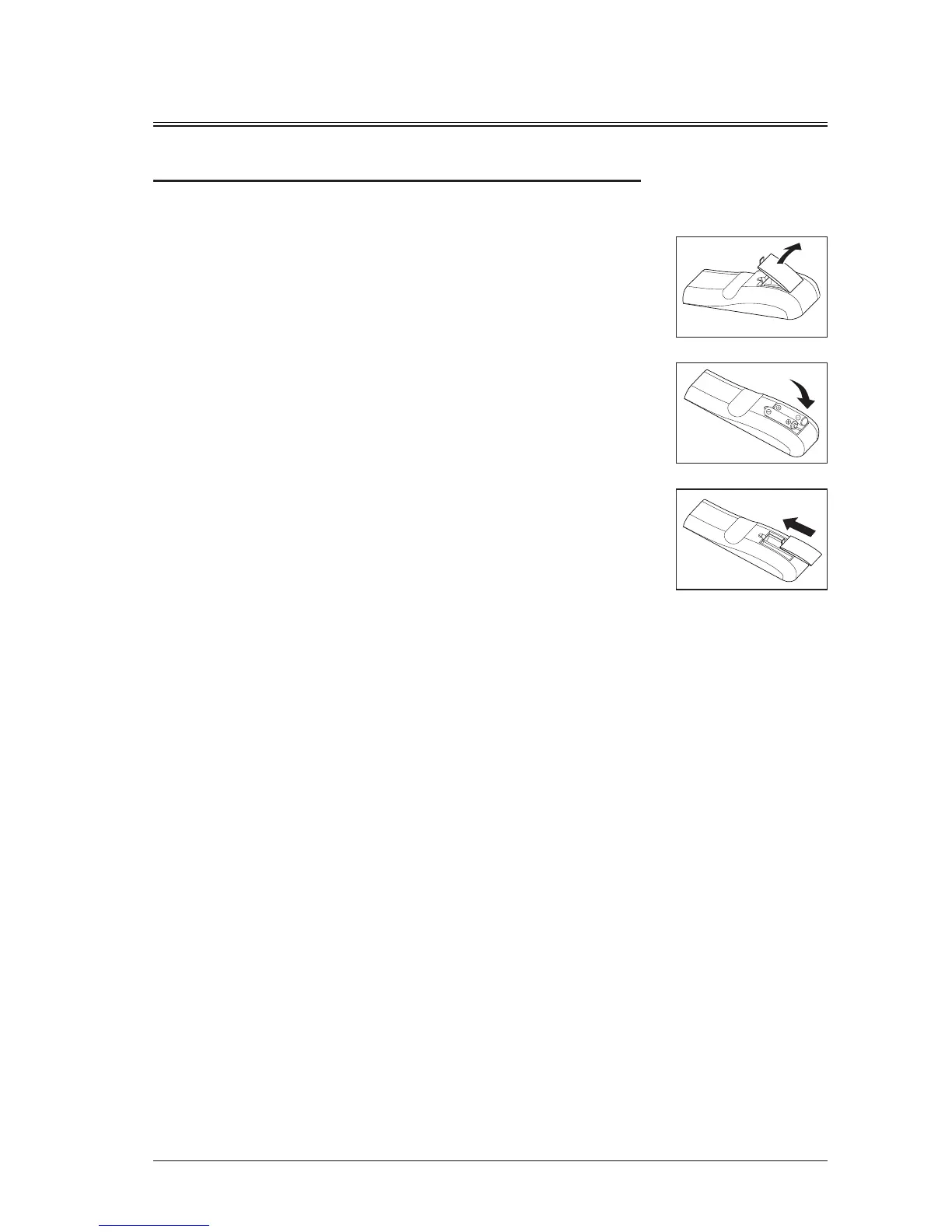
Place the remote control with the back facing up,
and open the battery cover.
Ensure that the polarity is correct when inserting the battery.
Do not throw the battery into the fire, since there may be a risk of explosion.
If the remote control is not used for a long period of time, remove the battery to avoid leakage and
damage to the remote control.
The liquid in the battery is harmful to the skin. Do not let the hands directly contact the liquid. When
installing a new battery, clean the leaked liquid thoroughly.
In most cases, you only need to point the remote control to the screen. The infrared signals will be
reflected back from the screen and received by the infrared sensor on the projector. However, in certain
circumstances, the projector may fail to receive signals from the remote control due to environmental
factors. In this case, point the remote control to the projector and try again.
If the effective signal receive range of the remote control is short, or the remote control does not work,
replace the battery.
If the infrared receiver is exposed to fluorescent or strong sunlight, the remote control may not work
properly.
Please refer to requirements for handling waste batteries of the local government. Improper handling of
waste batteries will cause damage to the environment.
①
③
②
Procedure
Precautions for the remote control
Put the new battery to the battery compartment.
Ensure that the polarity (+ and -) of two AAA
batteries are correctly connected to the
connectors in the battery compartment.
Install the battery cover.


 To Next Page