18
Installation
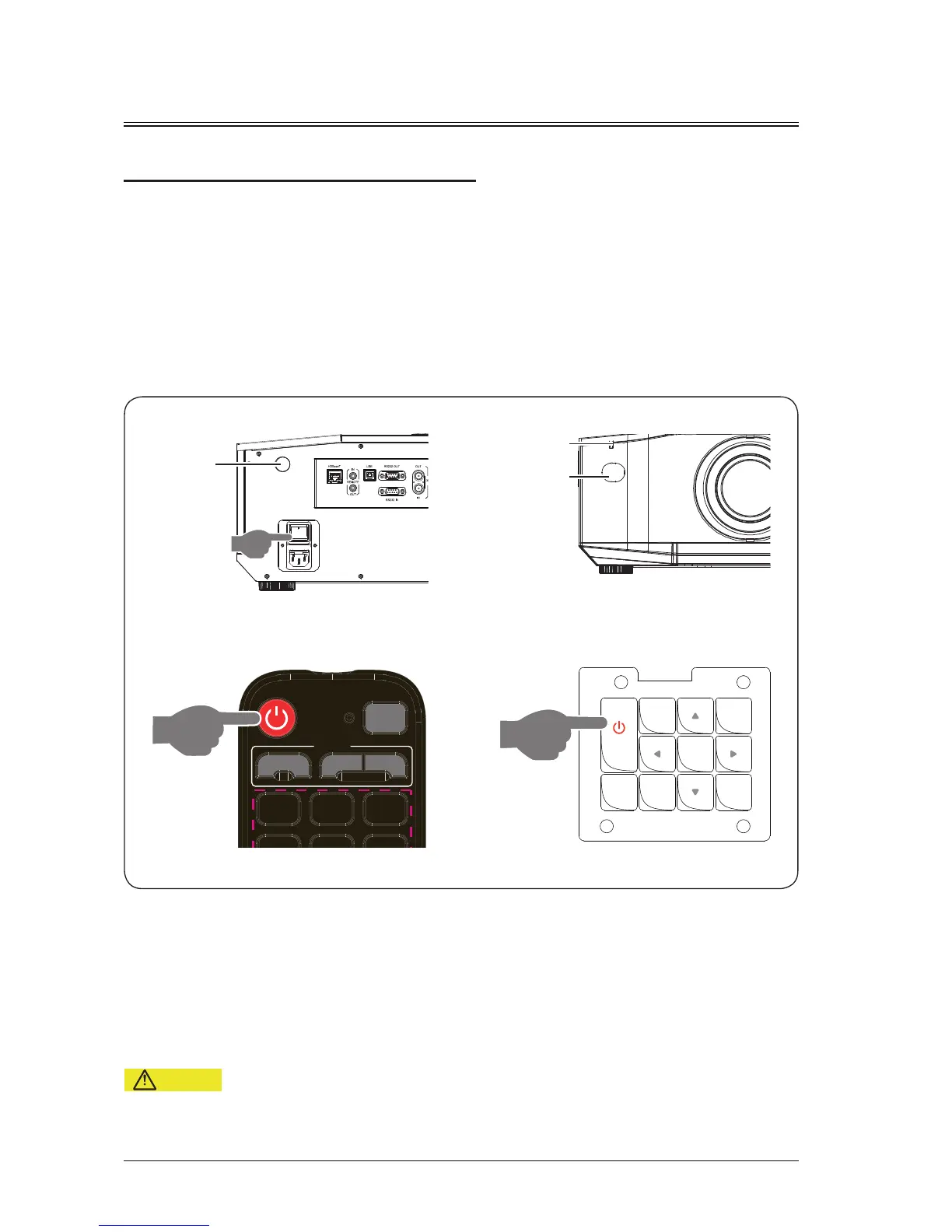
Powering On/Off the Projector
- Do not power on the project immediately after it enters the standby mode.
Powering on the projector
Powering off the projector
Press the power button on the remote control or control panel to shut down the projector.
Ensure that the power cable and signal cable are securely connected. Turn on the power switch and wait
until the state LED indicator is steady on red.
Press the power button on the remote control or control panel to start up the projector. The state LED
indicator is on green, and the screen displays "No signal".
Enable the signal source. Select the signal source (video, RGB1, RGB2, HDMI, DVI, DP or HDBaseT)
using the remote control or button. The projector detects the input source and displays pictures.
POWER
button
POWER
button
AUTO
SETUP
POWER
LENS
SOURCE
OK
DOUSER
MENU
Power
switch
Rear
infrared
receiver
Front
infrared
receiver
State LED
indicator


 To Next Page