EasyManua.ls Logo

Aprilaire E100C - User Manual

Aprilaire E100C
16 pages
Print Icon
To Next Page IconTo Next Page
Loading...
READ AND SAVE THESE INSTRUCTIONS
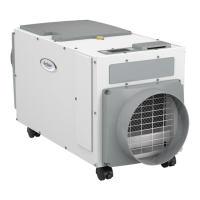
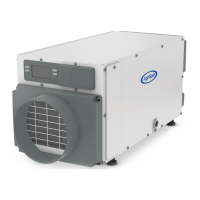
Model E100C Dehumidifier
Installation and Operating Manual
SAFETY INSTRUCTIONS
WARNING
1. 120 Volts may cause serious injury from electric shock. Disconnect electrical power before starting installation or servicing. Leave power
disconnected until installation/service is completed.
2. Dropping may cause personal injury or equipment damage. Handle with care and follow installation instructions.
3. Sharp edges may cause serious injury from cuts. Use care when cutting plenum openings and handling duct work.
CAUTION
1. Read all instructions before beginning installation.
2. Improper installation may cause property damage or injury. Read instructions before installation, service or maintenance.
3. Do not use in pool applications. Pool chemicals can damage the dehumidifier.
4. Do not use solvents or cleaners on or near the circuit board. Chemicals can damage circuit board components.
5. Wait 24 hours before running the unit if it was not shipped or stored in the upright position
6. Do not use dehumidification to prevent window condensation in the winter. To address window condensation, use ventilation to lower
indoor humidity in the winter.
7. This appliance is not intended for use by persons(including children) with reduced physical, sensory, or mental capabilities, or lack of
experience and knowledge, unless they have been given supervision or instruction concerning the use of this appliance by a person
responsible for their safety.
8. Children should be supervised to ensure that they do not play with the appliance.
9. If the supply cord is damaged, it must be replaced by a special cord or assembly available from the manufacturer or its service agent.
TABLE OF CONTENTS
SAFETY INSTRUCTIONS � � � � � � � � � � � � � � � � � � � � � � � � � � � � � � � � � � � � � � � � � 1
SPECIFICATIONS � � � � � � � � � � � � � � � � � � � � � � � � � � � � � � � � � � � � � � � � � � � � � � � � 2
REMOVE SHIPPING BRACKET � � � � � � � � � � � � � � � � � � � � � � � � � � � � � � � � � � � � 2
LOCATION CONSIDERATIONS � � � � � � � � � � � � � � � � � � � � � � � � � � � � � � � � � � � � 3
LEVELING ������������������������������������������������������3
DRAIN INSTALLATION � � � � � � � � � � � � � � � � � � � � � � � � � � � � � � � � � � � � � � � � � � �4
Condensate Pump and Float Switch � � � � � � � � � � � � � � � � � � � � � � � � � � � � � 5
SETTING THE DESIRED HUMIDITY LEVEL � � � � � � � � � � � � � � � � � � � � � � � � �6
MAINTENANCE� � � � � � � � � � � � � � � � � � � � � � � � � � � � � � � � � � � � � � � � � � � � � � � � � � 7
Clean or Replace the Air Filter � � � � � � � � � � � � � � � � � � � � � � � � � � � � � � � � � � 7
Check the Drain � � � � � � � � � � � � � � � � � � � � � � � � � � � � � � � � � � � � � � � � � � � � � � �8
DUCT COLLAR INSTALLATION� � � � � � � � � � � � � � � � � � � � � � � � � � � � � � � � � � � �9
Control Location� � � � � � � � � � � � � � � � � � � � � � � � � � � � � � � � � � � � � � � � � � � � � � 10
DUCTING � � � � � � � � � � � � � � � � � � � � � � � � � � � � � � � � � � � � � � � � � � � � � � � � � � � � � � �11
Ducting in Basement � � � � � � � � � � � � � � � � � � � � � � � � � � � � � � � � � � � � � � � � � �11
Ducting to HVAC System in Mechanical Closet� � � � � � � � � � � � � � � � � � � 12
Ducting to Whole Home without an Air Handler� � � � � � � � � � � � � � � � � 12
TROUBLESHOOTING � � � � � � � � � � � � � � � � � � � � � � � � � � � � � � � � � � � � � � � � � � � 13
Table 1 – Diagnostic Codes � � � � � � � � � � � � � � � � � � � � � � � � � � � � � � � � � � � � 13
Table 2 – Troubleshooting Guide � � � � � � � � � � � � � � � � � � � � � � � � � � � � � � � 14
SERVICE PARTS � � � � � � � � � � � � � � � � � � � � � � � � � � � � � � � � � � � � � � � � � � � � � � � � 15
LIMITED WARRANTY � � � � � � � � � � � � � � � � � � � � � � � � � � � � � � � � � � � � � � � � � � � 16
English 1

Questions and Answers

  • R
    Raymond CookAug 19, 2025
    What does E7 error mean on Aprilaire E100C?
    • N
      Nicholas ReyesSep 12, 2025
      If your Aprilaire Dehumidifier displays error code E7, indicating a float switch open, start by emptying the condensate pan. Then, check the float switch connection at the control board. If you're not using a float switch, make sure the jumper is correctly placed between the float switch terminals on the dehumidifier control board. If the problem continues, consider replacing the float switch.
  • J
    John EscobarAug 21, 2025
    What does error E2 mean on Aprilaire E100C Dehumidifier?
    • F
      fhuntAug 21, 2025
      If your Aprilaire Dehumidifier shows an E2 error (High Refrigeration Pressure), first verify that the fan is working correctly and that nothing is blocking the airflow. If the problem continues, it is recommended to call Technical Support.
  • C
    Cody GomezAug 23, 2025
    What does E8 error mean on Aprilaire E100C Dehumidifier?
    • R
      Rachel GomezAug 23, 2025
      If your Aprilaire Dehumidifier displays error code E8, and the temperature is out of the specified range, no action is needed as this is normal operation. However, if the air temperature is between 50°F – 104°F with a dew point above 40°F, it is recommended to contact Technical Support.
  • E
    evan00Aug 26, 2025
    What does E3 error mean on Aprilaire E100C?
    • C
      Catherine WilliamsAug 26, 2025
      If your Aprilaire Dehumidifier displays error code E3, indicating a communication loss with the Model 76 remote control, check the connections between the Model 76 and the dehumidifier control board. Ensure the terminals are fully inserted and secured. If the connections are correct, turn off the dehumidifier, remove the Model 76, and use a short 4-wire cable to reconnect it directly to the control board. Turn the dehumidifier back on and increase the dryness level on the Model 76. If the dehumidifier turns on, the issue is with the wiring. If it doesn't turn on, contact Technical Support.
  • D
    David FisherAug 27, 2025
    What does error E4 mean on Aprilaire E100C?
    • T
      Tamara SmithAug 28, 2025
      If your Aprilaire Dehumidifier is showing an E4 error, indicating insufficient capacity, check the frost sensor connection at the power board to ensure the terminal is fully seated. Also, remove the side access panel and make sure the sensor is secured to the suction line. If it's connected properly, reset the fault by cycling power to the dehumidifier. Lower the humidity setting and allow the unit to run for 10-15 minutes. Then, enter diagnostic test mode by pressing the and MODE buttons for 3 seconds. Record the displayed values and contact Technical Support.
  • E
    elizabethrichardsAug 29, 2025
    What does error E5 mean on Aprilaire E100C?
    • C
      Carla BrennanAug 30, 2025
      If your Aprilaire Dehumidifier displays error code E5, which indicates a high temperature thermistor failure, check the high temperature sensor connection at the power board to ensure the terminal is fully seated. Remove the side access panel and verify the sensor is not damaged and is connected to the refrigeration line coming from the compressor. If the sensor is connected and secured, it may need to be replaced with Part No. 5456 — contact Technical Support to confirm.
  • W
    Whitney ThomasSep 1, 2025
    What does error E6 mean on Aprilaire Dehumidifier?
    • M
      Matthew MontoyaSep 1, 2025
      If your Aprilaire Dehumidifier displays error code E6, indicating a low temperature thermistor failure, check the low temperature sensor connection at the power board. Remove the side access panel and verify the sensor is not damaged and is connected to the suction line. If the sensor is connected and secured to the refrigeration line, it may need to be replaced with Part No. 5455 — contact Technical Support to confirm.
  • A
    Angela DavisSep 3, 2025
    What does E1 error mean on Aprilaire E100C?
    • M
      Matthew AndersonSep 3, 2025
      To address the E1 error on your Aprilaire Dehumidifier, which indicates an issue with the internal humidity or temperature sensor, first try cycling the power to clear the error code. If the error code reappears, you should replace the User Interface, Part No. 5445.
  • G
    Greg LewisSep 5, 2025
    How to troubleshoot Aprilaire E100C Dehumidifier that does not turn on?
    • M
      Monique LoveSep 5, 2025
      If your Aprilaire Dehumidifier isn't turning on, make sure it's properly plugged in and that the power switch is in the ON position. Also, check if the control is turned ON and verify that the circuit breaker hasn't tripped.
  • J
    Jason RobertsSep 7, 2025
    What to do if Aprilaire Dehumidifier is not draining properly?
    • S
      Summer GreenSep 7, 2025
      If your Aprilaire Dehumidifier isn't draining correctly, ensure the unit is level. Inspect the drain line for any blockages and confirm it has a continuous downward slope. Also, check for the presence and condition of the drain cover; if it's missing or damaged, clean it or consider replacing it with part number 5885.

Summary

Safety Instructions

Specifications

Remove Shipping Bracket

Location Considerations

Leveling

Drain Installation

Condensate Pump and Float Switch

Installation of a condensate overflow safety switch for drainage.

Setting the Desired Humidity Level

Maintenance

Clean or Replace the Air Filter

Procedure for cleaning or replacing the air filter.

Check the Drain

Annual check for drain blockages or air locks.

Duct Collar Installation

Control Location

Ducting

Ducting in Basement

How to duct the dehumidifier in a basement setup.

Ducting to HVAC System in Mechanical Closet

Installation for ducting to HVAC in a mechanical closet.

Ducting to Whole Home Without an Air Handler

Installation for ducting to a whole home without an HVAC air handler.

Troubleshooting

Diagnostic Codes

Error codes and their meanings for system faults.

Service Parts

Limited Warranty

Aprilaire E100C Specifications

General IconGeneral
BrandAprilaire
ModelE100C
CategoryDehumidifier
LanguageEnglish

Related product manuals