EasyManua.ls Logo

APsystems YC500A - YC500 A Installation Procedures; Step 1: Install AC Branch Circuit Junction Box

APsystems YC500A
23 pages
Print Icon
To Next Page IconTo Next Page
To Previous Page IconTo Previous Page
Loading...
YC500A Installation/User Manual
8
YC500A Installation Procedures
APsystems Microinverters are designed to only operate when they can sense
power coming from the grid. Even if they are plugged into the solar array,
they will not turn themselves on until they can read power from the grid.
WARNING:
Do NOT connect APsystems Microinverters to the
utility grid or energize the AC circuit until you have completed
all of the installation procedures as described in the following
sections.
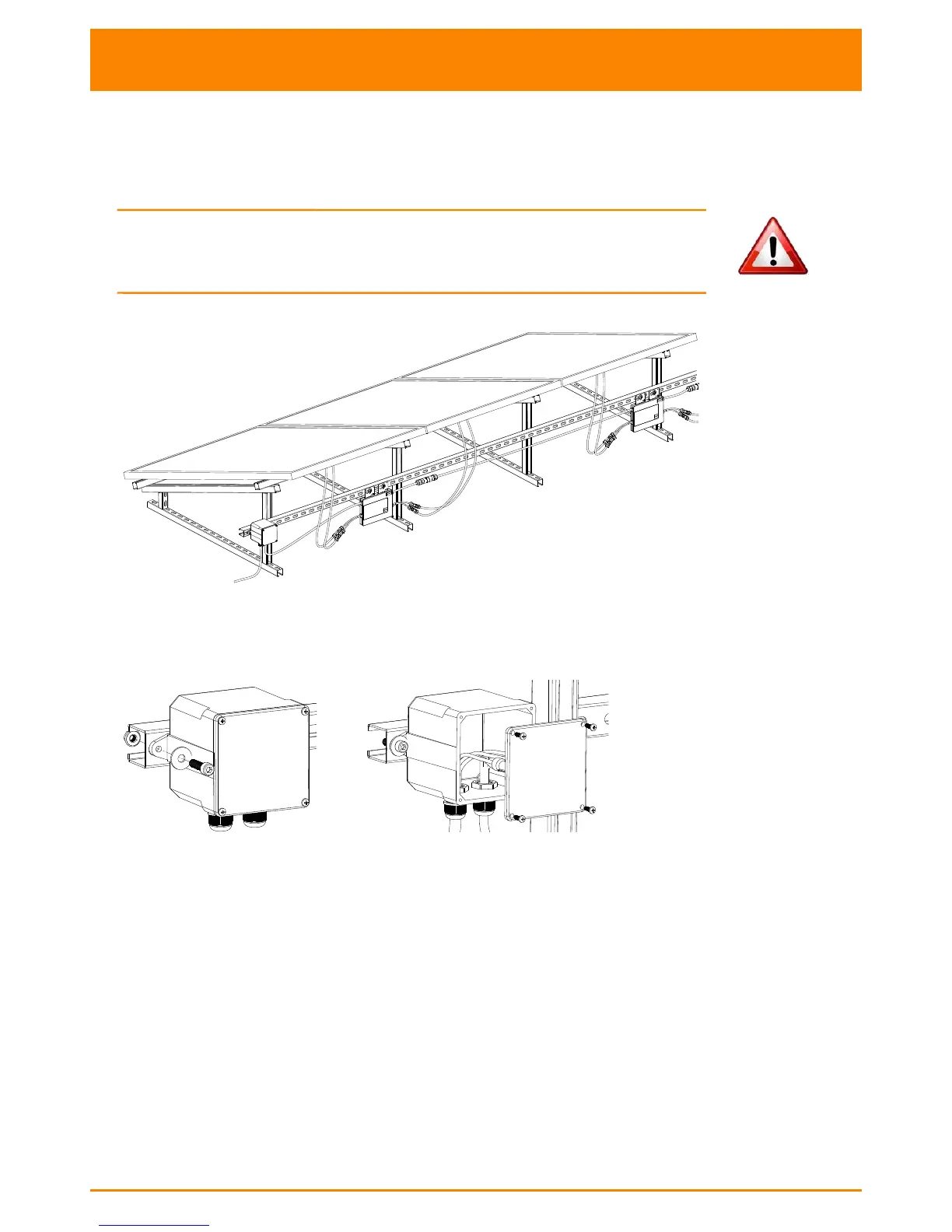
Figure 2
Step 1 - Installing the AC Branch Circuit AC Isolator
Figure 3

a. Install an appropriate AC isolator at a suitable location on the PV
racking system (typically at the end of a branch of modules).
b. Connect the open wire end of the AC branch end cable into the
junction box using an appropriate gland or strain relief fitting.
c. Wire the conductors: L - BROWN; N - BLUE; PE -YELLOW GREEN.
d. Connect the AC branch circuit AC isolator to the point of utility
interconnection.

Other manuals for APsystems YC500A

Related product manuals