The Aputure Sidus One is a versatile lighting control accessory designed to accept and convert various wired and wireless lighting protocols, making it a central hub for DMX control in professional lighting setups. It supports Wi-Fi Art-Net/sACN, Hardline DMX, CRMX, CRMX BT, and Sidus BT, offering comprehensive connectivity options.
Function Description:
The Sidus One acts as a bridge between different lighting control systems.
- Wi-Fi Art-Net/sACN: It allows users to send Art-Net or sACN data over Wi-Fi from a DMX control app on a mobile device or a lighting console. The Sidus One then converts this data and outputs one universe of DMX via its wired DMX adapter or wirelessly via (TX) CRMX.
- Art-Net/sACN over Wi-Fi IN to CRMX Transmitter OUT: Converts Wi-Fi Art-Net/sACN to wireless CRMX.
- Art-Net/sACN over Wi-Fi IN to Wired DMX OUT: Converts Wi-Fi Art-Net/sACN to wired DMX.
- DMX IN/OUT and CRMX TX/RX: The device can receive wired DMX signals from DMX consoles and transmit them wirelessly via CRMX to control CRMX-compatible fixtures. It can also receive CRMX signals and output them as wired DMX.
- Wired DMX IN to CRMX Transmitter OUT: Converts wired DMX to wireless CRMX.
- CRMX Receiver IN to Wired DMX OUT: Converts wireless CRMX to wired DMX.
- CRMX BT: Compatible apps can connect to the Sidus One via CRMX BT to transmit CRMX and hardline DMX 512 data.
- CRMX Bluetooth IN to CRMX Transmitter OUT: Converts CRMX Bluetooth to wireless CRMX.
- CRMX Bluetooth IN to Wired DMX Out: Converts CRMX Bluetooth to wired DMX.
- Sidus BT (Master Node): When configured as the Master Node in the Sidus Link App, the Sidus One enhances the stability of the Sidus Mesh network, improving the reliability of Sidus Link setups.
- Sidus BT Master Node to Sidus BT Compatible Fixtures: Facilitates a stable Sidus Mesh network for compatible fixtures.
Important Technical Specifications:
- Product Size: 113 x 75 x 23.3mm (without antennas)
- Net Product Weight: 302g
- Operating Temperature: From -20°C to 45°C
- Protection Level: IP54
- Gross Product Weight: 756g
- Package Size: 237 x 218 x 50mm
- Transmission Distance:
- CRMX: ≤300m
- Wi-Fi: ≤120m
- Sidus BT: ≤180m
- Operating Frequency Bands:
- Wi-Fi: 5GHz/2.4GHz
- CRMX/Sidus BT: 2.4GHz
- DMX Compatibility: CRMX, DMX, RDM, Art-Net, sACN
- Battery Life: 19h
- Battery Capacity: 3.7V 5600mAh
- Charging Time: 3.5 hours while powered off
- Operating Voltage: 5V
- Universe Support: 1, 2, 3, 4
- Wi-Fi Mode: Access Point Mode (AP) / Client-Station Mode (STA)
- CRMX Mode: TX mode/RX mode
Usage Features:
The Sidus One is designed for intuitive operation with clear indicator lights and accessible ports.
- Antenna Installation: Antennas must be attached to their corresponding color-coded ports to ensure optimal wireless range.
- Powering On/Off: A dedicated Power button allows users to turn the device on or off by holding it for 3 seconds. Mode Status Lights and Battery Capacity status lights illuminate upon power-on.
- Charging: The device charges via a USB Type-C port using a 5V/2A charging block. During charging, battery capacity lights display a "waterfall" effect.
- CRMX Linking: In TX mode, users can tap the CRMX Link button to initiate linking with CRMX-compatible fixtures. The CRMX Status Light flashes during linking and becomes solid when DMX data is present. To unlink, hold the CRMX button for 3 seconds.
- Wi-Fi Universe Settings: The "U" button allows users to change the DMX Universe (U1-U4) for Art-Net/sACN.
- TX/RX Mode Switching: A dedicated TX/RX button allows switching between Transmitter and Receiver modes by holding it for 1 second.
- AP/STA Mode Switching: The AP/STA button switches between Access Point, Station, and Wi-Fi Off modes by holding it for 1 second. In AP mode, the Sidus One acts as a wireless router, broadcasting its own Wi-Fi network (SSID and password found on the device's back).
- DMX IN/OUT Adapter: The device uses a 3-Pin Push-Pull Connector DMX Adapter Port for wired DMX input and output. When connecting to Aputure or amaran fixtures with a USB port for DMX, a specific Aputure Active DMX Adapter or amaran DMX Adapter must be used.
- Sidus BT Master Node Setup: Within the Sidus Link App, the Sidus One can be set as a Master Node to enhance mesh network stability. This involves adding it as a "New Wireless Device" in a scene and then selecting "Set as Master Node."
Maintenance Features:
- Firmware Updates: The Sidus One supports firmware updates via two methods:
- Sidus Link App: With an active internet connection, users can select the Sidus One in the app's fixture list and initiate a firmware update. The app checks for newer firmware and guides the user through the process.
- USB Flash Disk: Firmware can be updated by inserting a USB flash drive with the latest firmware into the USB Type-C port and then holding the RESET and Power buttons together for 1 second. Indicator lights will show the update status (all 4 lights blink together for updating, all 4 solid for successful, specific flashes for failure).
- Factory Reset: Holding the RESET button for 3 seconds restores the device to its factory settings. All status lights flash during this process. Default settings include Wi-Fi in AP Mode, CRMX in TX Mode, Universe 1, and a reset wireless connection.
- Bluetooth Reset: Double-tapping the RESET button twice resets Sidus Bluetooth (Sidus Mesh). The Sidus Mesh status light flashes rapidly during this reset. If in TX mode, the TX/RX button must be pressed and held to switch to RX mode before initiating a Bluetooth reset.
The Sidus One is a robust and flexible tool for integrating various lighting control protocols, designed for reliability and ease of use in professional environments. Its IP54 rating ensures durability in diverse conditions.

 Need help?
 General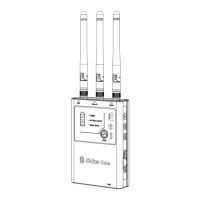

 To Next Page