44
DATA AND SETTINGS
Quits without confirming the
changes
Saves the changes
Cancel
Exits
Confirm
Goes back to previous menu,
or scrolls the pages of a menu
(previous page)
Scrolls the pages of a menu
(next page)
Goes back to main screen
Saves the changes to current
page
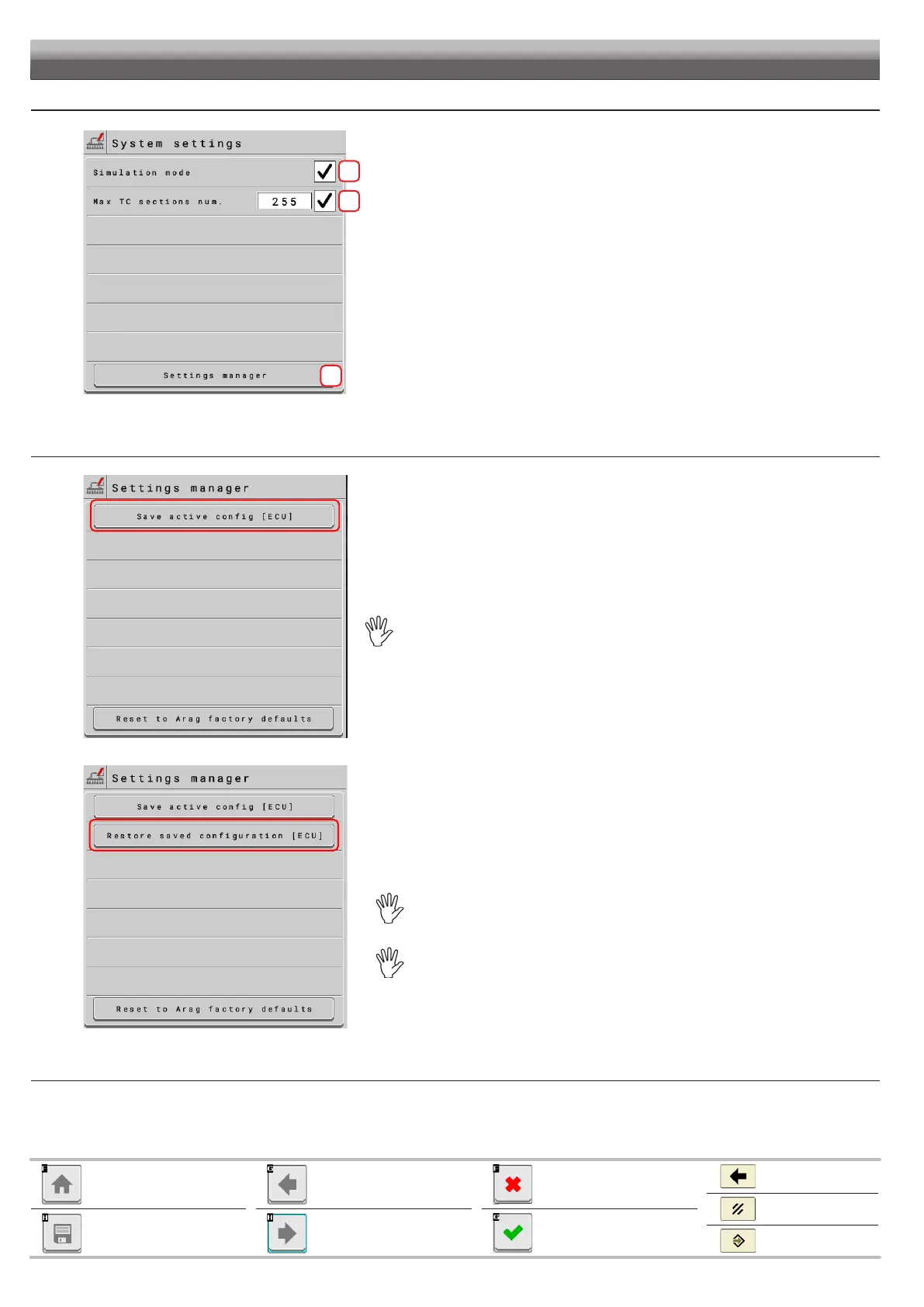
12.7.4 Data and settings > System status > System settings
1
2
3
1 Enables/disables simulation mode (mainly used for demonstrative purposes, training, etc.)
2
server (VT)
3 Allows accessing the backup management page (see next sub-paragraph).
Data and settings > System status > System settings > Settings manager > Save active config [ECU] / Restore saved configuration [ECU]
Press Save active config [ECU] to create a backup file of the settings in use and save it to the
Press Save active config [ECU] TO OVERWRITE THE PREVIOUSLY SAVED FILE
WHICH WILL BE PERMANENTLY DELETED.
Allows restoring the settings contained in the last saved backup file.
Press Restore saved configuration [ECU] to restore all settings in the previously saved
backup file using the Save active config [ECU] button.
Save active
config [ECU]41.4.1).
PERMANENTLY LOST.
The backup file IS NOT DELETED after the reset.
CONTINUES


 To Next Page