56
JOB FUNCTIONS
15.3 Home >
par.
par.
par.
par.
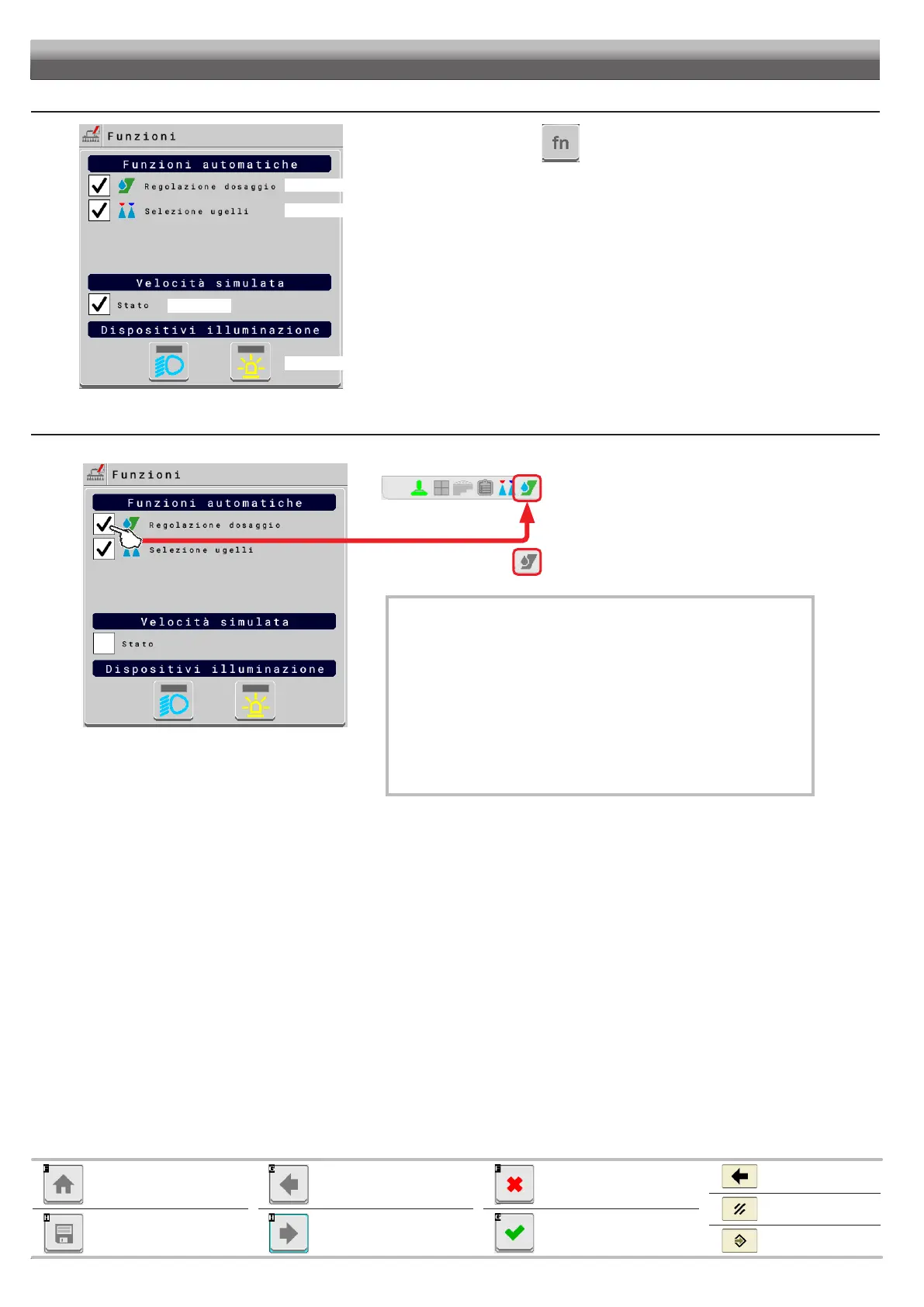
From “Home” screen, press .
15.3.1 Home > Automatic functions > Application rate regulation
Enables / disables automatic output adjustment (DEFAULT: ON).
“HOME” SCREEN“HOME” SCREEN
Automatic adjustment ON
Automatic adjustment OFF
Quits without confirming the
changes
Saves the changes
Cancel
Exits
Confirm
Goes back to previous menu,
or scrolls the pages of a menu
(previous page)
Scrolls the pages of a menu
(next page)
Goes back to main screen
Saves the changes to current
page
AUTOMATIC ADJUSTMENT ON
boom section status.
In this case the application rate can be set with the proper functions
Manage presets (par. ) - Change target rate (par. ),
or by loading a prescription map from TC.
If necessary, during spraying, it is possible to intervene on output control (Auxiliary
Input) to adjust output to crop conditions, increasing or decreasing momentarily the
AUTOMATIC ADJUSTMENT OFF (MANUAL)
Rate manual regulation shall be carried out with the suitable command (Auxiliary
Input).



 To Next Page