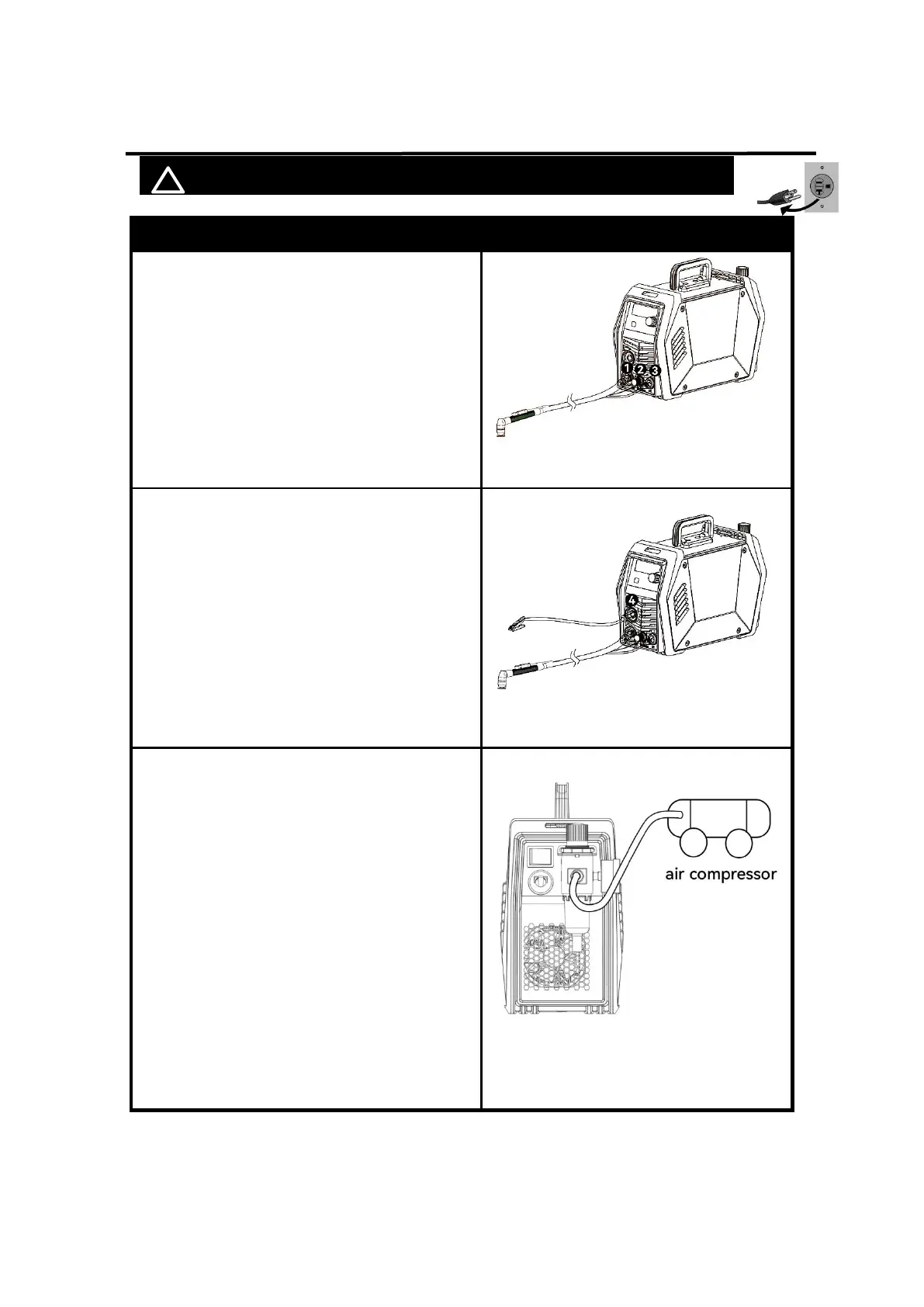
4.2 Installation of the Connection Cable
! WARINING DO NOT set up without SWITCH OFF !
1.
Connect the Cutting gun to “-” Negative
polarity and aviation plug
NOTICE:
The Cutting gun connector MUST be tightly
connected to the socket to avoid power
short circuit.
Figure 8 Connection of cutting torch
2. Connection of earth cable
Insert the quick plug on the earth cable into
the terminal and tighten it clockwise.
NOTICE:
The ground clamp connector MUST be
tightly connected to the socket to avoid
power short circuit.
Ensure the ground clamp is connected on
clean, bare metal (not rusty or painted).
Figure 9 Connection of earth cable
3. Connection of air compressor
The CUT55 requires compressed air to be
attached to the unit. Use a hose clamp to
tighten the gas hose to avoid air leakage
NOTICE:
The input air pressure mini-mum must be 72.5
PSl, 5 Bar and must not exceed150 PSl, 10.3
Bar. An air regulator is included with the unit
with optimum pressure setting set to 57.5 PSl,
4 Bar.
The unit is also equipped with an air filter
which captures water and oil vapor. The vapor
collected can be drained out of the bottom of
the unit by turning the drain button.
Figure 10 Connection of air
compressor



 To Next Page