Keep the nozzle of cutting torch upright over the workpiece, and check
if the arc is moving with the cutting line. If the space is not enough,
don’t bend the cable too much, step on or press upon the cable to
avoid suffocating of gas flow. The cutting torch may be burned
because the gas flow is too small. Keep the cutting cable away from
edge tools.
Clean up the spatters on the nozzle timely, for it will affect the cooling
effect of the nozzle. Clean up the dust and spatters on the torch head
after using everyday to ensure good cooling effect.
The workpiece is not cut fully. This may be caused by:
1. The cutting current is too low.
2. The cutting speed is too high.
3. The electrode and nozzle of the torch are burned.
4. The workpiece is too thick.
Molten slag drops from the bottom of workpiece. This may be caused by:
1. The cutting speed is too low.
2. The electrode and nozzle of the torch are burned.
3. The cutting current is too high.
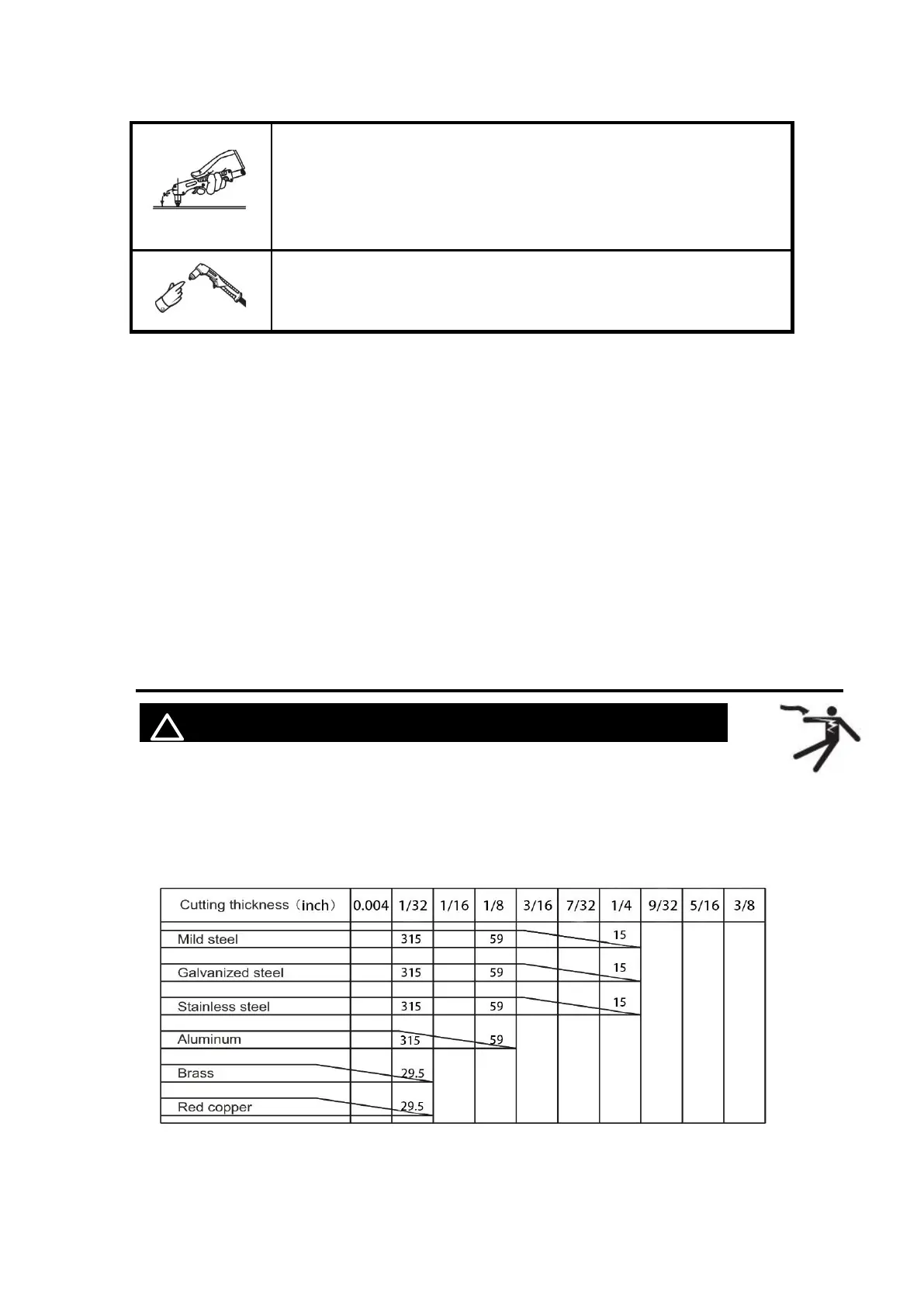
5.4 Cutting parameters table
! WARINING BEWARE OF ELECTRIC SHOCK!
Select proper current according to the cutting parameters table, workpiece material,
cutting thickness and cutting speed, etc. (The figure in the below table is an
approximation.)
Figure 18 Cutting speed (in/min) when cutting current is 55A



 To Next Page