EasyManua.ls Logo

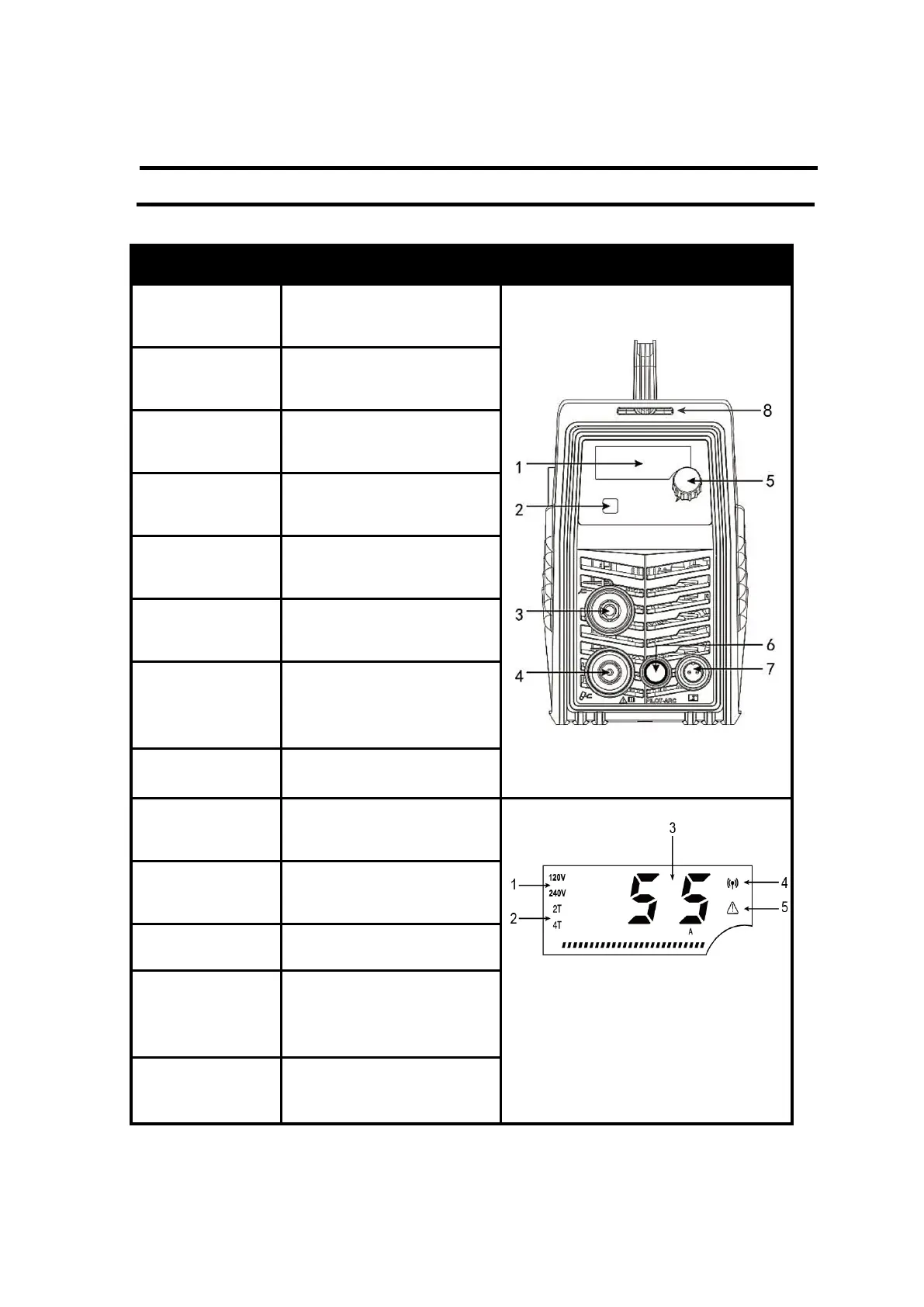
ARCCAPTAIN 55 Pro - Instructions; Panel Instruction

ARCCAPTAIN 55 Pro
23 pages
Print Icon
To Next Page IconTo Next Page
To Previous Page IconTo Previous Page
Loading...
6
3. INSTRUCTIONS
3.1 Panel Instruction
Part name
Function
Picture
1.Digital screen
To display the cutting
information
Figure 3 Front panel controls
2.Operation
mode button
For 2T/4T cutting mode
conversion
3.Earth cable
terminal
To connect the earth cable
4.Cutting torch
terminal
To connect the cutting torch
5.Current control
knob
To adjust the output current
6.Pilot arc
terminal
To connect pilot arc Line
7. Interface for
torch trigger (2
pin)
To connect the control
signal of cutting torch
8. Strap hole
To connect the strap
1. Input voltage
Display the current input
voltage:120v/240v
Figure 4 Digital Display
2. 2T/4T
Display the current
operating mode
3. Current
Display Current
4. Wireless
*
Display wireless signal light,
use App to control the
machine
5. Alarm lights
Abnormal alarm display
light