14 Dishwasher / User’s Manual/48 EN
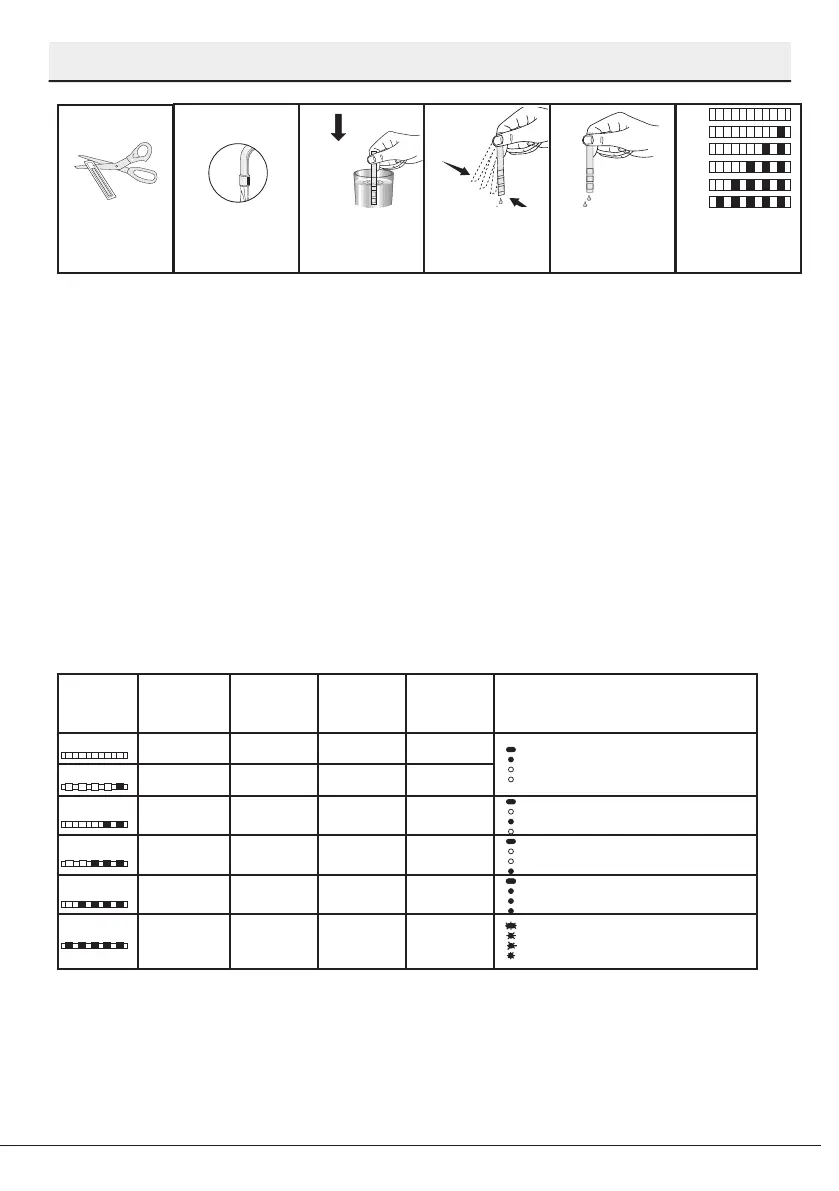
Preparation
a b
c
d e f
Remove the test
strip from the
packet.
Turn on the tap and
let the water run for
about a minute.
Hold the test strip in
the water for about
a second.
Remove the test
strip from the water
and shake it.
Wait for 1 minute. The test strip shows
you the hardness
level.
1 Second
1 Minute
1 min.
After determining hardness level of the supply water:
1. When the Programme Selection key is at “Off” position, keep Start/Pause/
Cancel key pressed and turn the Programme Selection key to position “1” within 5
seconds. Machine will enter into the regeneration adjustment mode at the end of
this period.
2. Regeneration level in the memory will be illuminated for 5 seconds when the
regenerator adjustment mode is activated.
3. To adjust the new Water Hardness Level, move the Programme Selection key
to the position that is suitable for your supply water. (see, “Water Hardness Level
Adjustment Table”)
4. Press Start/Pause/Cancel key for once to store the level you have selected.
Machine returns to the normal operating mode after the new setting is stored.
* Programme Selection key rotates in 5 steps regardless of the number of the
programmes contained on the machine.
5. Press “Start/Pause/Cancel” key for once to store the level you have selected.
Hardness
Level
English Water
Hardness °dE
German Water
Hardness °dH
French Water
Hardness °dF
Position of
Program
Selection Key*
Water Hardness Level Indicator
0th Level
0-5 0-4 0-8 1
Washing lamp on the panel will
illuminate.
1st Level
6-9 5-7 9-13 1
2nd Level
10-15 8-12 14-22 2
Drying lamp on the panel will
illuminate.
3rd Level
16-19 13-15 23-27 3 End lamp on the panel will illuminate.
4th Level
20-24 16-19 28-34 4
Washing, Drying and End lamps on
the panel will illuminate.
5th Level
25-62 20-50 35-90 5
Washing, Drying and End lamps on
the panel will ash with an interval of
1 second.
Perform the same hardness level adjustment that you have set on the control
panel also with the regeneration adjustment switch. For example, if you have
adjusted to “3rd level” in the control panel, also set the regeneration adjustment
switch to 3rd level.


 To Next Page