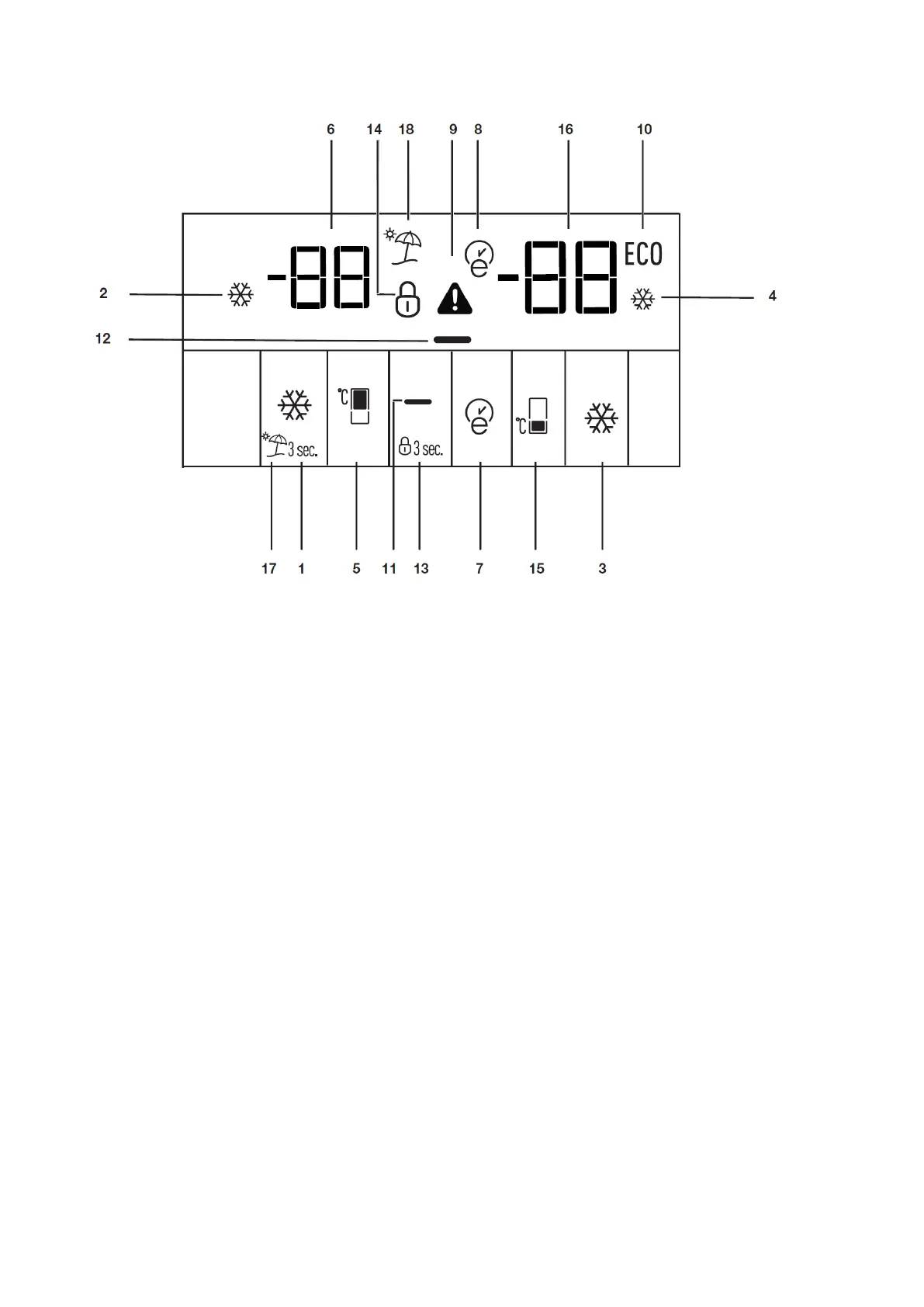
10.19 Display
1. Quick Cool Button
2. Quick Cool Icon (illuminated when quick cool is activated)
3. Fast Freeze Button
4. Fast Freeze Icon (illuminated when fast freeze is activated)
5. Fridge Compartment Temperature Setting Button
6. Fridge Compartment Temperature Indicator
7. Eco-Extra Function Button
8. Eco-Extra Icon (illuminated when Eco-Extra is active)
9. High temperature warning icon
10. Economy Mode Icon (illuminated when fridge compartment temperature is set to +8 and
freezer compartment temperature is set to -18)
11. Display Off Button
12. Display Off Icon (this icon is illuminated only when display is off)
13. Key Lock Button (activated when pressed for 3 sec)
14. Key Lock Icon (Illuminated when Key Lock is activated)
15. Fridge Compartment Temperature Indicator
16. Freezer Compartment Temperature Setting Button
17. Vacation Mode Button
18. Vacation Mode Icon (illuminated when vacation mode is activated)




 To Next Page