installation &
operating instructions
Design Envelope 4302 ivs and 4382 ivs vertical
in-line pumping unit with integrated controls
22
7.2.1 setting parameters for constant
pressure control
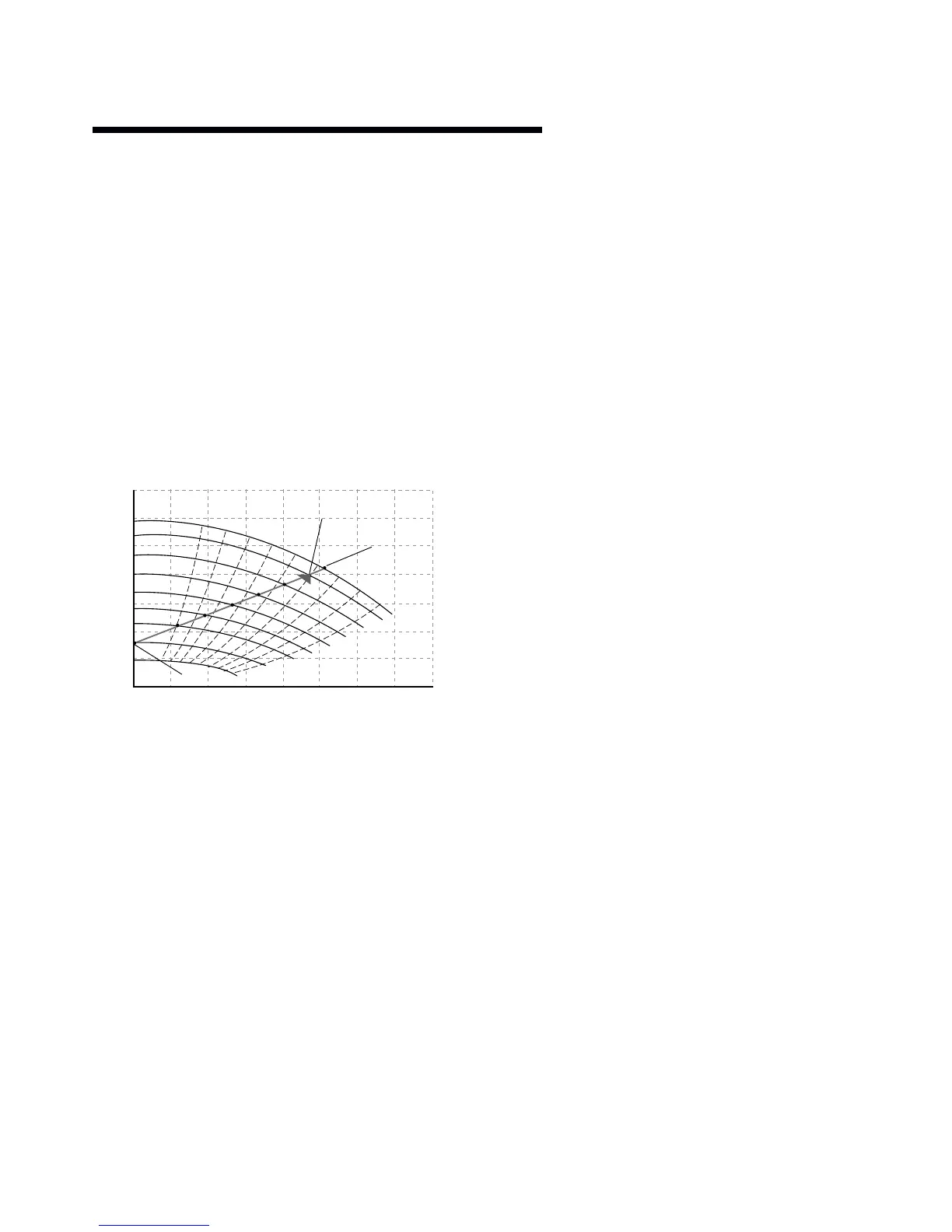
• Parameter 716 - Enter the head (kPa) at design flow.
•
Parameter 717
- Enter the design fl ow (l/s).
•
Parameter 707
- Enter the minimum head requirement
(as a percentage of p716). which will be 100% for
constant pressure.
• Parameter 705 - Quadratic Head should be set to ’off’.
•
Parameter 798
- This is a calculated value from the
settings above and should not be changed.
7.3 proportional pressure control
Where a linear reduction in head is required with reducing fl ow
then the quadratic curve should be turned o .
7.3.1 setting parameters for
proportional pressure control
• Parameter 716 - Enter the head (kPa) at design flow.
•
Parameter 717
- Enter the design fl ow (l/s).
•
Parameter 707
- Enter the minimum head requirement
(as a percentage of p716).
• Parameter 705 - Quadratic Head should be set to ’off’.
•
Parameter 798
- This is a calculated value from the
settings above and should not be changed.
8.0 control using external feedback
(closed loop control).
ivs Sensorless pumps can be confi gured (using the keypad) to
accept a feedback signal from a remote sensor (e.g. temperature
transmitter for constant temperature). The connection of an
external device will depend on the device itself although typical
devices are 4-20mA, 2 wire where the supply will be provided by
24v dc on terminal 6 of x101 and the output signal connected to
terminal 1 of x101.
The parameter list following this section gives typical settings
for closed loop control.
8.1 parameter groups and descriptions.
group 0 – operation and display.
Language/Local Control – Parameters 001,002, 003
Not normally changed.
Active Set-up – Parameter 004
It is possible to program two separate sets of data for controlling
the inverter.
Program Set-up – Parameter 005
The active set-up can be either set-up 1, set-up 2 or can be
remotely switched between the two.
Copying of Set-ups – Parameter 006
A copy is made from the set-up selected in parameter 005
and copied to the set-up selected in parameter 006.
Copying of Set-ups Between Inverters – Parameter 007
• Connect key pad to the inverter from which the desired
set-up is to be copied.
• Select 1 in parameter 007 to upload all parameters into the
key pad.
• Connect key pad to the inverter to which the desired set-up
is to be copied.
• Select 3 in parameter 007 to download all parameters into
the inverter.
• By selecting 3 in parameter 007, copying from one size of
inverter to a di erent size will not a ect the power settings.
Display Scaling – Parameter 008
Multiplication factor of frequency (normally set at 1).
Display Confi guration – Parameters 009-012
Allows choice of data to displayed in lines 1 and 2 of the key pad.
Local Operations – Parameters 013 -019
Not normally changed.
group 1 – load and motor.
Confi guration – Parameter 100
Sets the confi guration under which the inverter is controlled.
attention:
Set to Process Closed Loop for control via the 4 -20mA trans-
ducer feedback input set to Speed Open Loop for Potentiometer,
bms or Sensorless control.
0
0
20
40
60
80
100
120
10
51
1450 rpm
1388 rpm
1290 rpm
1190 rpm
1090 rpm
990 rpm
894 rpm
750 rpm
580 rpm
62
71
77
81
82
81
77
1
2
3
4
5
6
7
71
20 30 40 50 60 70 80
flow – L/s
water, spgr= 1.0000
head kpa
Head Qmin (P707)
Head Qmin (P798)
Flow working point (P717)
Head working point (P716)
Control (QPC)


 To Next Page