installation &
operating instructions
Design Envelope 4302 ivs and 4382 ivs vertical
in-line pumping unit with integrated controls
35
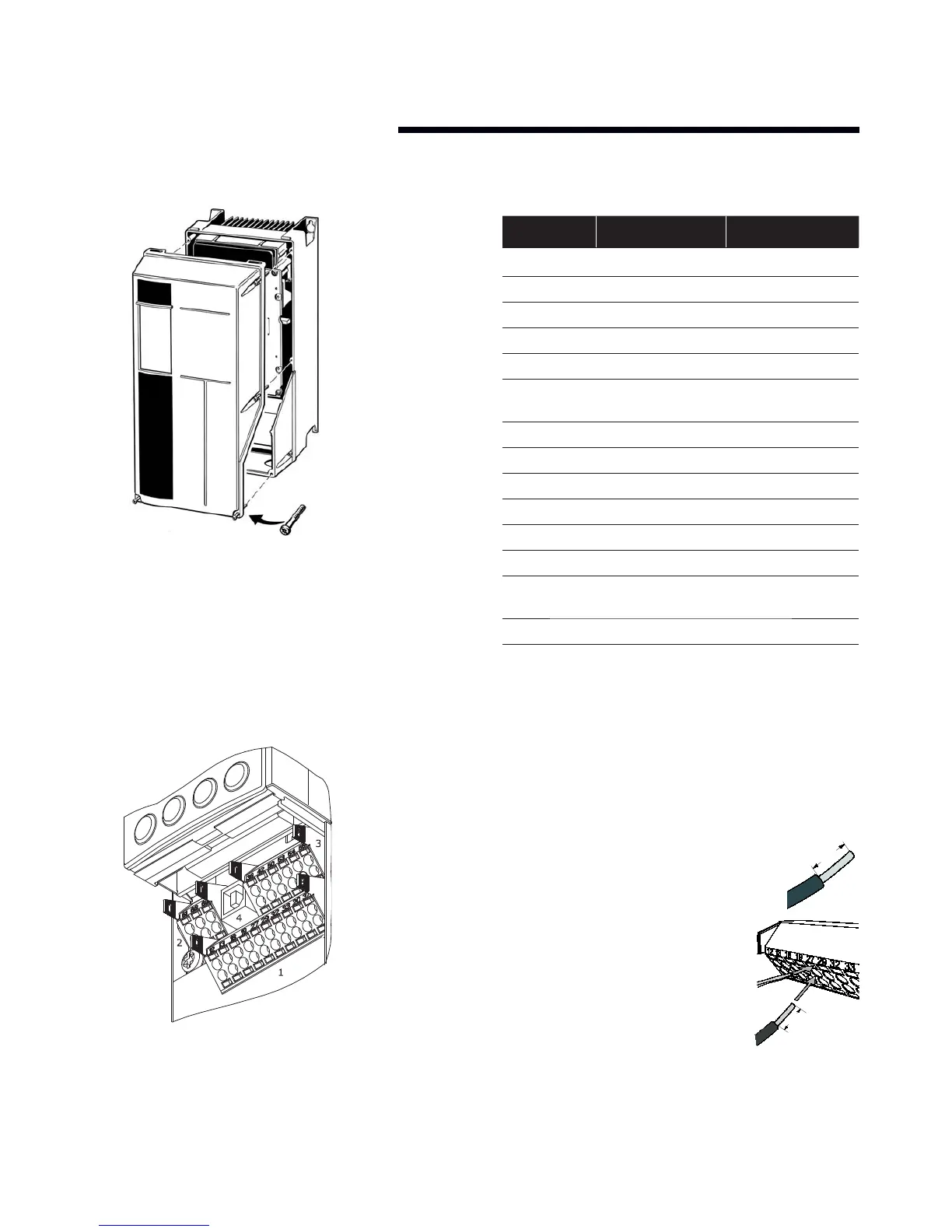
11.8.1 access to terminals
Remove front-cover to access control terminals. When
replacing the front cover, please ensure proper fastening by
applying a torque of 2 Nm.
11.8.2 control terminals
With reference to fi gure 9:
fig. 11 Control connections
Control terminal functions and factory settings are
as follows:
terminal no. type / description factory setting
1,2,3 Relay 1 Running
4,5,6 Relay 2 Alarm
12 Supply +24v dc
13 Supply +24v dc
18 Digital input Start
19 Digital input Pump operating
mode
20 Common ok
27 Digital input Low water interlock
29 Digital input No operation
32 Digital Input No operation
33 Digital input No operation
37 Digital input No operation
42 Analogue output Output frequency
(4-20mA - 0-100Hz)
53 Analogue input Reference (0-10v)*
54 Analogue input Feedback (0-10v)*
*Note that Analogue inputs ai53 and ai54 can be either Volt
age (0-10v) or Current (4-20mA) input and by default both
inputs are set to Voltage. Switches s201 and s202 (see fi g 8)
are used to confi gure the analogue inputs as follows:
s201 (ai53) off = Voltage, on = Current
s202 (ai54) off = Voltage, on = Current
Inserting Cables into Control Terminals
i Strip 10mm of insulation from the cable:
ii Insert a suitable terminal screwdriver
as shown and then push the cable into
the terminal.
iii Remove the terminal screwdriver and
check the terminal has gripped the
cable by gently pulling it.
Note:
Terminal plugs can be easily removed
for improved access when making
connections.
2
1
10mm
10mm





 To Next Page