3600 SERIES USER MANUAL
3600 Series Programmable DC Power Supply
VERSION 2.10 2006.03
20
4.6 Keypad and Rotary dial
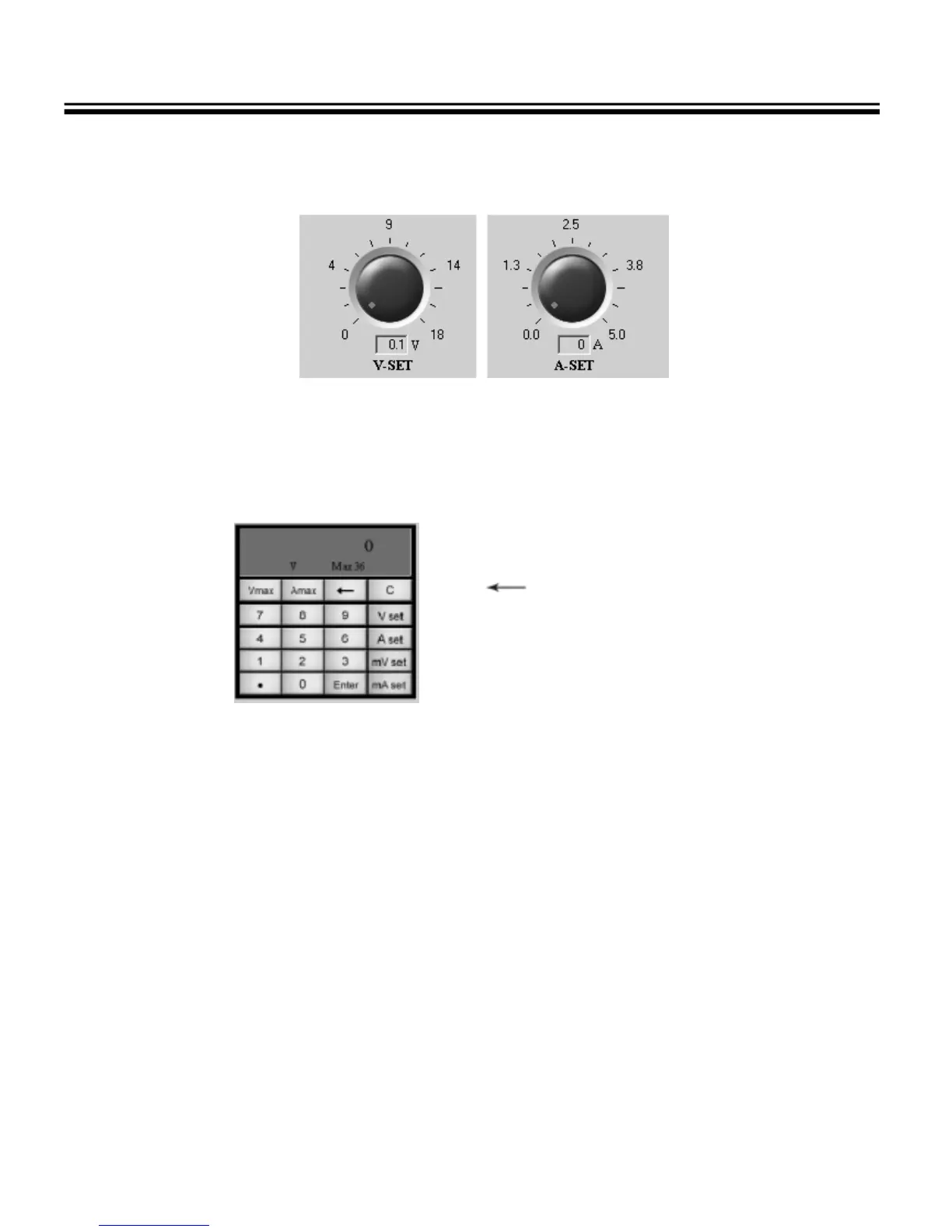
Fig. 4-8 Voltage and Current setting dial
To quickly modify a parameter (Voltage or Current), put the mouse on the red point of the dial and rotate. To
accurately set a parameter, use the keypad.
Fig. 4-9 Keypad
Number Keys: 0-9
“.”: the point key
“C”: the cleared key
: the backspace key
“V”: the voltage setting key (Unit: V)
“A”: the current setting key (Unit: A)
“mV”: the voltage setting key (Unit: mV )
“mA”: the current setting key (Unit: mA)
“Vmax”: show the max voltage value
“Amax”: show the max current value
“Enter”: the confirmation key
To set a Voltage: Press the “V set” or “mV set” button, enter the voltage value and then press the “ENTER”
button.
To set a Current: Press the “A set” or “mA set” button, enter the current value and then press the “ENTER”
button.



 To Next Page