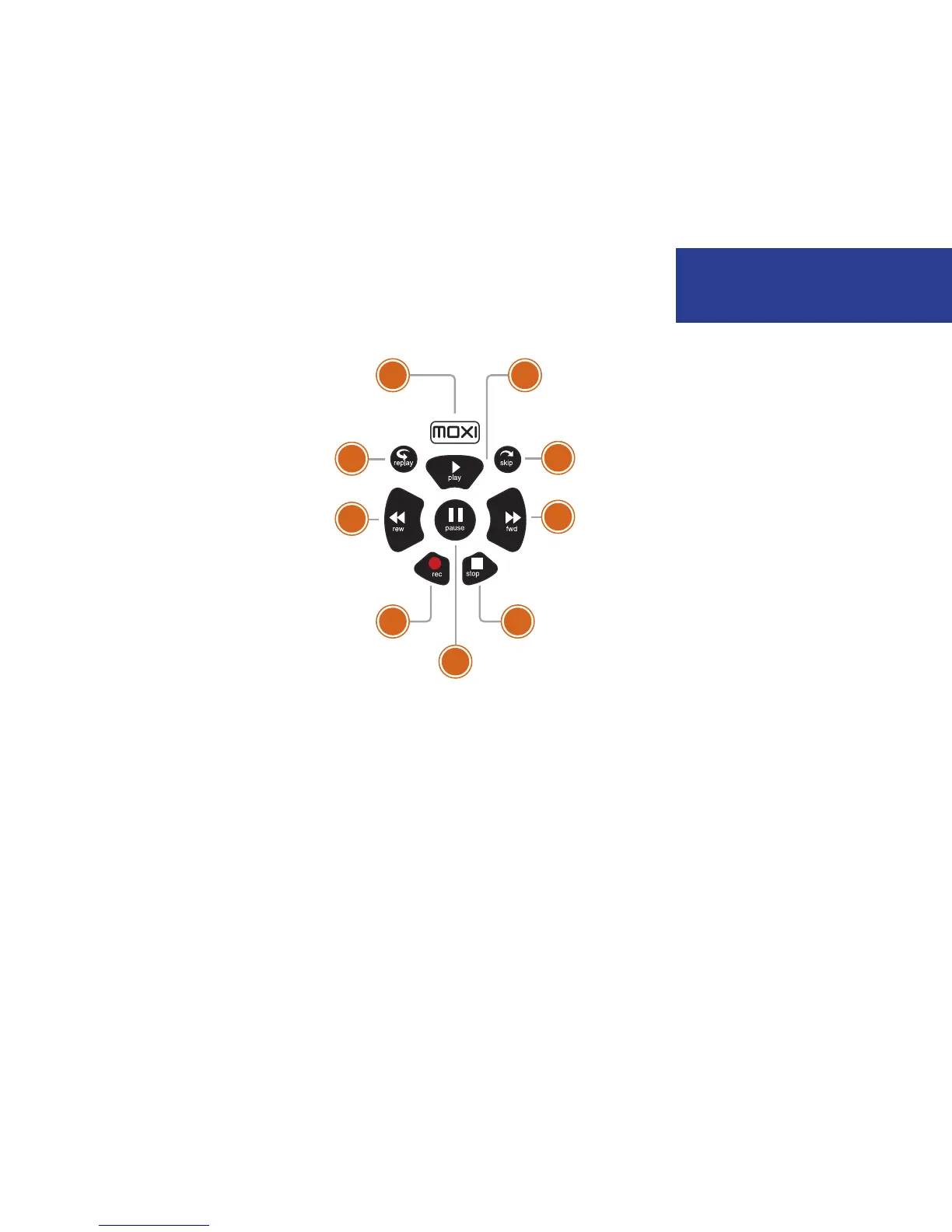
Player controls
Control your recorded or live program with the following buttons:
1 MOXI
From wherever you are, MOXI returns
you one step at a time toward the top
level of the Moxi Menu.
2 PLAY
Views the show at the point of fast-
forwarding or rewinding. Also initiates
the playing of content with a piece of
media selected in the Moxi Menu.
3 SKIP
Skips forward in your program the
number of seconds that you predefine in
Settings.
4 REPLAY
Rewinds the program seven seconds, so
you can check out what you missed.
5 REWIND
Press up to three times (for three
speeds) to rewind the show.
6 FAST-FORWARD
Press up to three times (for three
speeds) to fast-forward.
7 RECORD
Press record while watching a show or
with a show in center focus to record.
8 STOP
Exits out of a recorded show or stops a
recording in progress if you’re watching
that show full screen.
9 PAUSE
Pauses the show you are watching.
11
SLOW MOTION
To activate slow motion, press pause, and
then press fast-forward once.
FRAME ADVANCE
To activate frame advance, press pause, and
then the skip button once for each frame.
Welcome to MoxiWelcome to Moxi
7 8
1 2
3
6
9
4
5



 To Next Page