Chapter 3: Install and connect your Telephony Gateway
Enter the MAC addresses of any "trusted" computers on the network and click
the Apply button. You can add two trusted computers. Once added, these trusted
computers will not be affected by the parental control settings. For example, you
may want the computers of the father and mother to be trusted, while the childrens’
computers have parental controls in effect.
Note: Refer to the Find the MAC address of a computer (page 21) for
information on determining the MAC address of your computer.
b. Keyword and Web Site Filtering:
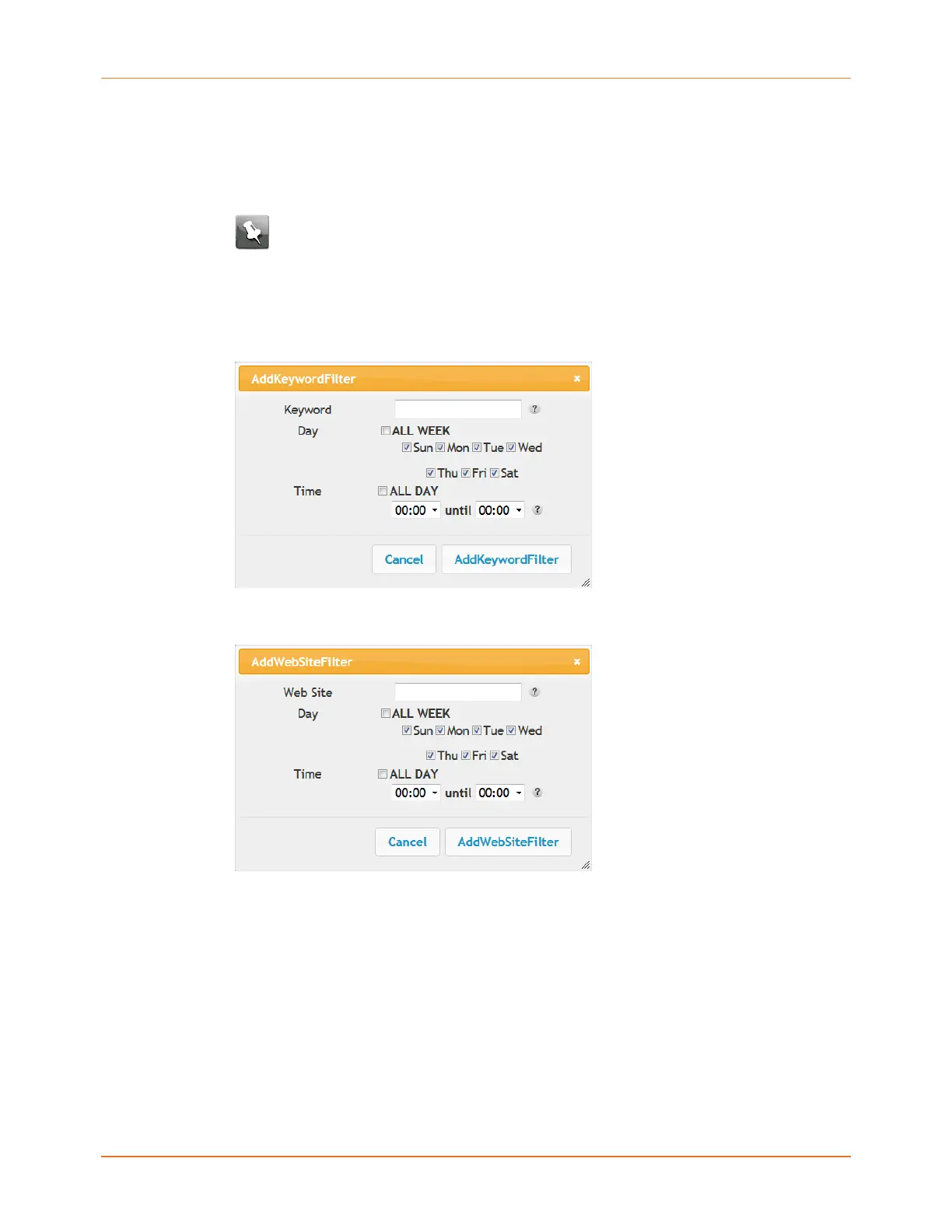
You can add a list of keywords and web sites that you want to block. To add a
keyword or web site to the list, click the respective Add button. To delete a keyword
or web site from the list, first click its check box and then click the Delete button.
Add Keyword Filter Dialog Box
Add Web Site Filter Dialog Box
▶
Adding a Keyword or Web Site Filter
5. Enter the keyword in the Keyword field or web site URL address in the Web Site field.
6. Click the checkboxes for the days you want access blocked, or click the All Week
checkbox for all week.
7. Set the start time and end time during the specified days (24-hour clock). (0:00 until 0:00
indicates all day, or just click the All Day checkbox.)
8. Click the Add Keyword Filter or Add Web Site Filter button respectively. Then click the
Apply button.
Touchstone TG4482 Telephony Gateway User Guide DRAFT Revision 1.3 22










 To Next Page