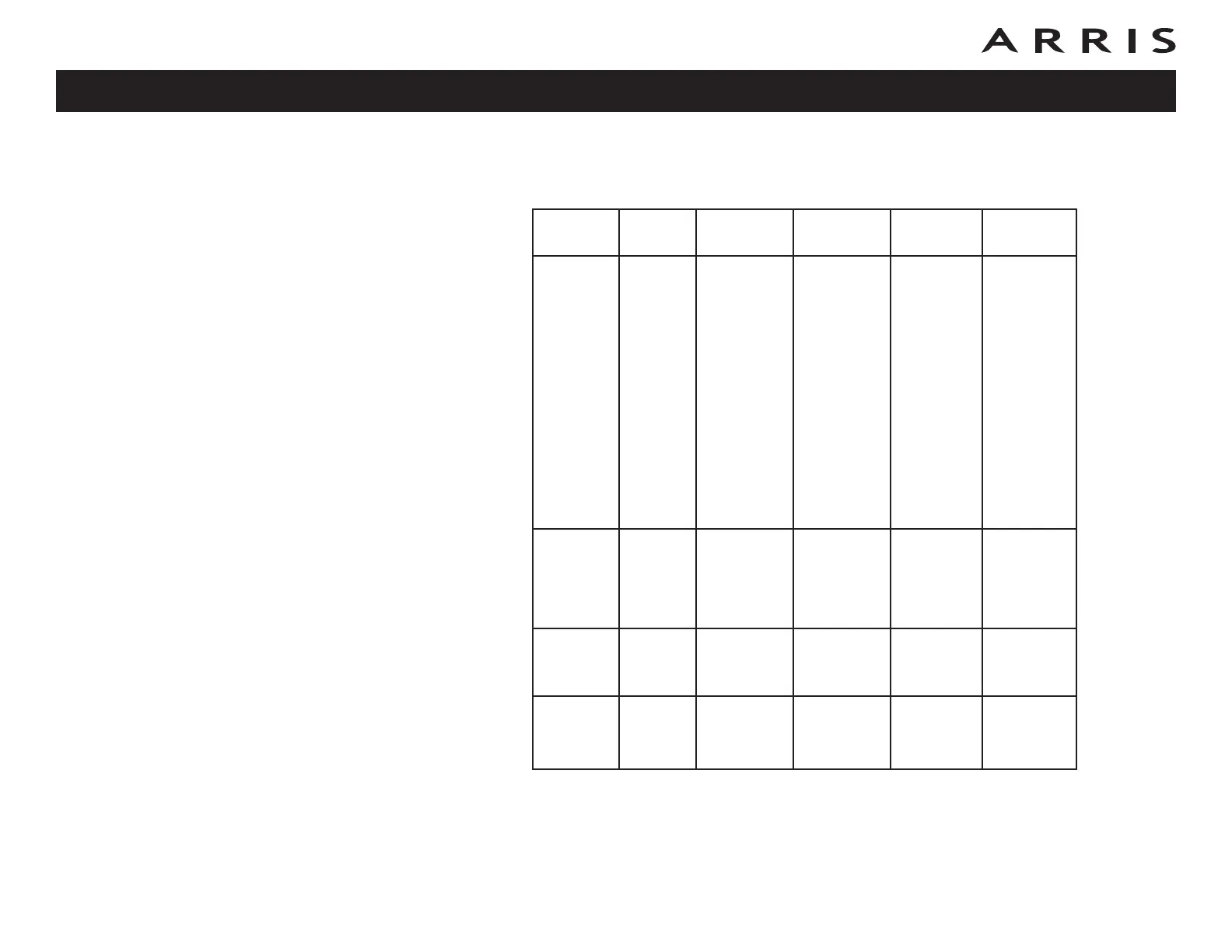
Patterns: Normal Operation (WAN and Battery)
The following table shows light patterns during normal operation.
Note 1: Your cable company may configure the Telephony Gateway to always
display the DS and US indicators in green regardless of the connection
speed or swap the meaning (speed indication) of yellow and green.
Mode Power DS US Online Battery
AC Power
Good
On
Yellow
1
=
Connected
to the
Internet
(high
speed)
Green
1
=
Connected
to the In-
ternet
(ultra-high
speed)
Flash = Not
connected
to the
Internet
Yellow
1
=
Connected
to the
Internet
(high
speed)
Green
1
=
Connected
to the In-
ternet
(ultra-high
speed)
Flash = Not
connected
to the
Internet
On =
Internet
available
Off =
Internet
not
available
On =
Battery
good or low
Off =
Battery
missing
Flash =
Battery bad
No AC
Power
Battery
Installed
Flash Off Off Off
Off =
Battery
power
Flash =
Battery bad
No AC
Power No
Battery
Off Off Off Off Off
Firmware
Upgrade
On Flash Flash On
(normal
operation)
Touchstone TG862 Telephony Gateway User’s Guide
Safety
Getting
Started
Battery
Installation
Installation
Ethernet
Configuration Usage Troubleshooting Glossary
43









 To Next Page