EasyManua.ls Logo

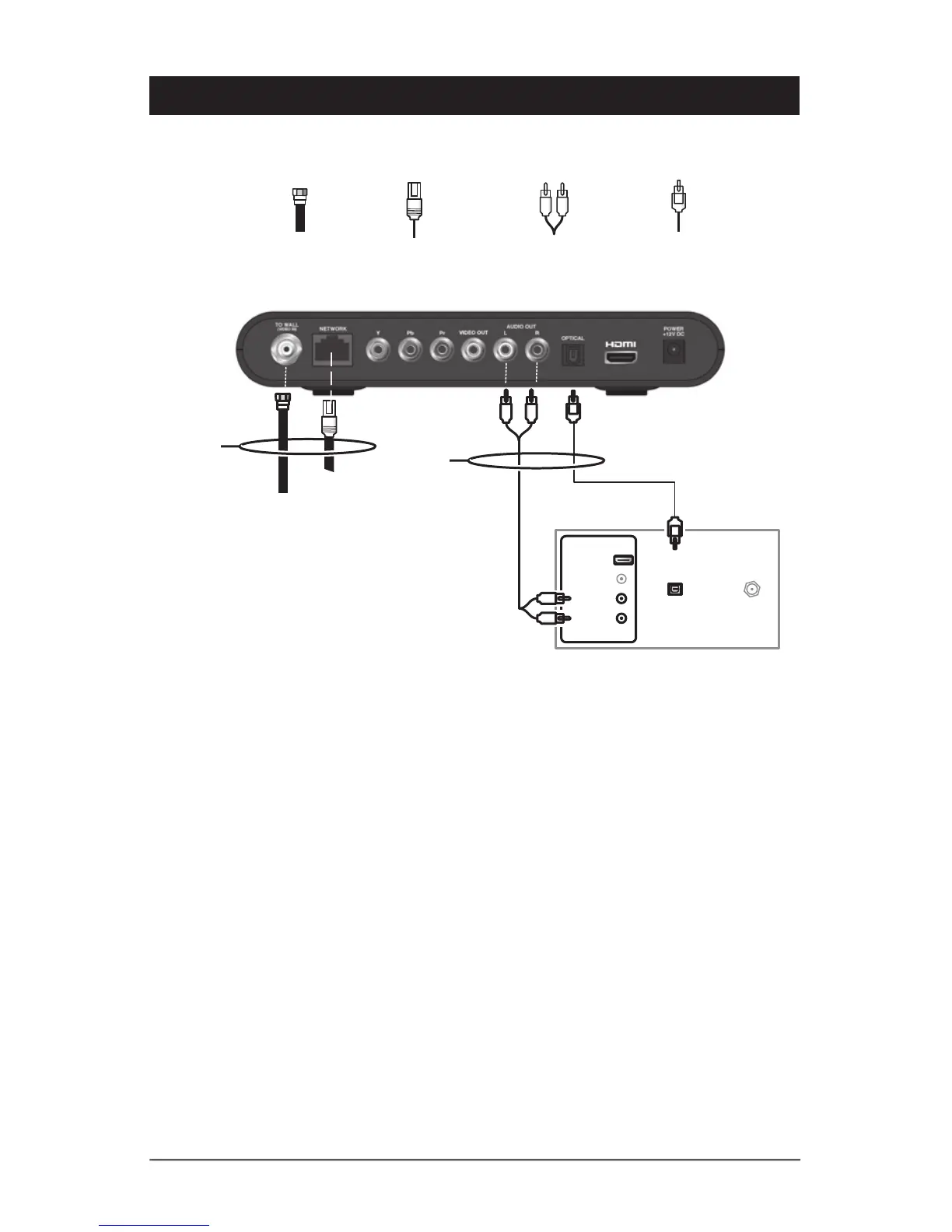
Arris VIP2102 - Connecting to an HDTV - Audio Only

Arris VIP2102
32 pages
Print Icon
To Next Page IconTo Next Page
To Previous Page IconTo Previous Page
Loading...
6 VIP2102 High-Definition IPTV Receiver Installation Manual
Connecting to an HDTV – Audio Only
RJ-45 (network)
connection
Video in
IP Network
Sample HDTV audio inputs
CABLE/
ANTENNA IN
OPTICAL
SPDIF
INPUT
AUDIO LEFT
AUDIO RIGHT
VIDEO
Either / or
RF (75 Ohm)
connection
Optical S/PDIF
connection
Baseband audio
connection
HDMI
Either / or
If your equipment supports it, use the OPTICAL S/PDIF output. Otherwise, use the AUDIO
OUT L and R connectors. In most cases, S/PDIF offers better audio quality, including
support for Dolby Digital 5.1 Surround Sound.
HDMI carries video and audio. If you connect your HDTV using HDMI, no additional audio
connections to the TV are necessary.

Related product manuals