EasyManua.ls Logo

Arris VIP2502W - Connecting Audio to a Home Theater Receiver

Arris VIP2502W
40 pages
Print Icon
To Next Page IconTo Next Page
To Previous Page IconTo Previous Page
Loading...
VIP2502W Wireless IPTV Receiver Installation Guide 9
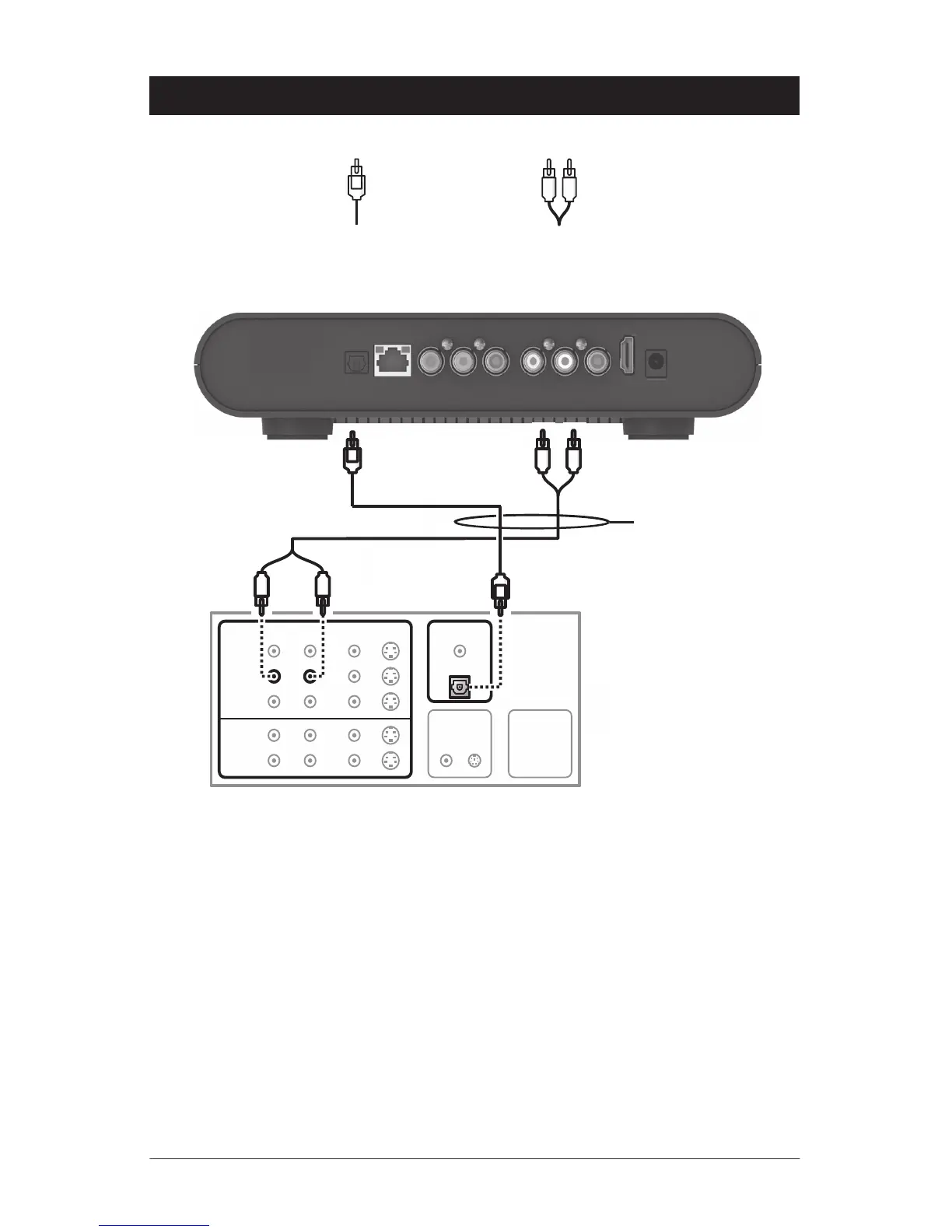
Connecting Audio to a Home Theater Receiver
POWER
+12V DC
HDMI
NETWORK
OPTICAL
AUDIO OUT
R
VIDEO OUT
Y
Pb
Pr
L
Optical S/PDIF
connection
Baseband audio
connection
DIGITAL INPUT
TV/MONITOR
OUTPUT
SPEAKER
CONNECTORS
COAX
VIDEO S-VIDEO
R
DVD
CABLE/TV
VIDEO 2
IN
OUT
VCR
AUDIO VIDEO
L VIDEO S-VIDEO
OPTICAL
Sample home theater receiver
Either / or
If your home theater receiver supports it, use the OPTICAL S/PDIF output. Otherwise,
use the AUDIO OUT L and R connectors. In most cases, S/PDIF offers better audio quality,
including support for Dolby Digital 5.1 Surround Sound.

Related product manuals