EasyManua.ls Logo

Arthrex NanoScope - User Manual

Arthrex NanoScope
44 pages
Print Icon
To Next Page IconTo Next Page
Loading...
NanoScope™ System
User’s Guide
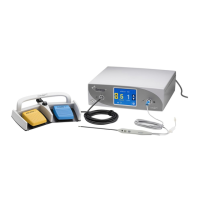
The Arthrex NanoScope™ System Manual provides safety operation information for all
system and components of the Arthrex NanoScope
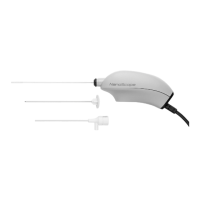
Console, including the disposable
NanoScopeHandpiece Kit with accessories. All operating personnel must read this
Manual thoroughly prior to using this system and follow all safety warnings, precautions,
and notes.
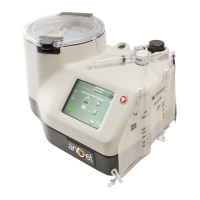
Console
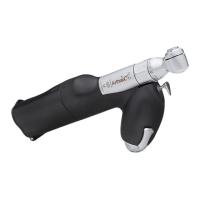
Disposable Handpieces
0086
Arthrex, Inc. Arthrex GmbH
1370 Creekside Blvd. Erwin-Hielscher-Straße 9
Naples, FL 34108-1945 USA 81249 München, Germany
Toll-free 1-(800) 934-4404 Tel: +49-89-90 90 05-0
www.arthrex.com www.arthrex.de
DFU-0298-1
Revision 0 07/2019
© 2019 Arthrex, Inc. All rights reserved.

Questions and Answers

  • J
    jstevensJul 27, 2025
    Why is there poor image quality on my Arthrex NanoScope?
    • C
      Carl DelacruzJul 27, 2025
      Poor image quality or color reproduction on your Arthrex Medical Equipment may be due to several reasons. It could be caused by a failed calibration, which you can resolve by performing the calibration again. Another cause might be a dirty front window; in this case, clean the distal tip of the handpiece with sterile gauze and/or fluid. A defective handpiece or a communication error with the handpiece could also be the reason. To resolve communication issues, power down the console, wait three minutes, restart the system, and recalibrate the handpiece.
  • E
    Emily VargasJul 31, 2025
    What to do if my Arthrex Medical Equipment shows no image?
    • A
      Anna CurtisJul 31, 2025
      If your Arthrex Medical Equipment displays no image, first ensure that the NanoScope is properly connected by fully inserting the handpiece cable connector into the console connector. If the cable is cut or the camera tube is bent or broken, you will need to use a new NanoScope Handpiece.
  • A
    Ashley CarneyAug 4, 2025
    What should I do if my Arthrex NanoScope warns about 10% battery life?
    • J
      jdicksonAug 5, 2025
      If your Arthrex Medical Equipment is displaying a 10% battery life warning, connect the console to the power supply to charge the battery. Alternatively, you can call Arthrex Technical Support for further assistance.
  • L
    larry95Aug 9, 2025
    What to do if Arthrex Medical Equipment interferes with other devices?
    • G
      Geoffrey HarrisAug 9, 2025
      If your Arthrex Medical Equipment is causing interference with other devices, resulting in image disruption or noise on the display, try the following: 1. Turn off the suspect device to verify if it's causing the interference. 2. Reorient or relocate the receiving device. 3. Increase the distance between the devices. 4. Connect the device to an outlet on a different circuit than the other devices. If these steps do not resolve the issue, consult the manufacturer or field service technician for the receiving device for assistance.
  • S
    Sharon SmithAug 13, 2025
    Why does Arthrex Medical Equipment say 'unsupported device'?
    • J
      Jaime AllenAug 13, 2025
      If your Arthrex Medical Equipment displays an 'unsupported device' message, it could be due to a previously used device or a damaged cable. In either of these cases, use a new NanoScope Handpiece. If the console has an internal power failure, it should be returned to Arthrex for repair.
  • V
    vkimAug 17, 2025
    Why does the battery fail to charge on my Arthrex NanoScope?
    • G
      gomezanaAug 17, 2025
      If the battery on your Arthrex Medical Equipment fails to charge, it may be damaged or at the end of its life. In this case, call Arthrex Technical Support for assistance.
  • F
    fgrossAug 21, 2025
    How to fix Arthrex NanoScope Medical Equipment if it does not boot up correctly?
    • W
      William LaraAug 21, 2025
      If your Arthrex Medical Equipment does not boot up correctly, and the banners do not display or do not display properly, this could be due to an improper shutdown of the console. To resolve this, power down the device, wait three minutes, and then restart the system.

Summary

General Warnings and Safety

Important Safety Conventions

Details safety conventions and symbols used in the manual, following IEC 60601-1.

Safety Symbol Definitions

Product Overview and Intended Use

Intended Use

Specifies the intended applications and procedures for the NanoScope System in various surgical fields.

Technical Specifications

Safety, EMC, and Regulatory Requirements

Outlines safety certifications, EMC compliance, and regulatory standards for the system.

Setup and Usage Procedures

Set up the NanoScope Console

Provides step-by-step instructions for setting up the NanoScope Console in a new location.

Performing a NanoScope Procedure

Step-by-step guide on how to perform a surgical procedure using the NanoScope system.

Cleaning and Disinfecting Procedures

System Maintenance Guidelines

Technical Support and Assistance

Troubleshooting Common Issues

Device Repair and Return Policy

Arthrex NanoScope Specifications

General IconGeneral
Light SourceLED
CategoryMedical Equipment
PortabilityPortable
TypeVisualization System
CompatibilityArthroscope systems
Direction of View0 degrees

Related product manuals