12 ARTURIA – KeyStep – USER’S MANUAL
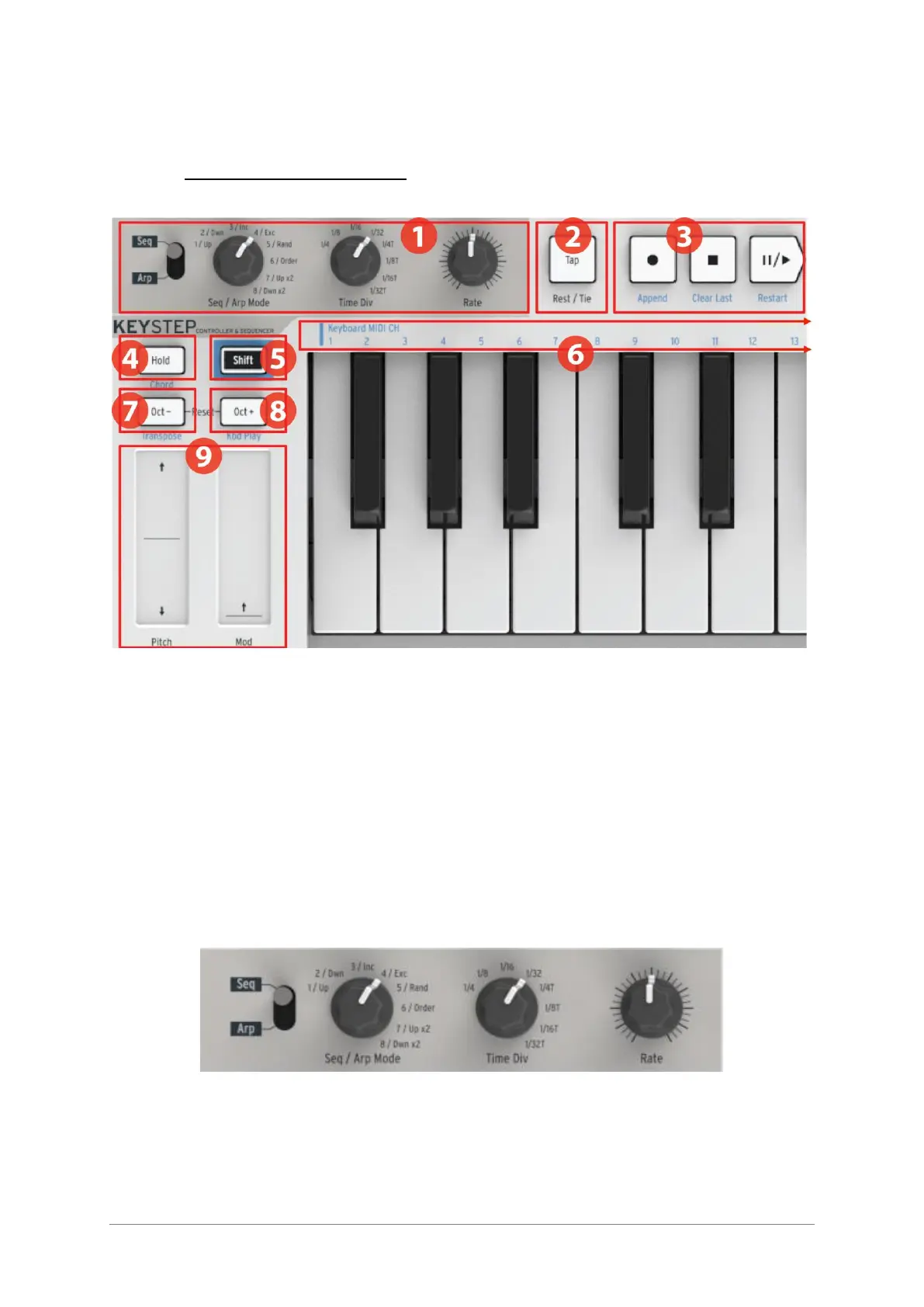
2.2 Front panel overview
1. Sequencer / Arpeggiator section (see 2.2.1)
2. Tap Tempo / Rest / Tie (see 2.2.2)
3. Transport section (see 2.2.3)
4. Hold / Chord (with Shift) (see 2.2.4)
5. Shift button (see 2.2.5)
6. Keyboard functions (with Shift) (see 2.2.5)
7. Oct - / Transpose (with Shift) (see 2.2.6)
8. Oct + / Kbd Play (with Shift) (see 2.2.6)
9. Pitch / Mod touch strips (see 2.2.7)
2.2.1 Sequencer / arpeggiator
KeyStep provides a sequencer and an arpeggiator. You can record eight different
sequences, each with up to 64 steps. The arpeggiator generates notes based on the keys
you have pressed and plays them back according to the Arp Mode setting.
The sequencer and arpeggiator have unique features, so be sure to read chapter 4 and
chapter 5 to learn more.













 To Next Page