20 |Installation Aruba Mobility Master Hardware Appliance | Installation Guide
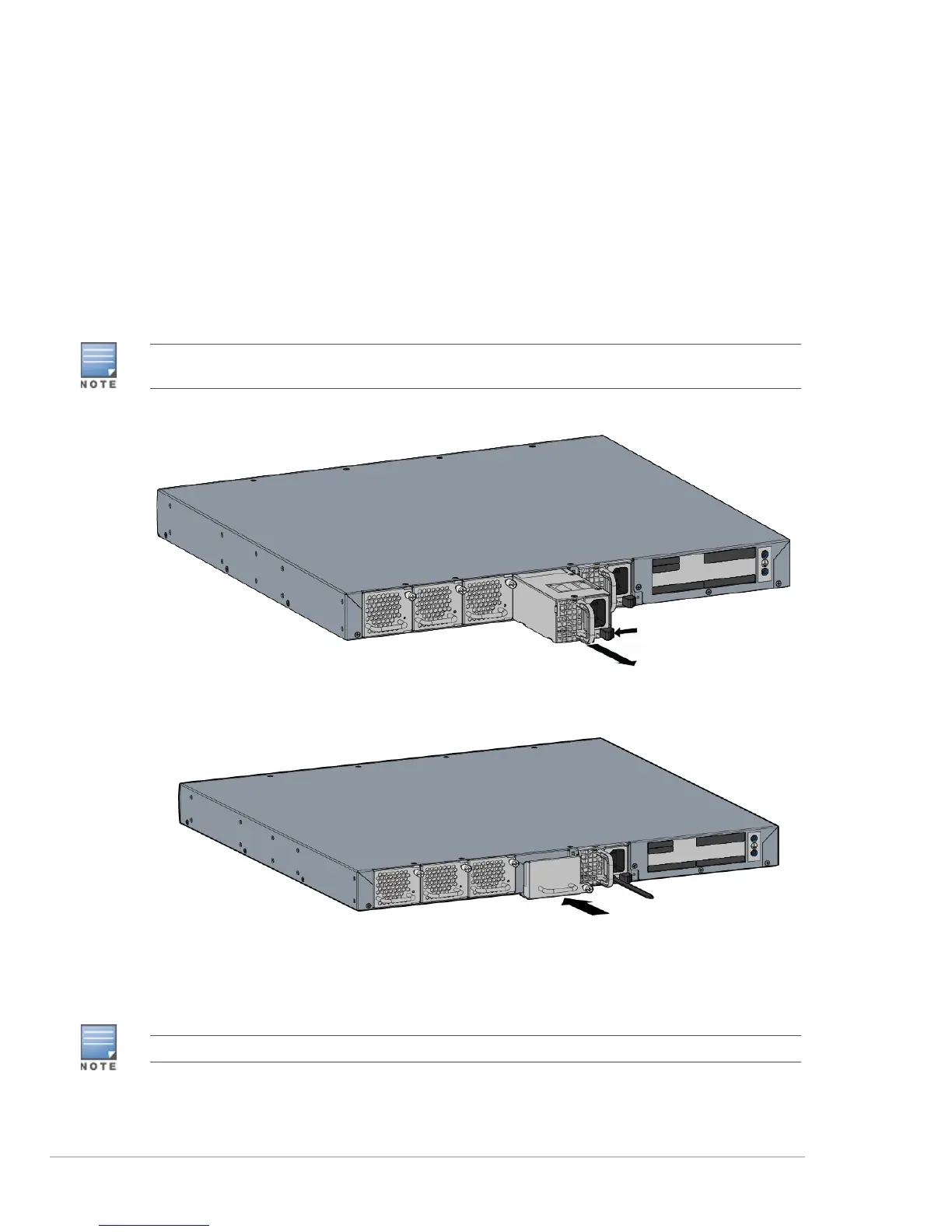
2. Pull the tab on the power supply module towards the left and slide it out using the handle (see
Figure 11).
3. If you are not replacing the power supply module immediately, ensure to install a filler panel that
was included with your Mobility Master hardware appliance. To install the filler panel:
a. Align the filler panel with the opening in the appliance.
b. Slide the filler panel into the appliance.
c. Turn the screws on the filler panel clockwise until tight to secure the filler panel into the
appliance. (see Figure 12).
Figure 11 Removing a Power Supply Module
Figure 12 Installing a Filler Panel
Connecting and Removing an SFP/SFP+/LC Cable
SFP/SFP+ modules are collectively referred as SFP modules in this section.
Step3 on page 20 is mandatory if you do not have a replacement power supply module. If you have a replacement
power supply handy, skip Step3 on page 20 and proceed to “Installing a Power Supply Module” on page19.
Use standard ESD precautions when installing or removing an SFP.



 To Next Page