8 | Mobility Master Hardware Appliance Aruba Mobility Master Hardware Appliance | Installation Guide
Mobility Master Hardware Appliance Components
This section introduces the component and its location in the Mobility Master hardware appliance.
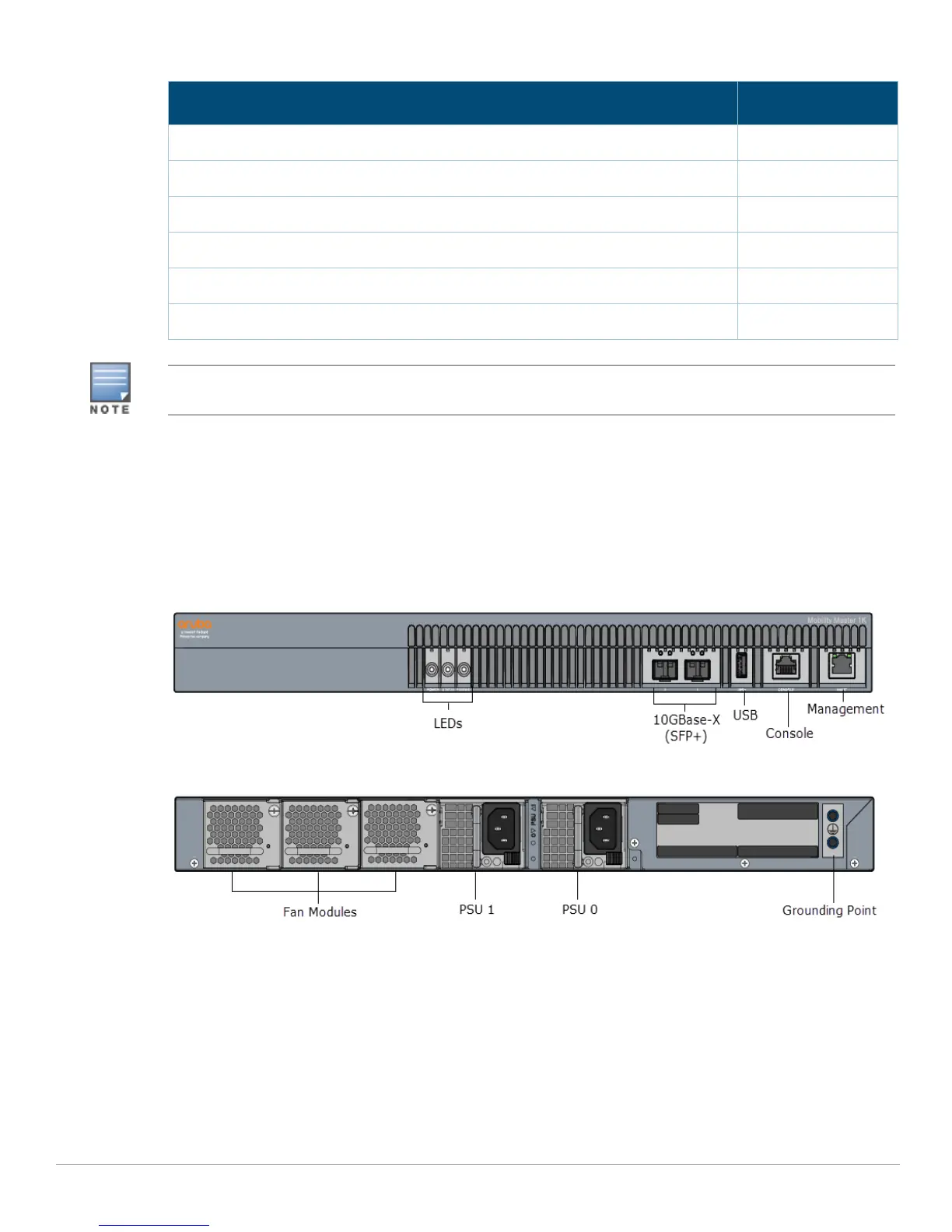
Figure 1 shows the front panel of the Mobility Master hardware appliance and Figure 2 shows the
back panel of the Mobility Master hardware appliance.
Figure 1 Front Panel of the Mobility Master Hardware Appliance
Figure 2 Back Panel of the Mobility Master Hardware Appliance
LEDs
The front panel includes power, status, and peered LEDs that provide basic monitoring of the overall
status of the Mobility Master hardware appliance.
Power Cable 2
USB to RJ-45 Console Cable 1
PSU Filler Panel 1
Rubber Feet 4
Aruba Mobility Master Hardware Appliance Start-up Guide (Printed) 1
End User License Agreement (Printed) 1
Table 4 Package Contents (Continued)
Item Quantity
Optional accessories are available for use with the Aruba Mobility Master hardware appliance and are sold
separately. Contact your Aruba sales representative for details and assistance.



 To Next Page