Aruba Mobility Master Hardware Appliance | Installation Guide Mobility Master Hardware Appliance | 9
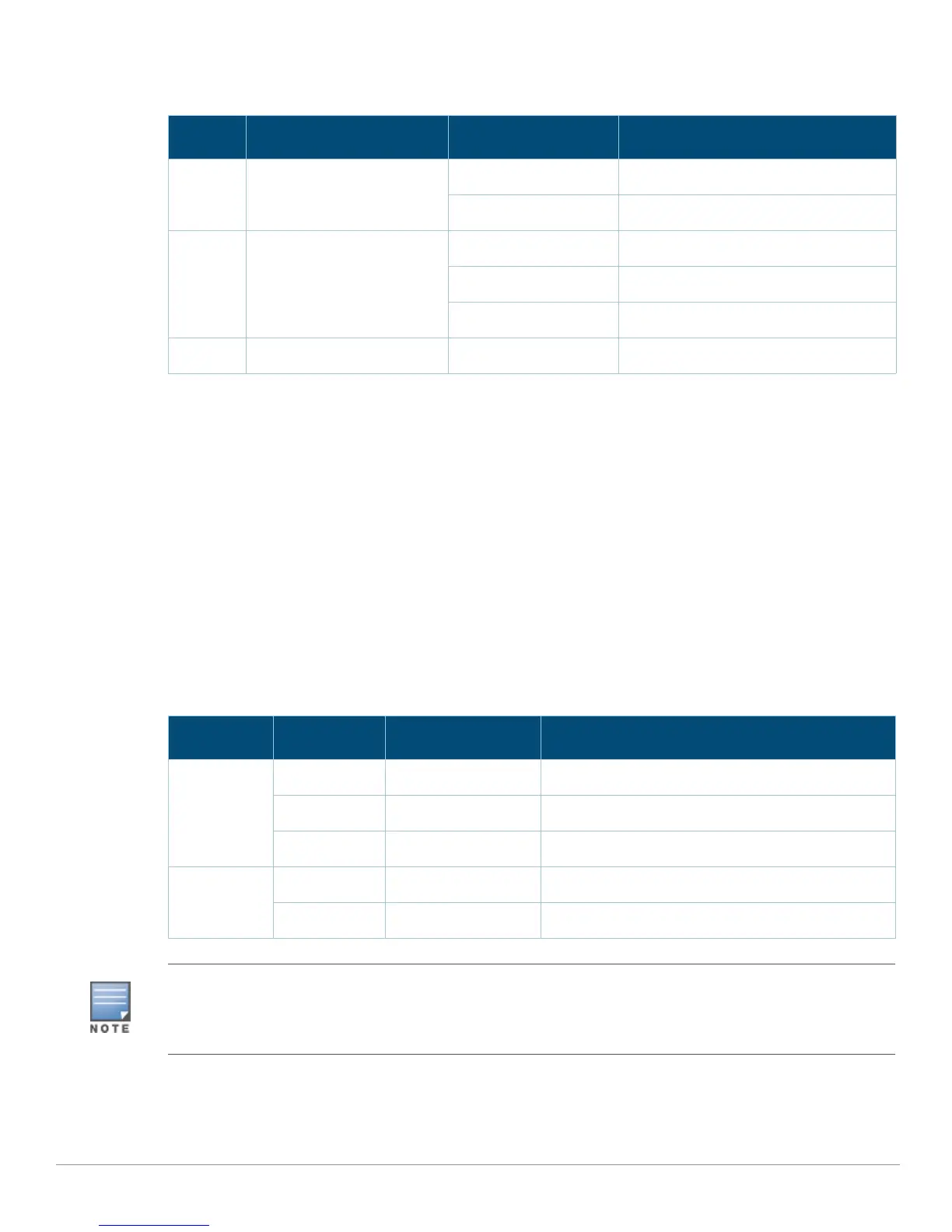
The following table show the LED indicators and the corresponding status:
10GBase-X (SFP+) Ports
The Mobility Master hardware appliance is equipped with two 10GBase-X (SFP+) data ports (0 and 1).
These ports are intended for use with SFP/SFP+.
SFP/SFP+ modules are 10Gb hot-swappable, optical transceivers, which convert serial electrical
signals to external serial optical or electrical signals. The ports support dual speed (1GbE or 10GbE)
operation.
Each 10GBASE-X port is equipped with two LEDs that allow basic monitoring of status, activity, and
configuration of the port. The behavior of the STATUS LED can be changed using the CLI.
LINK— Placed on the top left of the port, this LED displays the link status and activity of the port.
SPEED— Placed on the top right of the port, this LED displays the link speed at the port.
The LED behavior corresponding to each mode is listed in the following table
.
USB Interface
Currently, this port is not supported and is reserved for future use.
Table 5 LEDs
LED Function Indicator Status
Power System powers Green (Solid) Power On
Off Power Off
Status System status Green (Solid) Operational
Amber (Solid) Major/Critical alarm
Off No power
Peered Reserved for future use N/A N/A
Table 6 10G Base-X Port LEDs
LED State Indicator Status
LINK On Green (Solid) Link established, but no traffic
Active Green (Blinking) Port is transmitting or receiving data
Off NA No link
SPEED 10 Gbps Green (Solid) Link at 10 Gbps
1 Gbps Off Link at 1 Gbps
Aruba tests and supports Aruba approved optics within their appliance devices. Non-approved third party optics
are not tested or supported; therefore, Aruba does not guarantee proper functionality of non-approved third party
optics when used in an Aruba system. For a complete list of Aruba approved optics, contact your Aruba sales
representative.



 To Next Page