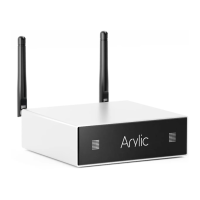
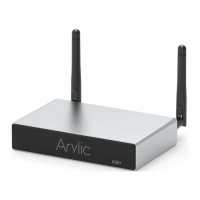
The Arylic A30+ is a wireless streaming amplifier designed to integrate into existing stereo systems, enabling music streaming from various sources. It supports both WiFi and Bluetooth 5.0 connectivity, allowing users to stream music from smart devices, USB drives, NAS, and a wide array of online streaming services. The device can also be used to set up a wireless multiroom whole-house audio system by adding multiple units.
Function Description:
The Arylic A30+ serves as a central hub for wireless audio streaming. It amplifies audio signals for passive speakers and offers multiple input options. Users can control the device through the dedicated 4Stream APP (available for iOS and Android), a full-function remote controller, or directly via buttons on the device. It supports various streaming protocols including Spotify Connect, AirPlay, Qplay, DLNA, and UPnP, making it compatible with a broad range of third-party applications and services. The amplifier is designed for high-quality music streaming, supporting sample rates up to 24bit/192kHz.
Important Technical Specifications:
- Connectivity:
- Wireless network: IEEE802.11 b/g/n 2.4G
- Ethernet: Single 10/100M RJ45
- Bluetooth: 5.0
- USB Host: For playing USB music (up to 1024 tracks)
- Micro USB: Connects to PC as an external DAC
- Power Input: 18V/4A
- Audio Input: 3.5mm Line in
- Frequency Response: 20Hz to 20kHz
- Speaker Power:
- 2x35W @ 4Ω load at 18V
- 2x18W @ 8Ω load at 18V
- THD+N: 0.03% @ 1kHz
- Speaker Impedance: 4-8ohms
- Music Format: FLAC/MP3/AAC/AAC+/ALAC/APE/WAV
- Decoding: Up to 24bit/192kHz
- Protocols: AirPlay, DLNA, UPnP, Spotify Connect, Qplay
- Dimensions: 131.8mm x 85.5mm x 27mm (5.18in x 3.37in x 1.06in)
- Weight: 0.35kg (0.77lb)
Usage Features:
- App Control: The 4Stream app allows for device setup, renaming, viewing speaker information (IP address, Mac address, SSID, firmware version), setting alarm clocks (up to 4 with chosen music), managing preset content (10 buttons), and setting a sleep timer.
- Connection Options:
- WiFi Setup: Initial setup involves holding the power button, plugging in the cable, waiting for the LED to flash slowly, ensuring mobile GPS and Bluetooth are on, and then using the 4Stream app to connect to the desired home network. An alternative method involves connecting directly to the device's WiFi hotspot (SoundSystem_xxxx) and then configuring the router connection via the app.
- LAN Connection: Plugging an Ethernet cable into the RJ45 port allows the device to appear on the app within approximately 10 seconds, provided both the mobile phone and device are on the same network.
- Bluetooth Pairing: Switch to Bluetooth mode via the app or remote, then find "SoundSystem_XXXX" in your phone's Bluetooth settings to pair.
- Music Playback:
- Local Storage: Play music from "My Music" within the app, accessing files from mobile device storage, USB thumb drives, or NAS (DLNA feature supported).
- Line-in Mode: Connect external audio sources (e.g., TV, CD player) via the 3.5mm AUX IN and select line-in mode on the app or remote.
- Bluetooth Mode: Stream audio wirelessly from a paired Bluetooth device.
- Online Streaming Services: Integrated services include Spotify, Deezer, Tidal, Qobuz, iHeartRadio, TuneIn, Napster, and Amazon Music. Some services may require a premium account.
- AirPlay: Supports AirPlay1 for streaming from Apple devices.
- Qplay: Supports QQ Music via the Qplay protocol, requiring activation in the QQ Music player settings.
- Multiroom and Multizone: Group multiple Arylic units to play synchronized music across different rooms or create distinct zones with different music. Devices can be added or removed from multiroom groups via the app. The master device is indicated by a gray tick icon, and slave devices by a green tick.
- Channel Configuration: Users can select left, right, or stereo mode via the app. Two devices can be grouped, with one set to left channel and the other to right, to create a stereo pair.
- Preset Playlists: The remote control features 6 preset buttons, allowing quick access to pre-configured playlists. The app supports up to 10 presets.
- Source Mode Change: Input modes (WiFi, Bluetooth, Line in, USB) can be switched via the app, remote control, or by a single short press of the RESET button on the device.
- PC Streaming:
- iTunes (Mac & Windows PC): Stream audio from iTunes media library and online services, with control over playback, volume, and grouping of audio devices.
- Foobar2000 (Windows PC): Supports UPnP protocol. After installing Foobar2000 and the UPnP component, users can select the Arylic device as the output.
- USB Audio: Connect the device to a PC via a USB data cable. The PC will recognize it as an external DAC, outputting digital audio (44.1KHz/16bits). This audio can then be streamed to other devices in a multiroom setup (with a ~3-second delay).
- Up2Stream ACPWorkbench (Sold Separately): This Windows-only program allows for advanced audio effect tuning via a USB connection, including Music Noise Suppressor, Virtual Bass, Stereo Widener, Exciter, 10-band EQ, and configuration of output channels and PINs. Changes can be saved to the device.
Maintenance Features:
- Firmware Update: The 4Stream app notifies users when new firmware versions are available. Updates are recommended to correct bugs, improve security, and add new features.
- Restore Factory Settings:
- Method 1: Quickly press the RESET button three times.
- Method 2: Navigate to "App setting - speaker info - restore factory setting" in the 4Stream app.
- WiFi Re-pairing/Reset: If the router or password changes, long-press the POWER button for 5 seconds in WiFi mode to reset the connection. Holding the POWER button while plugging in the power cable forces the device into WiFi mode, automatically connecting to a previously configured router if available.
- LED Indicator: The LED light on the device indicates its status, including flashing patterns during WiFi setup.
- IR Receiver: For use with the included remote control.
- Antenna Connectors: Dedicated connectors for WiFi and Bluetooth antennas ensure optimal wireless performance.

 Need help?











 To Next Page
 General