4
5. Interface
1.
2.
3.
4.
5.
6.
7.
8.
9.
10
11.
12.
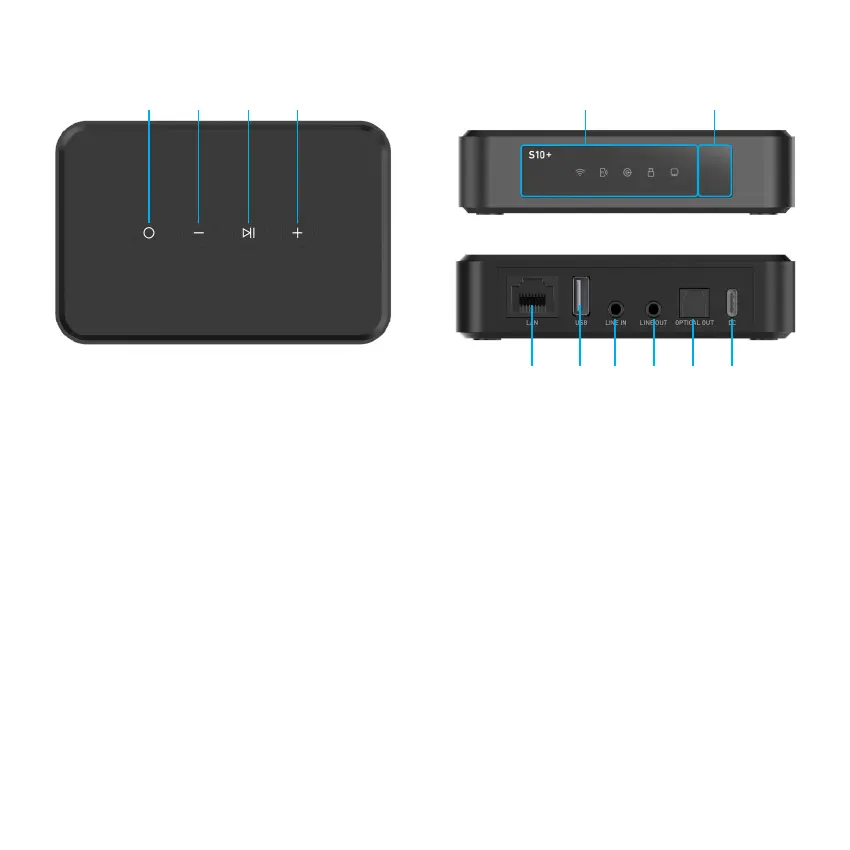
Mode Button: Short Press: Switch input mode
Long Press: Standby mode on/off
Vol - Button: Short Press: Decrease volume
Long Press: Play prev track
Play/Pause button: Short Press: Play or Pause music
Long Press: Disconnect current WiFi/BT connection
Vol + Button: Short Press: Increase volume
Long Press: Play next track
LED: Standby, WiFi mode, Bluetooth mode, Line in mode, USB mode, DAC mode
IR Receiver: For remote controller
LAN: Wired connection to router
USB: To connect USB pen drive (1024 tracks at most)
Line In: For external analog audio sources connection
Line Out: Provide analog audio to other deviec
Optical Out: Provide digital audio to other device
USB Type-C: 5V/1A DC input or connection to PC as external DAC
* Long Press Vol - & Vol +: Factory Reset
1 2 3 4 5 6
7 8 9 10 11 12



 To Next Page