Ascon Tecnologic - K31D - OPERATING INSTRUCTIONS - PAG. 13
6. ACCESSORIES
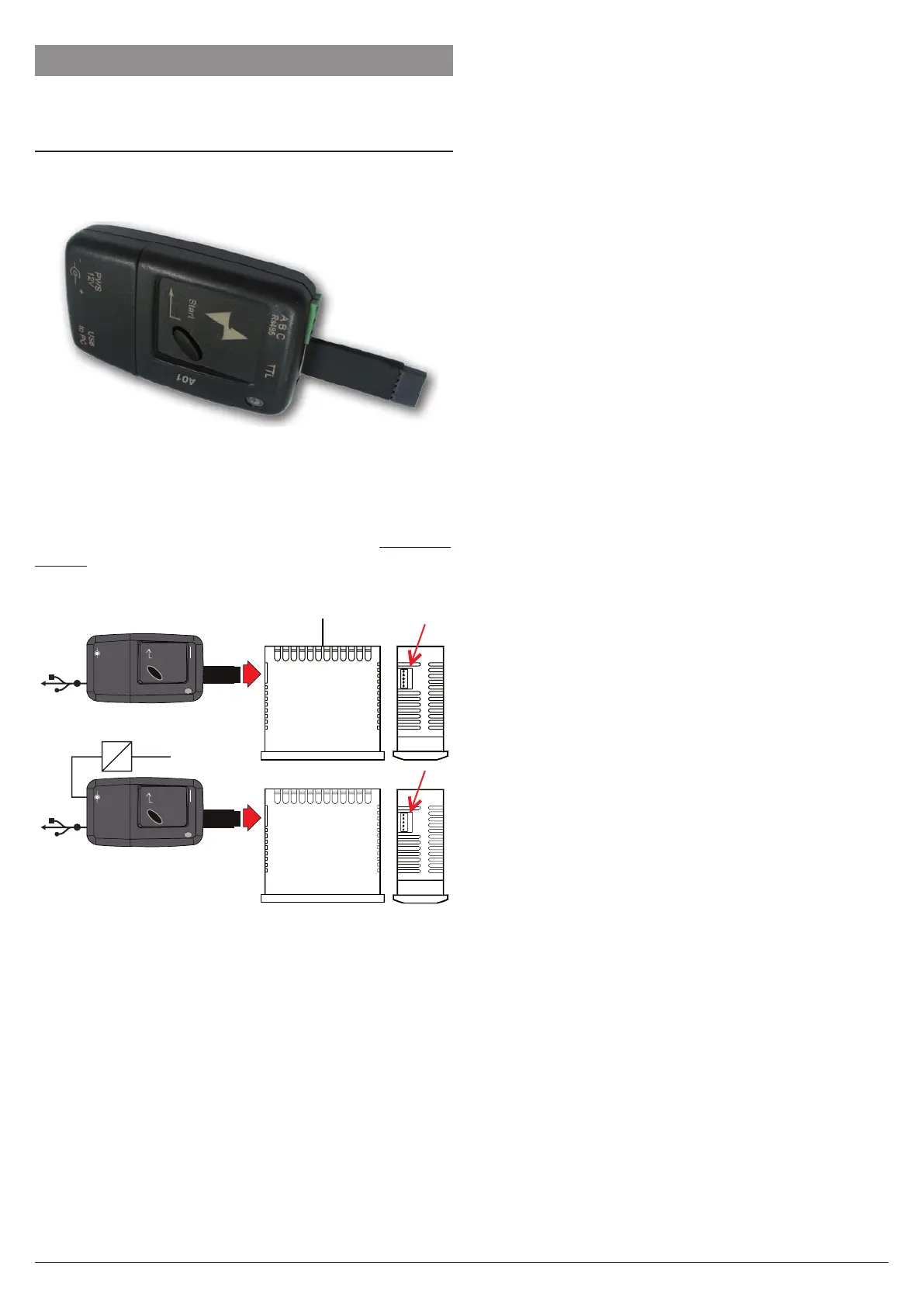
The instrument has a lateral socket into which a special tool
can be inserted.
6.1 Parameters configuration by “A01”
The instrument is equipped with a 5 poles connector that
allows the transfer from and toward the instrument of the
functioning parameters through the device A01.
This device it is mainly usable for the serial programming of
some instruments which need to have the same parameters
configuration or to keep a copy of the parameters setting of
an instrument and allow its rapid retransmission.
The same device allows to connect a PC via USB with which,
through the appropriate configuration software for “AT Univer-
salConf” tool, the operating parameters can be configured.
To use the A01 device it is necessary that the device or
instrument are being supplied.
AC supply
Supply adapter
12 VDC
Power supply
Enter
PWS
12 V
A B C
TTL
+-
USB
to PC
USB
Enter
PWS
12 V
A B C
TTL
+-
USB
to PC
USB
Note: For instruments equipped with an RS485 serial com-
munication port, it is essential that PAcS = LorE.
For additional info, please have a look at the A01 instruction
manual.


 To Next Page