Ascon Tecnologic - K31D - OPERATING INSTRUCTIONS - PAG. 9
the instrument shows noAt on the display.
In case of probe error, the instrument automatically stops the
cycle in progress.
The values calculated by Auto-tuning are automatically
stored in the instrument memory at the end of the correct
PID parameters tuning.
5.8.2 How to activate Self-tuning function
1 Program and activate the desired Set Point;
2 Set parameter Cont = Pid;
3 If Single Action control, set parameter Func according to
the process to be controlled through output 1.rEG;
4 Program an output as 2.rEG if the instrument controls the
plant with double action or a time positioning servodrive;
5 Set parameter SELF = yES;
6 Exit from the parameter programming;
7 Connect the instrument to the controlled plant;
8 Activate Self-tuning selecting the entry tunE in the main
menu (or using the
key, when correctly programmed) .
When the Self-tuning function is active, the LED Tun is per-
manently lit up and all the PID parameters (Pb, Int, dEr,
etc.) are no longer displayed.
To stop the Auto-tuning cycle or deactivate the Self-tuning
function select a different control type: rEG, oPLo or oFF
from the menu SEL. If the instrument is switched OFF during
Auto-tuning or with the Self-tuning function activated, these
functions will remain activated the next time it is switched ON.
5.9 Dynamic Set Point change and automatic
switching between two Set Points
(ramps an dwell time)
All parameters referring to the ramps functioning are con-
tained in the group ]rEG.
It is possible to reach the Set Point in a predetermined time
(in any case longer than the time the plant would naturally
need). This could be useful in those processes (heating
or chemical treatments, etc.) where the Set Point must be
reached gradually or in a predetermined time.
Once the instrument has reached the first Set Point (SP1) it
is possible to switch automatically to the second Set Point
(SP2) after a set time, thus obtaining a simple automatic pro-
cess cycle. These functions are available for all the program-
mable controls (PID single and double action, ON/OFF and
Neutral Zone ON/OFF).
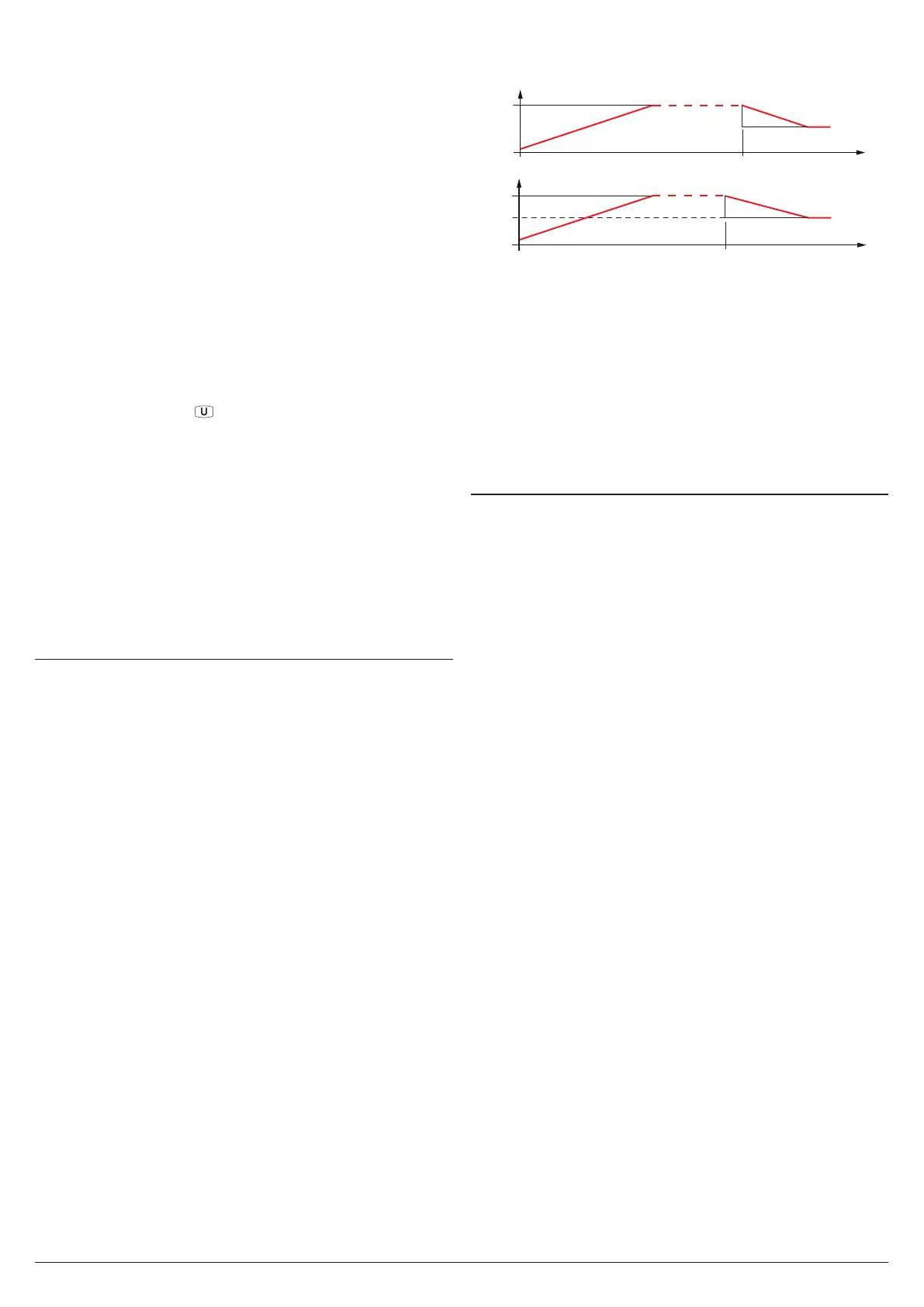
The function is determined by the following parameters:
SLor Gradient of first ramp expressed in unit/minute;
SLoF Gradient of second ramp expressed in unit/minute;
dur.t Dwell time of SP1 Set Point before automatic switching
to SP2 Set Point (expressed in hours and minutes).
The functions are deactivated when the relative parameters
are set to InF.
If is desired only one ramp (e.g. to reach SP1) it is enough to
program the parameter SLor with the desired value.
The ramp SLor will always be active at Power ON and
when the Active Set Point value is changed.
On the contrary, if an automatic cycle is to be executed at
Power ON, program nSP = 2, then the two Set Point values
SP1 and SP2 and naturally parameters SLor, dur.t and
SLoF with the desired values.
In this case at the end of the cycle all the ramps would not
be more active.
PV
SP1
SP1
time [min]
SLor
SLor
Change SP1 Value
PV
SP1
SP2
time [min]
dur.t
SLor
SLoF
Examples with starts from values lower than SP1 and with
decreasing of the Set Point.
Note: In case of PID control, if Auto-tuning is desired whilst
the ramp function is active, the ramp will not be car-
ried out until the tuning cycle has been completed.
It is therefore recommended that Auto-tuning be start-
ed avoiding activating the ramp function and, once
the tuning is finished, deactivate Auto-tuning (
Auto =
oFF
), program the desired ramp and, if it automatic
tuning is desired, enable the Self-tuning function.
5.10 Soft-start function
All parameters referring to the Soft -Start functioning are
contained in the group ]rEG.
The Soft-Start function only works through PID control
and allows the limitation of control power when the instru-
ment is switched ON, for a programmable period of time.
This is useful when the actuator, driven by the instrument,
may be damaged by the excess of power supplied when the
application is not yet in the normal rating (e.g. for certain
heating elements).
The function depends on the following parameters:
St.P Soft-Start power;
SSt Soft-Start time (expressed in hh.mm);
HSEt End Soft Start cycle threshold.
If both parameters are programmed with values other than
OFF, when Powered ON the instrument gives the output
power set at parameter St.P for the time set at SSt or when
is reached the absolute value set at HSEt.
Practically, the instrument works in manual condition and
switches to automatic control at the elapsing of time SSt or
when is reached the absolute value programmed at param-
eter HSEt.
To disable the Soft-Start function simply program: SSt = oFF.
Whenever a measurement error occurs during the Soft-Start
execution, the function is interrupted and the instrument gives
the output power programmed at parameter oPE. If the
measurement is restored, the Soft-Start remains deactivated.
To activate the Auto-tuning together with Soft-Start set:
Auto = 4/-4.
Auto-tuning starts automatically at the end of the pro-
grammed Soft-Start cycle.


 To Next Page