Ascon Tecnologic - K31D - OPERATING INSTRUCTIONS - PAG. 2
equipped with Fast and Oscillatory
Auto-tuning, Self-tuning
and Fuzzy overshoot control for adjusting the PID. The
instrument offers the possibility of having 2 programmable
digital inputs and an RS485 serial communications port
using MODBUS-RTU communications protocol with a trans-
mission speed up to 38.4 kbaud.
The process value is displayed on a 4 digit red display, while
the outputs status is shown by 4 LEDs.
The controller is
equipped with a programmable 3 LEDs shift
display ( ),
stores 2 Set Points and can have up to
4 outputs [relay or solid state relays drive type (SSR)]. A
model is also available with Out1 analogue control output
(0/4 ÷ 20 mA or 0/2 ÷ 10 V type).
Other important available functions are: Loop-Break Alarm
function, reaching of the Set Point at controlled speed,
ramp and dwell function, Soft-Start function, protection
compressor function for neutral zone control, parameters
protection on different levels.
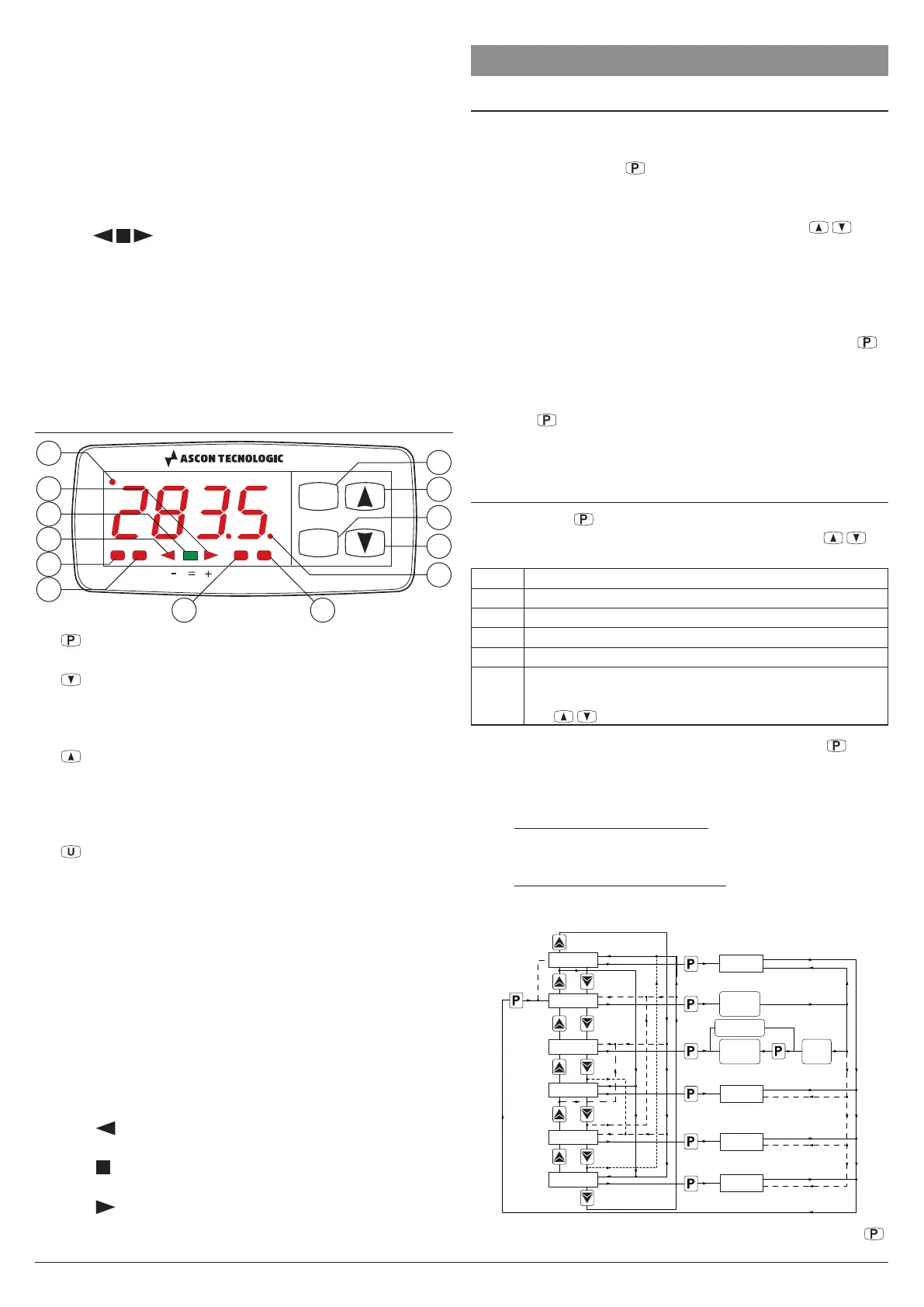
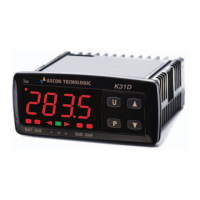
1.2 Front Panel Description
P
U
K31D
Tun
Out1 Out2 Out3 Out4
10
3
2
4
1
9
87
5
6
12
13
11
1 : This key is used to access the programming param-
eters and to confirm selection;
2 : This key is used
to decrease the values to be set and
to select the parameters. If the key is held down, the user
returns to the previous programming level until it exits the
programming mode
;
3 : This key is used to increase the values to be set and
to select the parameters. If the key is held down, the user
returns to the previous programming level until it exits the
programming mode. Outside the programming mode it
permits the visualisation of the output control power;
4 : This key is used to display the temperatures read by
the probes (Pr1 and Pr2) and their difference (
Pr1 - Pr2
).
It can also be programmed through the
USrb
parameter
for: Activating Auto-tuning or Self-tuning, setting the in-
strument to manual regulation, setting the alarm, chang-
ing the active Set Point and deactivating the control;
5 LED OUT1: Indicates the state of output Out1;
6 LED OUT2: Indicates the state of output Out2;
7 LED OUT3: Indicates the state of output Out3;
8 LED OUT4: Indicates the state of output Out4;
9 LED Tun: Indicates that the Self-tuning function is activat-
ed (light ON) or that Auto-tuning is in progress (flashing);
10 LED SET: When flashes, indicates the access to the
programming mode;
11 LED Shift index -: Indicates that the process value is
lower than the one programmed for parameter AdE;
12 LED Shift index =: Indicates that the process value is
within the range [SP + AdE÷SP - AdE];
13 LED Shift index +: Indicates that the process value is
higher than the one set for parameter AdE.
2. PROGRAMMING
2.1 Set Point Fast Programming
This procedure allows you to quickly set the active Set Point
and, when required, the alarm thresholds (paragraph 2.3).
Press and release the key, the display the display will
alternate between “SP n” and the set value (n is the number
of the Set Point active at that moment).
To increase/decrease the Set Point value press the
/ keys.
These keys change the value one digit a time but when pressed
for more than one second, the value increases or decreases
rapidly and, if pressed for more than two seconds, the changing
speed increases further to allow the rapid achievement of the
desired value.
Once the desired value has been reached, pressing key
it is possible to exit the Set Point fast programming mode or
switch to the alarm thresholds display (paragraph 2.3).
To exit the Set Point fast programming mode it is necessary to
press the
key after the last Set Point has been displayed,
alternatively, operating no keys for about 15 seconds the dis-
play will return to normal operation.
2.2 Control Status and Parameter Selection
By pushing key
and holding it down for about 2 s it is pos-
sible to enter into the main selection menu. Using the
/
keys, it is then possible to roll over the selections:
oPEr
To enter into the operating parameters menu
ConF
To enter into the configuration parameters menu
oFF
To swap the controller into the OFF state
rEG
To swap the controller into the automatic control state
tunE
To activate the Auto-tuning or Self-tuning function
oPLo
To swap the controller to the manual control state
and therefore to program the % control value using
the / keys
Once the desired item has been selected, push key to
confirm. Selecting oPEr and ConF gives the possibility of
accessing other menus containing additional parameters and
more precisely:
oPEr Operating parameters Menu: normally contains the
Set Point parameters but it can contain all the desired
parameters (paragraph 2.3).
ConF
Configuration parameters Menu: contains all the operat-
ing parameters and the functioning configuration param-
eters (alarm configuration, control, input, etc.).
AUTOTUNING
SELFTUNING
Hold
for 2 s
oFF
SET
PASSWORD
ConF
menu
oPEr
menu
rEG
oPLo
AT-ST
reg .
0per.
Conf.
off .
tune.
oplo.
282.8
off
282.8
oplo
PASS = OFF
To enter the menu oPEr, select the option oPEr and press
.


 To Next Page